• ×
    Information
    Need Windows 11 help?
    Check documents on compatibility, FAQs, upgrade information and available fixes.
    Windows 11 Support Center.
  • post a message
  • ×
    Information
    Need Windows 11 help?
    Check documents on compatibility, FAQs, upgrade information and available fixes.
    Windows 11 Support Center.
  • post a message
Guidelines
Seize the moment! nominate yourself or a tech enthusiast you admire & join the HP Community Experts!
Common problems HP Solution Center not working : Adobe Flash Player Error and Unable to scan
We would like to share some of the most frequently asked questions about HP Solution Center not working : Adobe Flash Player Error and Unable to Scan.
HP Recommended
HP Officejet 6600
macOS 10.15 Catalina

Hello All,

I used to be able to scan from my all in one printer, but now when I open printers and scanner, my all in one doesn't offer a scan function. I have researched HPSmart, and all I can find is that my scanner 'has been disabled' - and check with my network admin or the person who set up my printer (moi!) What to do? So frustrating!! I've uninstalled the printer and re-installed it to no avail. Please help if you can!

-Starfolk

1 REPLY 1
HP Recommended

@Starfolk


Welcome to the HP Support Community.


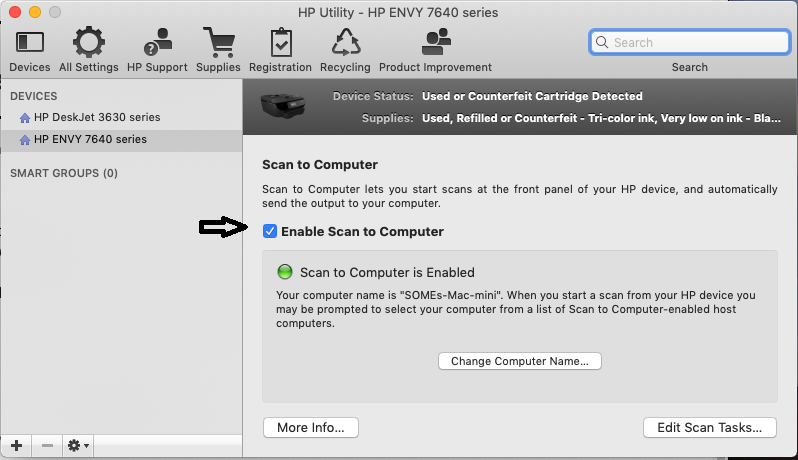
Enabling Scan to computer using HP Utility may resolve the issue. Let's try these steps:


1.) On your Mac, click Finder, click Applications, click the Hewlett-Packard or HP folder, then double-click HP Utility. (If HP Utility is not available, download and install the printer essential software from here

2.) Under Scan Settings, click Scan to Computer, then make sure the Enable Scan to Computer check box is selected.

https://lithium-response-prod.s3.us-west-2.amazonaws.com/hpcsc.response.lithium.com/RESPONSEIMAGE/946f6e5f-68db-4b93-a3ad-831e2c463488.default.png


3.) Try to scan.


Let me know if this helps.


If the information I've provided was helpful, give us some reinforcement by clicking the Accepted Solution and Kudos buttons, that'll help us and others see that we've got the answers!


Thanks!


Have a great day!


I am an HP Employee

† The opinions expressed above are the personal opinions of the authors, not of HP. By using this site, you accept the <a href="https://www8.hp.com/us/en/terms-of-use.html" class="udrlinesmall">Terms of Use</a> and <a href="/t5/custom/page/page-id/hp.rulespage" class="udrlinesmall"> Rules of Participation</a>.