• ×
    Information
    Need Windows 11 help?
    Check documents on compatibility, FAQs, upgrade information and available fixes.
    Windows 11 Support Center.
  • post a message
  • ×
    Information
    Need Windows 11 help?
    Check documents on compatibility, FAQs, upgrade information and available fixes.
    Windows 11 Support Center.
  • post a message
Guidelines
Is your HP DeskJet 3830 series scanner not working? Here is the solution Click here to view the instructions!
Common problems HP Solution Center not working : Adobe Flash Player Error and Unable to scan
We would like to share some of the most frequently asked questions about HP Solution Center not working : Adobe Flash Player Error and Unable to Scan.
HP Recommended
Envy Printers
Microsoft Windows 10 (64-bit)

Dows anyone know if the new software that comes with the printers will allow you to scan multiple pictures at once and save each picture individually?  Thinking about getting a new printer and won't spend until I can find one thatdoes.


I have a Photosmart Premium C309g that stopped working and cannot get parts.  The HP Solution Center that come with the printer let me scan multiples and save them all individualy.


I tried on our old Photosmart 5520 and the Printer Assistant that came with that will only scann all the pictures into a single image.

2 REPLIES 2
HP Recommended

Hi,

Thanks for using the HP Support Community.


The software should allow you to scan multiple photos.


Check out this example:


HP Deskjet 2652 & 2655 : Scan Multiple Photos with Auto Crop


Hope that helps!


I am an HP Employee. Although I am speaking for myself and not for HP.
Click Helpful = Yes to say Thank You.
Question / Concern Answered, Click "Accept as Solution"
HP Recommended

@Sweathog66 


Assuming your Photosmart Full Feature Software is installed (likely), try / consider adding the following scan alternative:


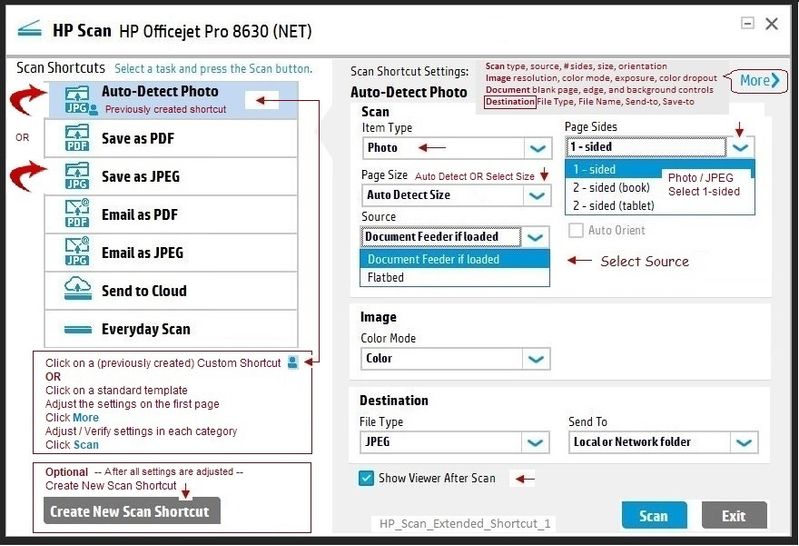
  HP Scan Extended 

Download, save, and install to use.  Exceptional free HP scan program:  HP Scan Extended features include (and are not limited to): Single, Multiple scans, Image and PDF scans, Email as PDF / JPEG, Source selection, Page Size choices include Auto-Detect (extracts image / document boundary).  May include OCR (Save as Editable Text).

NOTES

  • HPSE is an older subset of the printer software; features are very similar to scan software included in 2015 or newer Full Feature Software packages.
  • If you have the newer version of the scan software inside your Full Feature Software, use that: Printer Assistant shortcut icon on Desktop (named for printer) > Scan a document or image (wording varies).
  • Although the HPSE program works as a separate program, HPSE is dependent on the infrastructure provided by the printer software. The Full Feature Software for your printer should be installed before installing HPSE.


Install the software


Optional:  Add HP Scan Extended shortcut to Taskbar / Send to Desktop / Pin to Start


Open File Explorer > Navigate to C:\Program Files (x86)\HP\HP Scan Extended\bin

Right-Click HPScan.exe > Select Pin to Taskbar / Send to Desktop / Pin to Start


Open HP Scan Extended

Place the photos on the printer glass - arrange with at least about a half inch between photos

Set Page Size to Auto Detect Size

Check the other settings, including options in More > Destination


Note: Destination is where you can change the "scan" name prefix and (if desired) add the date / time designator to the name function.


Example
HP_Scan_Extended_Shortcut_1.HP_Scan_Extended_Shortcut_1.


Reference and Resources – Places to find (more) help and learn about your Printer

Printer Homepage – “Things that are your printer”

Drivers / Software / Firmware Updates, Videos, Bulletins/Notices, How-to, Troubleshooting, User Guides, Product Information, more

HP Photosmart 5520 e-All-in-One Printer series


Thank you for participating in the HP Community Forum.

We are a world community of HP enthusiasts dedicated to supporting HP technology.

Click Thumbs Up on a post to say Thank You!

Answered? Click post "Accept as Solution" to help others find it.


Dragon-Fur

† The opinions expressed above are the personal opinions of the authors, not of HP. By using this site, you accept the <a href="https://www8.hp.com/us/en/terms-of-use.html" class="udrlinesmall">Terms of Use</a> and <a href="/t5/custom/page/page-id/hp.rulespage" class="udrlinesmall"> Rules of Participation</a>.