
-
×InformationNeed Windows 11 help?Check documents on compatibility, FAQs, upgrade information and available fixes.
Windows 11 Support Center. -
-
×InformationNeed Windows 11 help?Check documents on compatibility, FAQs, upgrade information and available fixes.
Windows 11 Support Center. -
- HP Community
- Printers
- Scanning, Faxing, and Copying
- Re: Scanning from the printer is not available

Create an account on the HP Community to personalize your profile and ask a question
Your account also allows you to connect with HP support faster, access a personal dashboard to manage all of your devices in one place, view warranty information, case status and more.
Common problems HP Solution Center not working : Adobe Flash Player Error and Unable to scan
We would like to share some of the most frequently asked questions about HP Solution Center not working : Adobe Flash Player Error and Unable to Scan.

It has been a while since anyone has replied. Simply ask a new question if you would like to start the discussion again.

04-17-2021
10:00 AM
- last edited on
10-07-2025
11:47 AM
by
 Raj_05
 HP Recommended
Product: HP 6032
Following update to HP app on iOS, I’m having random problems scanning from the printer. I’ve gone through various checks and even deleted and reinstalled the app. All no good. Problem occurs on various iOS devices iPhone XS and iPad mini 3.
error message reads:
”Scanning from the printer is not available when connected remotely. To scan, use this app to scan using the camera.”
Devices are all on the same 5ghz WiFi network and I can print without issues (so far!).
Solved! Go to Solution.
1 ACCEPTED SOLUTION
Accepted Solutions


04-17-2021 02:19 PM
HP Recommended
Well, the recent updates were issued to fix a previous bug (Printer Status Unknown).
If there is another - and you are the unfortunate one to discover it - the bug will be fixed when there is a solution a available.
If I -- or another Expert or Agent - have anything else to offer, we will post back.
You can also ask your question again - Post a new question - add the details we covered here and see what comes back...
I don't think iOS is the issue ...
Just in case, Check for any iOS updates in your device Settings (these usually show an alert on the Settings icon on the Homepage so the idea is a leap over deep water).
Good Luck.
Thank you for participating in the HP Community.
The Community is a separate wing of the HP website - We are not an HP business group.
Our Community is comprised of volunteers - people who own and use HP devices.
Click Thumbs Up to say Thank You.
Question Resolved / Answered, Click "Accept as Solution"
Dragon-Fur
8 REPLIES 8
04-17-2021
12:42 PM
- last edited on
10-07-2025
11:45 AM
by
Raj_05
HP Recommended
====================================================================
Welcome to the HP Community.
Be Aware:
Do not respond to individuals who include phone numbers or email addresses in public posts.
Do not respond to individuals who ask you to provide private information in a public Post.
These people might be scammers trying to steal your information / money.
====================================================================
An idea...
If you have not done so,
Make sure all the devices are running the latest version of the HP application.
There have been recent application version updates for HP App Mobile / Mac / Windows
What else?
Restart everything, including your router...
References / Resources...
and the How-to document here:
Mobile Printing – Options, How-to, Help, and Information
Print from your Android, iOS, or Amazon Fire device with the HP Mobile printing app.
Read this document first.
Open the section for your printer series > Find your printer and supported applications.
HP Printers - Mobile Printing Solutions Compatible with HP Printers
iOS_Here
HP App- iOS and Android >>> Download, How-to. Videos, and FAQ
HP Printers - Using the HP App (Android, Apple iOS)
Compatibility
iPhone
Requires iOS 13.0 or later
iPad
Requires iPadOS 13.0 or later
iPod touch
Requires iOS 13.0 or later
HP Printers - Printing with Apple AirPrint (iOS)
Printer Home Page - References and Resources – Learn about your Printer - Solve Problems
“Things that are your printer”
NOTE: Content depends on device type and Operating System
Categories: Alerts, Access to the Print and Scan Doctor (Windows), Warranty Check, HP Drivers / Software / Firmware Updates, How-to Videos, Bulletins/Notices, Lots of How-to Documents, Troubleshooting, Manuals > User Guides, Product Information (Specifications), more
When the website support page opens, Select (as available) a Category > Topic > Subtopic
HP ENVY 6032 All-In-One Printer
Thank you for participating in the HP Community.
The Community is a separate wing of the HP website - We are not an HP business group.
Our Community is comprised of volunteers - people who own and use HP devices.
Click Thumbs Up to say Thank You.
Question Resolved / Answered, Click "Accept as Solution"
Dragon-Fur
04-17-2021
12:46 PM
- last edited on
10-07-2025
11:47 AM
by
Raj_05
HP Recommended
Yeah thanks for the reply. To clarify, the problem has only started once I updated the HP app recently. I’ve checked for more updates but I’m on latest version. Latest version of iOS and I’ve restarted everything. No change.
04-17-2021
12:48 PM
- last edited on
10-07-2025
11:47 AM
by
Raj_05
HP Recommended
Yeah thanks for the reply. To clarify, the problem has only started once I updated the HP app recently. I’ve checked for more updates but I’m on latest version. Latest version of iOS and I’ve restarted everything. No change.
04-17-2021
01:48 PM
- last edited on
10-07-2025
11:46 AM
by
Raj_05
HP Recommended
@Dino11 wrote:
Yeah thanks for the reply. To clarify, the problem has only started once I updated the HP app recently. I’ve checked for more updates but I’m on latest version. Latest version of iOS and I’ve restarted everything. No change.
You are welcome.
Understood.
If all devices on the network are on the latest version of the application for that device, then that is not the issue.
Unsure - it sounds like a connection issue but it's more likely something tangled up in the Application.
?
If you have not done so,
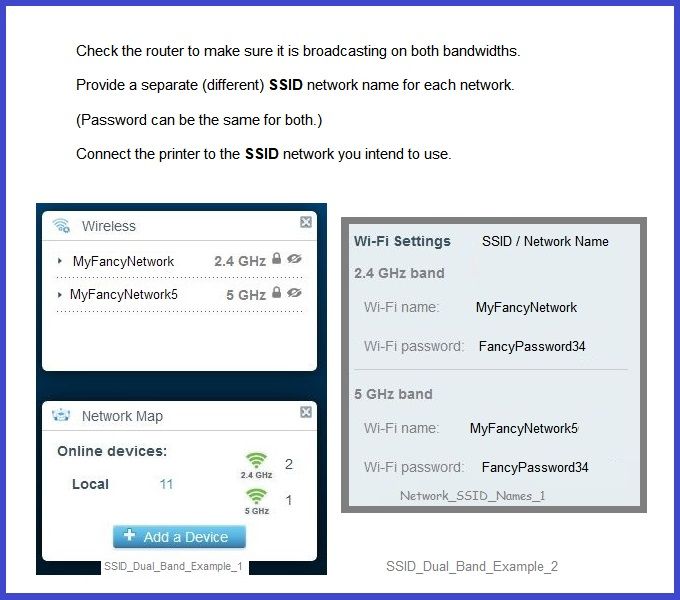
If the router being used for both 2.4 and 5GHz,
Make sure the router is broadcasting on both bandwidths,
Make sure each (band) is assigned a unique SSID network name for that bandwidth.
Passwords can be the same for both bands.
Each device on the network should be connected to the SSID network appropriate for that device.
Not relevant? Ignore as not useful to the situation...
Assuming this is something that worked previously, it should still work, of course.
If I think of anything else, I'll post back.
Thank you for participating in the HP Community.
The Community is a separate wing of the HP website - We are not an HP business group.
Our Community is comprised of volunteers - people who own and use HP devices.
Click Thumbs Up to say Thank You.
Question Resolved / Answered, Click "Accept as Solution"
Dragon-Fur
04-17-2021 02:19 PM
HP Recommended
Well, the recent updates were issued to fix a previous bug (Printer Status Unknown).
If there is another - and you are the unfortunate one to discover it - the bug will be fixed when there is a solution a available.
If I -- or another Expert or Agent - have anything else to offer, we will post back.
You can also ask your question again - Post a new question - add the details we covered here and see what comes back...
I don't think iOS is the issue ...
Just in case, Check for any iOS updates in your device Settings (these usually show an alert on the Settings icon on the Homepage so the idea is a leap over deep water).
Good Luck.
Thank you for participating in the HP Community.
The Community is a separate wing of the HP website - We are not an HP business group.
Our Community is comprised of volunteers - people who own and use HP devices.
Click Thumbs Up to say Thank You.
Question Resolved / Answered, Click "Accept as Solution"
Dragon-Fur
04-20-2021 03:22 AM
HP Recommended
Thanks so much for your help with this. I tried again this morning (20th April 2021) but still have the same problem. Checked the Apple App Store for updates and HPsmart app has a new update dated today, version 8.5.1. Some quick testing after updating and this appears to have resolved the problem so it probably was a bug introduced recently. I’ll continue to test to make sure!
Again, many thanks.
04-20-2021 07:14 AM
HP Recommended
You are welcome.
I am hoping the update dust will settle soon. Smiling.
Stay Safe.
Thank you for participating in the HP Community.
The Community is a separate wing of the HP website - We are not an HP business group.
Our Community is comprised of volunteers - people who own and use HP devices.
Click Thumbs Up to say Thank You.
Question Resolved / Answered, Click "Accept as Solution"
Dragon-Fur

Be alert for scammers posting fake support phone numbers and/or email addresses on the community.
If you think you have received a fake HP Support message, please report it to us by clicking on "Flag Post".
† The opinions expressed above are the personal opinions of the authors, not of HP. By using this site, you accept the Terms of Use and Rules of Participation.


Didn't find what you were looking for?
Ask the community
† The opinions expressed above are the personal opinions of the authors, not of HP. By using this site, you accept the <a href="https://www8.hp.com/us/en/terms-of-use.html" class="udrlinesmall">Terms of Use</a> and <a href="/t5/custom/page/page-id/hp.rulespage" class="udrlinesmall"> Rules of Participation</a>.