• ×
    Information
    Need Windows 11 help?
    Check documents on compatibility, FAQs, upgrade information and available fixes.
    Windows 11 Support Center.
  • post a message
  • ×
    Information
    Need Windows 11 help?
    Check documents on compatibility, FAQs, upgrade information and available fixes.
    Windows 11 Support Center.
  • post a message
Guidelines
Join the HP Community Solve‑a‑thon | Help Others & Share Your Solutions | Live on Zoom | 2:30 PM to 2:30 AM IST | Every Wednesday Click here to know more
Common problems HP Solution Center not working : Adobe Flash Player Error and Unable to scan
We would like to share some of the most frequently asked questions about HP Solution Center not working : Adobe Flash Player Error and Unable to Scan.
HP Recommended
office jet pro 8715
macOS 10.14 Mojave

Looking for a decent scanning software.

3 REPLIES 3
HP Recommended

@Bob72140


A warm welcome to HP forums! This is a great place to get support, find answers and tips to your technical queries.

HP Easy Scan is designed specifically for use with your HP multifunction printers, you may download HP Easy scan from here. You may also use Image Capture to scan photos and document. 

Here is how to do it:

1.) On your Mac, open Finder

2.) Click Applications and open Image Capture

3.) Select your printer name under Devices.

Let me know how it goes!


If the information I've provided was helpful, give us some reinforcement by clicking the Accepted Solution and Kudos buttons, that'll help us and others see that we've got the answers!
Have a great day!

Senan6806


I am an HP Employee

HP Recommended

Easy Scan works fine, but my OfficeJet Pro 6978 says "no computer found" when I attempt to scan from the printer.  I verified that my printer is on the same wireless network as my computer (Mac mini).  Why won't it find my computer??

HP Recommended

@AlfKG


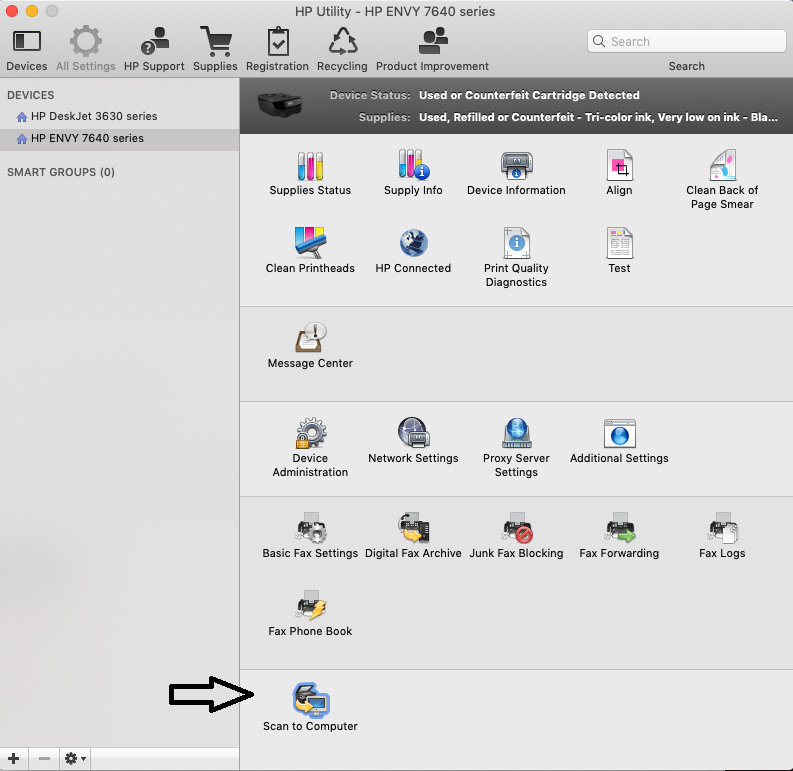
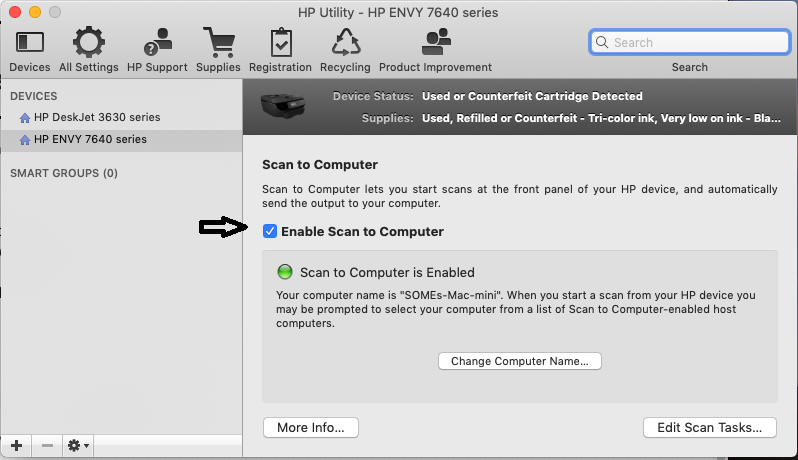
It's possible that Scan to computer is disabled, let's check and enable scan to computer:

1.) Open Finder, click Applications.

2.) Click the Hewlett-Packard or HP folder, then double-click HP Utility.

3.) Click Scan to Computer


4.) Check the box, Enable Scan to computer.


5.) Try to scan.

Keep me posted!

Senan6806


I am an HP Employee

† The opinions expressed above are the personal opinions of the authors, not of HP. By using this site, you accept the <a href="https://www8.hp.com/us/en/terms-of-use.html" class="udrlinesmall">Terms of Use</a> and <a href="/t5/custom/page/page-id/hp.rulespage" class="udrlinesmall"> Rules of Participation</a>.