• ×
    Information
    Need Windows 11 help?
    Check documents on compatibility, FAQs, upgrade information and available fixes.
    Windows 11 Support Center.
  • post a message
  • ×
    Information
    Need Windows 11 help?
    Check documents on compatibility, FAQs, upgrade information and available fixes.
    Windows 11 Support Center.
  • post a message
Guidelines
Join the HP Community Solve‑a‑thon | Help Others & Share Your Solutions | Live on Zoom | 2:30 PM to 2:30 AM IST | Every Wednesday Click here to know more
Common problems HP Solution Center not working : Adobe Flash Player Error and Unable to scan
We would like to share some of the most frequently asked questions about HP Solution Center not working : Adobe Flash Player Error and Unable to Scan.
HP Recommended
Envy 4500
Microsoft Windows 10 (64-bit)

How do you scan a document with several pages into one file?

6 REPLIES 6
HP Recommended

Hello @arthhh,
Welcome to the HP Support Community!


You can find the solution here: How to scan with an HP printer 

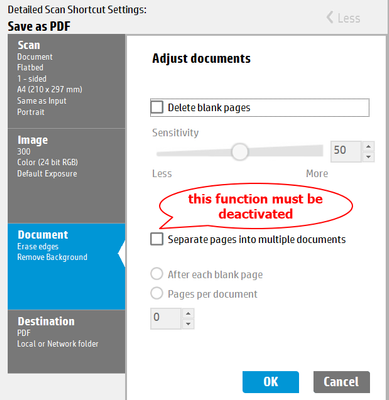
or you scan with App "HP Scan", then


Save as PDF 017-1.png


Hope this helps! Keep me posted.
Andreas

If my post resolved your problem please mark this post as an "Accepted Solution".
Click the “Kudos, Thumbs Up" on the bottom right to say “Thanks”!


I'm not an employee of HP, I'm as volunteer here.
         
HP Recommended

I have HP Smart installed on my computer.  When I click on scan then preview, I do not get a screen with the choice to add additional documents.  What am I missing?

HP Recommended

When I click on preview I do not get the screen that will let me add documents to scan in one file.  What am I missing?

HP Recommended

Reminder: the resolution must be 300 dpi (ppi) or smaller!

Then multiple pages can be scanned. My recommendation is to set the resolution to 150 dpi.


I'm not an employee of HP, I'm as volunteer here.
         
HP Recommended

OK.  I changed setting to 150 DPI.  This time after scanning the first document, a plus sign (+) appeared.  It allowed me to add a second page to the file after scanning.  Problem solved!

HP Recommended

excellent


If my post resolved your problem please mark this post as an "Accepted Solution".
Click the “Kudos, Thumbs Up" on the bottom right to say “Thanks”!


I'm not an employee of HP, I'm as volunteer here.
         
† The opinions expressed above are the personal opinions of the authors, not of HP. By using this site, you accept the <a href="https://www8.hp.com/us/en/terms-of-use.html" class="udrlinesmall">Terms of Use</a> and <a href="/t5/custom/page/page-id/hp.rulespage" class="udrlinesmall"> Rules of Participation</a>.