• ×
    Information
    Need Windows 11 help?
    Check documents on compatibility, FAQs, upgrade information and available fixes.
    Windows 11 Support Center.
  • post a message
  • ×
    Information
    Need Windows 11 help?
    Check documents on compatibility, FAQs, upgrade information and available fixes.
    Windows 11 Support Center.
  • post a message
Guidelines
Join the HP Community Solve‑a‑thon | Help Others & Share Your Solutions | Live on Zoom | 2:30 PM to 2:30 AM IST | Every Wednesday Click here to know more
Common problems HP Solution Center not working : Adobe Flash Player Error and Unable to scan
We would like to share some of the most frequently asked questions about HP Solution Center not working : Adobe Flash Player Error and Unable to Scan.
HP Recommended
Smart Tank 615
Microsoft Windows 10 (64-bit)

Hello to all. I have a little issue with my new ST615. When i scanning yesterday a ducument,i put it in documents tray or glass. I select scann on printer display. I was asked for what device scann,and what format i want. Today i cant do that,no format question,only to what computer. And then i have to manually click on my pc screen Windows scan. 2 days ago i scann only touching my printer. No action was necesary on PC. All go to my Documents folder automaticly. What is the problem ?

1 REPLY 1
HP Recommended

@Daro286, Welcome to HP Support Community!


If you already have the full-featured printer software installed, follow the steps below-


1. Click on the Printer Icon (on your desktop) and it will bring up the HP Printer Assistant.
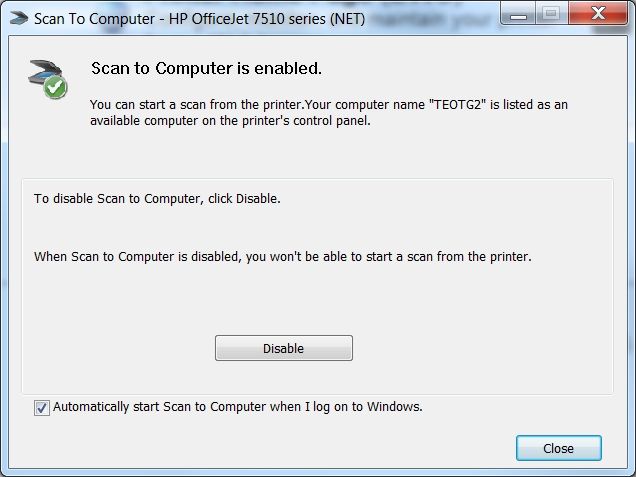
2. Under the Scan menu, there is a “Manage Scan to Computer”, click on that.
3. Make sure that you “Enable” Scan to Computer. Also, make sure the tab “Automatically start Scan to Computer when I log on to Windows” is checked if you want to make this feature permanent.

undefined


Now, try scanning!


If you still have issues, follow the steps from the document HP Printers - Network Scanner Connection Error (Windows).


Hope this helps! Keep me posted. 


Please click “Accepted Solution” if you feel my post solved your issue, it will help others find the solution. Click the “Kudos/Thumbs Up" on the bottom right to say “Thanks” for helping!

TEJ1602
I am an HP Employee

† The opinions expressed above are the personal opinions of the authors, not of HP. By using this site, you accept the <a href="https://www8.hp.com/us/en/terms-of-use.html" class="udrlinesmall">Terms of Use</a> and <a href="/t5/custom/page/page-id/hp.rulespage" class="udrlinesmall"> Rules of Participation</a>.