• ×
    Information
    Need Windows 11 help?
    Check documents on compatibility, FAQs, upgrade information and available fixes.
    Windows 11 Support Center.
  • post a message
  • ×
    Information
    Need Windows 11 help?
    Check documents on compatibility, FAQs, upgrade information and available fixes.
    Windows 11 Support Center.
  • post a message
Guidelines
Seize the moment! nominate yourself or a tech enthusiast you admire & join the HP Community Experts!
Common problems HP Solution Center not working : Adobe Flash Player Error and Unable to scan
We would like to share some of the most frequently asked questions about HP Solution Center not working : Adobe Flash Player Error and Unable to Scan.
HP Recommended
HP Envy 6032 All-in-one

Anyone know why my HP Envy 6032 all-in-one stops scanning?

I can scan happily for two or three weeks then suddenly HP Smarts tells me "HP Smart cannot scan from this printer. Either the printer does not have a scanner or HP Smart cannot use the Scanner in this printer".

I've had the printer for about 9 months and this used to happen about once per month. Now it's started to happen on a weekly basis. The only way to get it scanning again is to Uninstall HP Smart then Re-Install it and it works again - until a week or two later, when it decides my printer doesn't have a scanner any more.

The virtual agent help is worse than useless and I have been completely unable to get to speak to a real person, so I'm asking here. I know it's not really the right place but I just can't get an answer from HP themselves as they seem to be run just by robots.

3 REPLIES 3
HP Recommended

@NormanEH 


Welcome to the HP Community.


HP is not run by robots.  Smiling.


Our HP Community does provide access to the HP Virtual Agent - this somewhat smart search-and-answer software is not true AI (or a robot).  The database the HPVA uses does limit the kinds of questions the software can answer.


Losing Connection / Service to HP Smart


Regardless of whether you are using HP Smart on your PC / MacOS or whether you are using HP Smart Mobile, the application in both environments is dependent on the printer remaining connected to your network.


No Operating System / version provided -

Assuming that you are using a supported Mobile Device and HP Smart Mobile.


Your description sounds a bit like the printer is connecting OK and (then) is perhaps losing the connection "somewhere along the line".


If this is the case,

Add the following to your checkpoints ...

Check - and correct - the type of network connection and configuration being used.

Log into the router and check the logs, too.  Depending on the router, the logs can be an excellent source of information.


Reference

Product Specifications for the HP ENVY 6032 All-In-One Printer (5SE19B) 

Connectivity

Ports
1 Hi-Speed USB 2.0; 1 Wi-Fi 802.11ac (dual band)
Wireless capability
Yes, built-in Wi-Fi 802.11b/g/n


Dual Band Support and Dual Band Network


The printer supports Dual Band connection (not at the same time).

This means the printer can connect to either your 2.4GHz or 5GHz network.

One "problem" might arise when / if the printer is connected to a network that is using the same SSID named network for both bands / frequencies. 


What?

Depending on the router you are using to manage your network,

The router might be configured to use the same network SSID name for all its connections.

Mesh networks, for example, tend to work this way.


Some printers do not tolerate this "same name SSID " type of configuration.


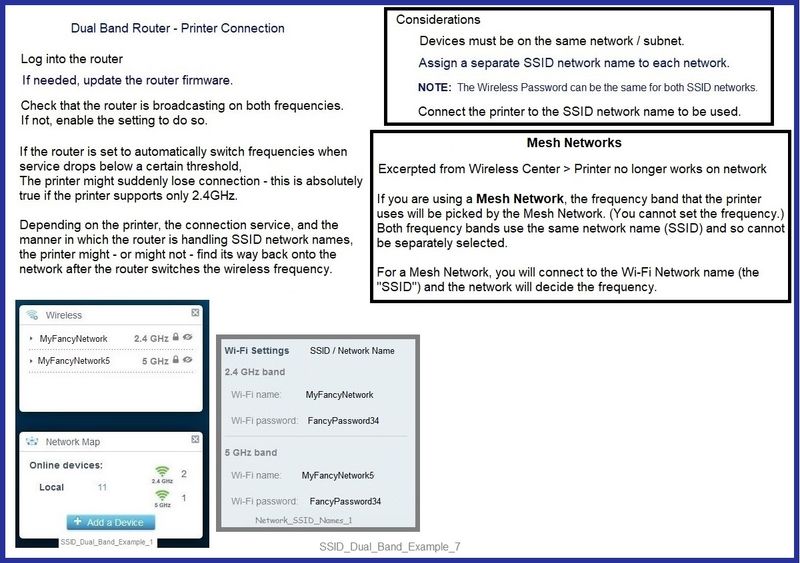
If your router supports Dual Band,

Make sure the router is configured to broadcast on both frequencies / bands,

If the router supports it,

Assign a separately named SSID network name for each frequency / band.


Example

SSID_Dual_Band_Example_7SSID_Dual_Band_Example_7


HP Printer Home Page - References and Resources – Learn about your Printer  - Solve Problems

 “Things that are your printer”

NOTE:  Content depends on device type and Operating System

Categories:  Alerts, Access to the Print and Scan Doctor (Windows), Warranty Check, HP Drivers / Software / Firmware Updates, How-to Videos, Bulletins/Notices, Lots of How-to Documents, Troubleshooting, Manuals > User Guides, Product Information (Specifications), more

HP ENVY 6032 All-In-One Printer 


Thank you for participating in the HP Community.

The Community is a separate wing of the HP website - We are not an HP business group.

Our Community is comprised of volunteers - people who own and use HP devices.

Click Thumbs Up to say Thank You.

Question / Concern Answered, Click "Accept as Solution"


Dragon-Fur

HP Recommended

Thanks for your helpful reply.

It could be a problem with the dual bands, but my printer remains connected by WiFi all the time and will continue to print even though it tells me it doesn't have a scanner.  That would indicate there is not a problem with the connection?


If I switch the printer off and back on again after it's told me it doesn't have a scanner, then it says I need to connect a new printer and no longer seems to recognise the connection with my PC - yet it still prints via WiFi!


I'm no techie but that seems very odd to me.

HP Recommended

@NormanEH 


You are welcome.


The provided answer does not address issues connecting / printing to PC / Windows.

Although...

True, if the printer is connected via HP Smart Mobile then printing and scanning requirements are typically similar to Windows.


Scanning does require a particularly strong and stable connection for both PC and for Mobile.


--------------------------------------------------------------------------------------------------------------'


Could the problem with scanning be a result of the dual band connection?


Could the problem with scanning NOT be a result of the dual band connection and yet still be a result of a poor connection to the network?


Sure - maybe.


Why is the answer elusive?


Well, remote diagnosis is a matter of hunting and pecking for information, asking the right questions, and then guessing at the actual environment.


One problem is that we do not have any built-in diagnostics that address this type of possible scenario.   HP Smart is secretive about its "under carriage" operation.  The lack of information is not deliberate - the coders at HP are certainly smart enough to write the code to include the information.  One limitation is prohibitive expense AND the enormity of the size of the software needed to carry the extra capabilities.   Fat software can be slow software.  Choice.


Both HP Smart Mobile and HP Smart Windows have access to the HP Print and Scan Doctor.  Doctor is smart but not magic.  For example, I am not aware that the doctor can identify problems resulting form odd issues in dual band configurations.  


Moving Target

The connection dynamics might not be the same for a mobile device - one that moves around, for example, as compared to a stable PC to network where the PC is sitting on a worksurface / desk in your office.


Is that a possibly weak link?

Yes, maybe.


What else?

Network considerations...

  • Is the router hardware decent (strong, new, three or four antennae)?
  • Is the router's firmware updated?

NOTE

These questions are rhetorical - do not answer.


The point is that you should consider the router / network as a resource that must be kept updated and in decent working condition.


What else?

Tools in Windows - those used to manage the printer software (full driver printer software) and the connection to the network - are a bit more robust than the toolsets available in the Mobile environment.


So, what?

Not sure.


  • If you want to discuss scanning using HP Smart on the PC, provide your Windows OS version.
  • Provide whether the printer is connected to a separately named SSID network.

And...

  • Tell us to which band (2.4GHz or 5GHz) the printer is connected
  • What - if anything - do the router logs tell you about loss of connection events?
  • Typically, how many devices are connected to the network at the same time?
  • When there are problems, is a particular device connected at that time that is not being used at other "stays connected" times?


Thank you for participating in the HP Community.

The Community is a separate wing of the HP website - We are not an HP business group.

Our Community is comprised of volunteers - people who own and use HP devices.

Click Thumbs Up to say Thank You.

Question / Concern Answered, Click "Accept as Solution"


Dragon-Fur

† The opinions expressed above are the personal opinions of the authors, not of HP. By using this site, you accept the <a href="https://www8.hp.com/us/en/terms-of-use.html" class="udrlinesmall">Terms of Use</a> and <a href="/t5/custom/page/page-id/hp.rulespage" class="udrlinesmall"> Rules of Participation</a>.