• ×
    Information
    Need Windows 11 help?
    Check documents on compatibility, FAQs, upgrade information and available fixes.
    Windows 11 Support Center.
  • post a message
  • ×
    Information
    Need Windows 11 help?
    Check documents on compatibility, FAQs, upgrade information and available fixes.
    Windows 11 Support Center.
  • post a message
Guidelines
Seize the moment! nominate yourself or a tech enthusiast you admire & join the HP Community Experts!
Common problems HP Solution Center not working : Adobe Flash Player Error and Unable to scan
We would like to share some of the most frequently asked questions about HP Solution Center not working : Adobe Flash Player Error and Unable to Scan.
HP Recommended
HP deskjet 2600 series
Microsoft Windows 10 (32-bit)

I plugged the printer to the laptop, as usual...it still tells me offline...

when I switched the connection to wi-fi, it takes printing orders.

I tried to scan, it says connect scanner, but it is connected wireless 

so no scanning connection....no cable printing connection!!

3 REPLIES 3
HP Recommended

@Eli47


Welcome to HP support community.


Check Windows Image Acquisition settings

  1. In Windows, search for and open View local services.

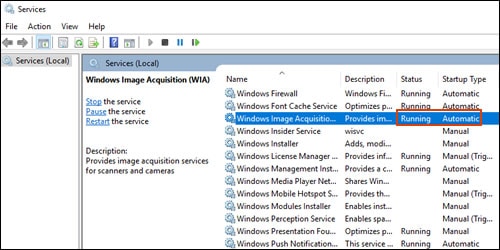
  2. In the Services window, scroll down the list and find Windows Image Acquisition (WIA).

  3. Look at the Status and Startup Type values.

    • If the status is Started or Running and the Startup Type is Automatic, WIA is running correctly. Skip to the next step.

      Making sure WIA Status is Running and Startup Type is Automatic

    • If the status is Disabled or no status displays, right-click Windows Image Acquisition (WIA), click Properties, click the General tab, select Automatic from the Startup type dropdown menu, and then click Start.

      If the Start button is grayed out, go back to the Services menu, make sure Remote Procedure Call, Shell Hardware Detection, RPC Endpoint Mapper, and DCOM Server Process Launcher are running and set as Automatic, and then start WIA.

You can refer this HP document for more assistance:- Click here


I hope that helps.

To thank me for my efforts to help you, please mark my post as an accepted solution so that it benefits several others.

Cheers.

Sandytechy20
I am an HP Employee

HP Recommended

I  bought the HP DJ 2600. I travel a lot for work by car and unhook and hook my laptop and printer back up.   The printer just stopped scanning and printing. I have run diagnostics and it says nothing wrong with printing and says no scanner attached I try scanning. 


Jeff

HP Recommended

@Jbear2003rn, Welocme to HP Support Community!


To provide you with an accurate solution, I would like to know the following-


How is the printer connected to the computer?

Are you able to print from the computer to the printer?

Could you share the screenshot of the error message that appears on the screen?

Have you tried different scanning options? refer to the document HP Printers - How to Scan (Windows)  for help.


Keep me posted for further assistance.


TEJ1602
I am an HP Employee

† The opinions expressed above are the personal opinions of the authors, not of HP. By using this site, you accept the <a href="https://www8.hp.com/us/en/terms-of-use.html" class="udrlinesmall">Terms of Use</a> and <a href="/t5/custom/page/page-id/hp.rulespage" class="udrlinesmall"> Rules of Participation</a>.