• ×
    Information
    Need Windows 11 help?
    Check documents on compatibility, FAQs, upgrade information and available fixes.
    Windows 11 Support Center.
  • post a message
  • ×
    Information
    Need Windows 11 help?
    Check documents on compatibility, FAQs, upgrade information and available fixes.
    Windows 11 Support Center.
  • post a message
Guidelines
Seize the moment! nominate yourself or a tech enthusiast you admire & join the HP Community Experts!
Common problems HP Solution Center not working : Adobe Flash Player Error and Unable to scan
We would like to share some of the most frequently asked questions about HP Solution Center not working : Adobe Flash Player Error and Unable to Scan.
HP Recommended
HP 8630

MY PRINTER WON'T SCAN. IF I TRY TO SCAN FROM MY COMPUTER IT WON'T WORK. I THINK MY STMP SERVER ADDRESS IS WRONG? NEED HELP HP WON'T EVEN TALK TO ME ABOUT IT BECAUSE I'M OUT OF WARRANTY. 

1 REPLY 1
HP Recommended

@Liz2315 


True, HP does not usually talk to those of us out of warranty. 

The HP Community works for free and we don't care about warranty status.


The OfficeJet Pro 8630 does support smtp / digital sending protocol.


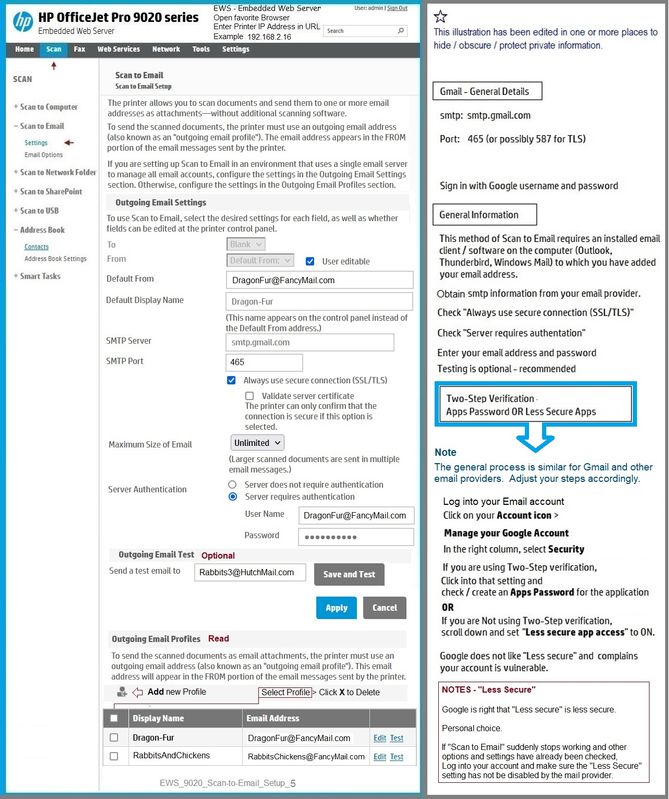
Edit the setup using the Embedded Web Server (EWS).


Open your favorite browser > type / enter Printer IP address into URL / Address bar

Tab Scan > Scan to Email >  Settings / Scan to Email Setup


Reminder

Like other printers that support this option, be aware that Scan to Email does NOT support two-step verification.

Use an Apps Password OR set the email address security to "Less Secure".


I cannot find a sample plate for my old OfficeJet Pro 8630 - As I recall, the setup is similar to the OfficeJet Pro 8740, which in turn, is at least somewhat the same as the OfficeJet Pro 9025.

Example:

EWS_9020_Scan-to-Email_Setup_5EWS_9020_Scan-to-Email_Setup_5


HP Printer Support Home Page - References and Resources – Learn about your Printer  - Solve Problems

 “Things that are your printer”

NOTE:  Content depends on device type and Operating System

Categories:  Alerts, Access to the Print and Scan Doctor (Windows), Warranty Check, HP Drivers / Software / Firmware Updates, How-to Videos, Bulletins/Notices, Lots of How-to Documents, Troubleshooting, Manuals > User Guides, Product Information (Specifications), more

When the website support page opens, Select (as available) a Category > Topic > Subtopic

HP Officejet Pro 8630 e-All-in-One Printer series 


Thank you for participating in the HP Community.

The Community is a separate wing of the HP website - We are not an HP business group.

Our Community is comprised of volunteers - people who own and use HP devices.

Click Thumbs Up to say Thank You.

Question / Concern Answered, Click "Accept as Solution"

Dragon-Fur

† The opinions expressed above are the personal opinions of the authors, not of HP. By using this site, you accept the <a href="https://www8.hp.com/us/en/terms-of-use.html" class="udrlinesmall">Terms of Use</a> and <a href="/t5/custom/page/page-id/hp.rulespage" class="udrlinesmall"> Rules of Participation</a>.