• ×
    Information
    Need Windows 11 help?
    Check documents on compatibility, FAQs, upgrade information and available fixes.
    Windows 11 Support Center.
  • post a message
  • ×
    Information
    Need Windows 11 help?
    Check documents on compatibility, FAQs, upgrade information and available fixes.
    Windows 11 Support Center.
  • post a message
Guidelines
Seize the moment! nominate yourself or a tech enthusiast you admire & join the HP Community Experts!
Common problems HP Solution Center not working : Adobe Flash Player Error and Unable to scan
We would like to share some of the most frequently asked questions about HP Solution Center not working : Adobe Flash Player Error and Unable to Scan.
HP Recommended
HP office jet pro 6969
Microsoft Windows 10 (64-bit)

Where do I find the graph that tells the ink left in cartridges? 

2 REPLIES 2
HP Recommended

Where do I find the graph that shows the ink left in cartridges for hp6969?

HP Recommended

@ebonytop

Thank you for posting on HP Support Community.


Don't worry as I'll be glad to help, I have a few troubleshooting steps we could try to fix the issue:  

Use one of the following methods to check your ink or toner levels from your Windows computer.

  • HP Smart app (Windows 10): Download the HP Smart app (in English) from the Windows store. Add your printer to view ink or toner levels on the home screen.

    HP Smart home screen
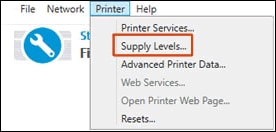
  • HP Print and Scan Doctor: Download and run HP Print and Scan Doctor. Select your printer, click Printer in the top menu bar, and then click Supply Levels.

    Supply Levels menu in HP Print and Scan Doctor
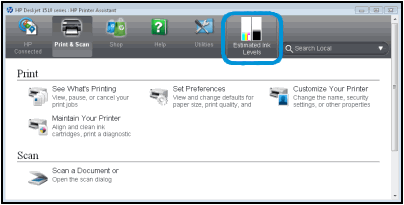
  • Printer software: Search Windows for HP, and then click your printer name or HP Solution Center. Click Maintain Your Printer, if necessary.

    Example of Estimated Ink Levels in HP Printer Assistant

    If you have not installed the HP printer software, go to HP Software and Driver Downloads. Identify your printer, and then follow the on-screen instructions.

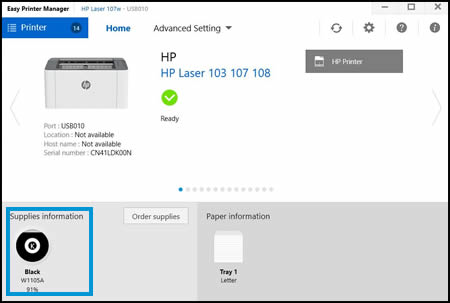
  • HP Laser Printers: Search Windows for Easy Printer Manager, and then click HP Easy Printer Manager.

    Example of Supplies Information in HP Easy Printer Manager

Hope this helps! Keep me posted for further assistance.
Please click “
Accept as Solution” if you feel my post solved your issue, it will help others find the solution.

ECHO_LAKE
I am an HP Employee

† The opinions expressed above are the personal opinions of the authors, not of HP. By using this site, you accept the <a href="https://www8.hp.com/us/en/terms-of-use.html" class="udrlinesmall">Terms of Use</a> and <a href="/t5/custom/page/page-id/hp.rulespage" class="udrlinesmall"> Rules of Participation</a>.