• ×
    Information
    Need Windows 11 help?
    Check documents on compatibility, FAQs, upgrade information and available fixes.
    Windows 11 Support Center.
  • post a message
  • ×
    Information
    Need Windows 11 help?
    Check documents on compatibility, FAQs, upgrade information and available fixes.
    Windows 11 Support Center.
  • post a message
Guidelines
Join the HP Community Solve‑a‑thon | Help Others & Share Your Solutions | Live on Zoom | 2:30 PM to 2:30 AM IST | Every Wednesday Click here to know more
Common problems HP Solution Center not working : Adobe Flash Player Error and Unable to scan
We would like to share some of the most frequently asked questions about HP Solution Center not working : Adobe Flash Player Error and Unable to Scan.
HP Recommended
laser jet m2727nf

my hp laser jet m2727nf scanner does not move and only blinking light can be shown while my copy does not respond or even work. i have try to reset everything but no improvement. I need a help solving this issued especially when the scanner make some noise like it wanna scan but doesnot work but still behave baddly..what are the step in solving the problem?thanks

2 REPLIES 2
HP Recommended

Hello Bigmeat,


I would suggest you try the folliowing steps on the stand-alone device connected directly to the wall outlet without any surge protector connected:


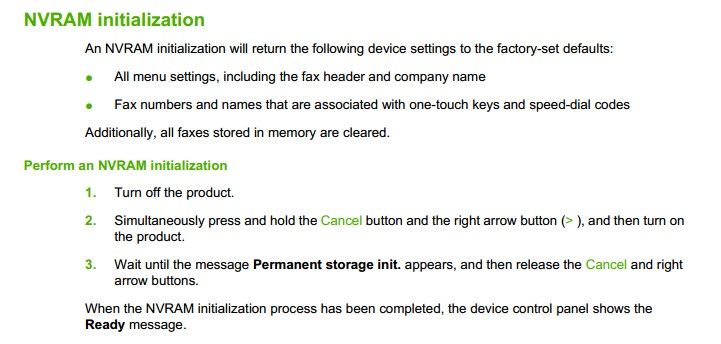
1. Perform a NVRAM reset on the device:


NVRAM.jpg


2. Once the device gets to the READY mode, try to make some copies and print some internal pages to make sure it works. Also, make sure the firmware on the device is updated to the latest version ( you may connect the device via USB or Network and perform a firmware update).


3. If we still have issues, I would suggest you contact the HP support team for further Hardware Diagnosis.


It could be something with the formatter board on the device or the scanner assembly causing issues.


Hope this information helps,


Thanks,

I am an HP employee
Say Thanks by clicking the Kudos Star in the post that helped you.
Please mark the post that solves your problem as Accepted Solution.
HP Recommended

Try performing a power drain on the scanner . With the scanner powerd on and connected only to the power cable , disconnect the power cable  and connect it back after atleast 60 seconds .


IF this is not a hardware failure then the above steps sholud resove the issue .


† The opinions expressed above are the personal opinions of the authors, not of HP. By using this site, you accept the <a href="https://www8.hp.com/us/en/terms-of-use.html" class="udrlinesmall">Terms of Use</a> and <a href="/t5/custom/page/page-id/hp.rulespage" class="udrlinesmall"> Rules of Participation</a>.