-
×InformationNeed Windows 11 help?Check documents on compatibility, FAQs, upgrade information and available fixes.
Windows 11 Support Center. -

-
×InformationNeed Windows 11 help?Check documents on compatibility, FAQs, upgrade information and available fixes.
Windows 11 Support Center. -
- HP Community
- Printers
- Scanning, Faxing, and Copying
- Re: scan to email

Create an account on the HP Community to personalize your profile and ask a question
10-26-2019 11:09 AM
Since I set up my printer a couple of years ago I have been able to choose mail as an option for scanning a document. I chose this from my mac desktop & it would combine all pages into one document so it could be emailed. All of a sudden this option is no longer available in the drop down box. I can only scan to desktop. Not sure why this happened but what do I do now?
10-29-2019 01:15 PM
@cookie16, Welcome to the HP Support Community!
Let us try these steps to resolve this issue:
Update the printer firmware
Click here to know different methods of updating printer firmware.
Also, check for any software updates on MAC
Click here to know how.
-
Confirm the following requirements for the scan to email feature. If you do not meet these requirements, you can manually attach the file to an email message by saving the scan to a folder on the computer.
-
Scan to email works best when a local email client, such as Apple Mail, is installed and set up on the computer.
-
Web-based email accounts (Gmail, Yahoo Mail, Hotmail) must be configured through your local email client to scan to them. Check your local email support site for additional information.
-
-
Start the scan.
-
Printers with touchscreen or LCD menu control panels: From the Scan menu on the printer, select your computer name, and then select Email as PDF or Email as JPEG A new email message automatically opens on the computer.
Some Web-enabled HP printers have a Scan to Email app in the Apps menu that sends emails from the printer using your printer's ePrint email address.
-
Printers with buttons only or printers without scan to email menu options: Continue to the next step to start the scan from the computer.
-
-
Open Finder
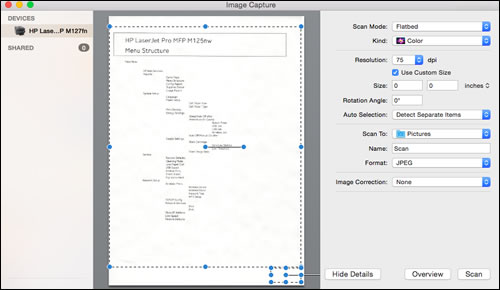
, click Go in the top menu bar, click Applications, and then double-click Image Capture.

-
Click your printer name in the Devices or Shared list, and then click Show Details at the bottom of the screen, if necessary.
After the preview of the scan displays, change the following settings:
-
Scan Mode: Select the scanning bed or automatic document feeder.
-
Scan to: Select Mail.
-
Name: Type a name for the scan file.
-
Format: Select the file type for the scan. When you select the PDF or TIFF format, the Combine into a single document feature is available to save multiple page documents or multiple images into a single file.
-
-
Click Scan.
A new email message automatically opens with the scan attached.
Let me know how this goes.
If you feel my post solved your issue, please click “Accept as Solution”, it will help others find the solution. Click the “Kudos/Thumbs Up" on the bottom right to say “Thanks” for helping!
KUMAR0307
I am an HP Employee
10-29-2019 04:53 PM
Are you scanning using Image Capture?
Apple changed the dropdown.
You have to select other and then you can navigate to Applications and select Mail.
Regards,
StretchMusic
If the answer provided resolves your issue please press the thumbs up button in order to make the answer available to others.
11-10-2019 12:40 PM
Sorry for the delay - I've been away. I am now getting the app to scan to email but the box to tick to add additional items to one document as an attachment is missing. Is this option still available for multiple pages to one person in one email?
11-11-2019 10:21 AM
The choice is only available if you set the type to PDF.
Regards,
StretchMusic
If the answer provided resolves your issue please press the thumbs up button in order to make the answer available to others.

