-
×InformationNeed Windows 11 help?Check documents on compatibility, FAQs, upgrade information and available fixes.
Windows 11 Support Center. -

-
×InformationNeed Windows 11 help?Check documents on compatibility, FAQs, upgrade information and available fixes.
Windows 11 Support Center. -
- HP Community
- Printers
- Scanning, Faxing, and Copying
- Re: scan to network folder

Create an account on the HP Community to personalize your profile and ask a question
12-16-2018 06:17 PM
I cannot scan to a network folder. I have shared the folder " scans" on my desktop, and have supplied the network path to the folder. The test shws as unsuccessful. I have downloaded and installed the latest software and firmware. I can scan to a network folder using the scanner icon on my desktop, but not from the screen on the printer. I can print across the network to from all devices.
Solved! Go to Solution.
Accepted Solutions
12-18-2018 03:10 PM
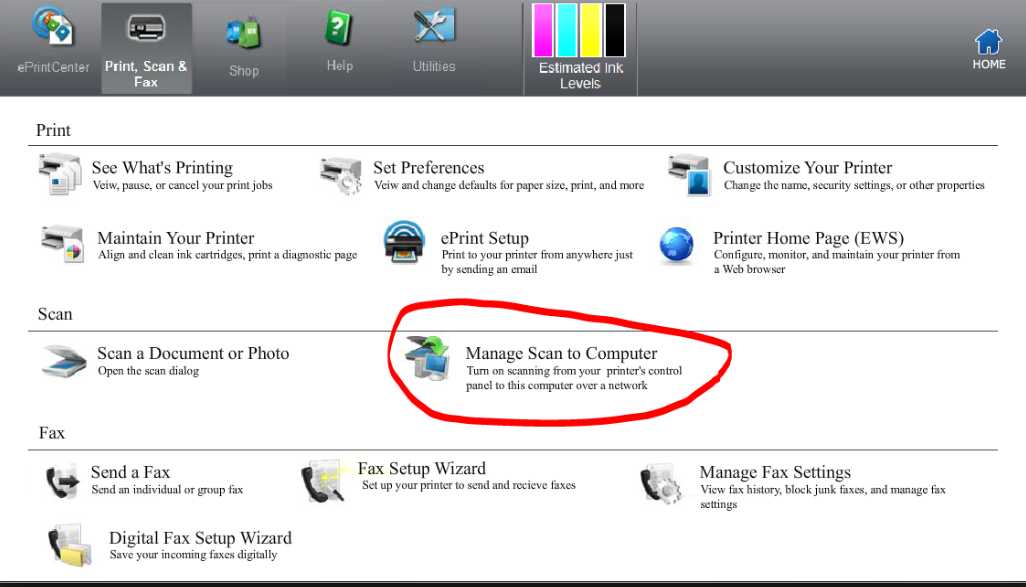
You will have to enable to Scan to Computer on the Printer software:
Let me know if this helps.
If the information I've provided was helpful, give us some reinforcement by clicking the Accepted Solution and Kudos buttons, that'll help us and others see that we've got the answers!
Thanks!
I am an HP Employee
12-17-2018 02:10 PM
Welcome to the HP Forums 🙂 I would like to take a moment and thank you for using this forum, it is a great place to find answers.
Let's run the HP Print and Scan Doctor, which helps in resolving common printing and scanning problems such as missing or corrupt print drivers, connectivity issues etc.
Use this link for details on using the HP Print and Scan doctor: https://hp.care/2JyaC93
If the issue persists, please perform Step 8 from this document: https://support.hp.com/in-en/document/c00040499
Let me know if this helps.
If the information I've provided was helpful, give us some reinforcement by clicking the Accepted Solution and Kudos buttons, that'll help us and others see that we've got the answers!
Thanks!
Have a great day!
I am an HP Employee
12-17-2018 04:39 PM
I used the print and scan doctor, but no luck. I also turned off firewalls and antivirus software, and made sure that the WAI is on and set to automatic. I also tried using my win 10 surface tablet and it doesn't work on that computer either.Computer to scanner communication is fine, the scanner to computer communication is what isn't working
12-18-2018 03:10 PM
You will have to enable to Scan to Computer on the Printer software:
Let me know if this helps.
If the information I've provided was helpful, give us some reinforcement by clicking the Accepted Solution and Kudos buttons, that'll help us and others see that we've got the answers!
Thanks!
I am an HP Employee