• ×
    Information
    Need Windows 11 help?
    Check documents on compatibility, FAQs, upgrade information and available fixes.
    Windows 11 Support Center.
  • post a message
  • ×
    Information
    Need Windows 11 help?
    Check documents on compatibility, FAQs, upgrade information and available fixes.
    Windows 11 Support Center.
  • post a message
Guidelines
Seize the moment! nominate yourself or a tech enthusiast you admire & join the HP Community Experts!
Common problems HP Solution Center not working : Adobe Flash Player Error and Unable to scan
We would like to share some of the most frequently asked questions about HP Solution Center not working : Adobe Flash Player Error and Unable to Scan.
HP Recommended
hp laserjet pro MFP M227fdw
Microsoft Windows 7 (64-bit)

I cannot scan to a network folder. I have shared the folder " scans" on my desktop, and have supplied the network path to the folder. The test shws as unsuccessful. I have downloaded and installed the latest software and firmware. I can scan to a network folder using the scanner icon on my desktop, but not from the screen on the printer. I can print across the network to from all devices. 

1 ACCEPTED SOLUTION

Accepted Solutions
HP Recommended

@hughesb6


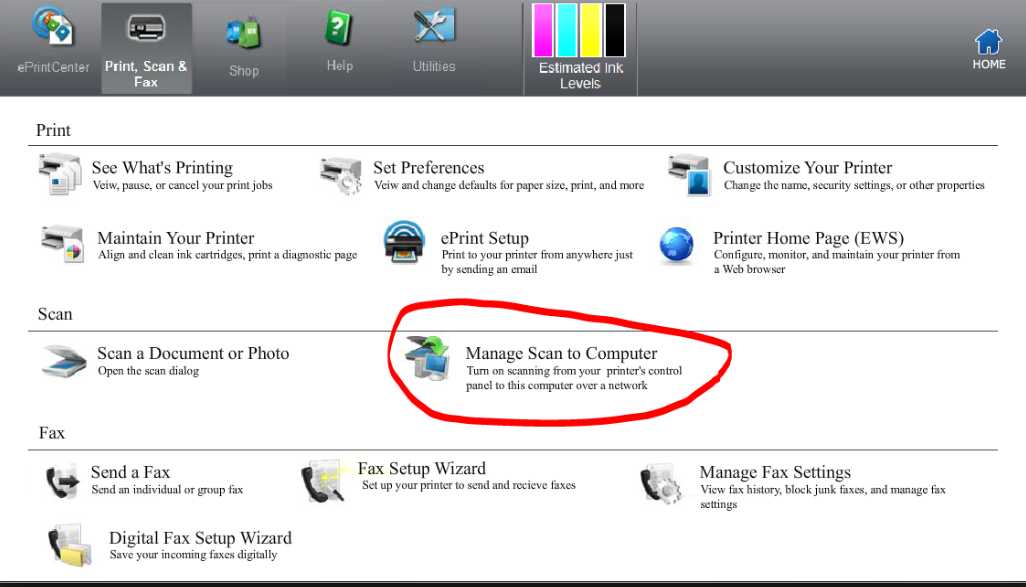
You will have to enable to Scan to Computer on the Printer software:


Let me know if this helps.


If the information I've provided was helpful, give us some reinforcement by clicking the Accepted Solution and Kudos buttons, that'll help us and others see that we've got the answers!


Thanks!


I am an HP Employee

View solution in original post

3 REPLIES 3
HP Recommended

@hughesb6


Welcome to the HP Forums 🙂 I would like to take a moment and thank you for using this forum, it is a great place to find answers. 


Let's run the HP Print and Scan Doctor, which helps in resolving common printing and scanning problems such as missing or corrupt print drivers, connectivity issues etc.


Use this link for details on using the HP Print and Scan doctor: https://hp.care/2JyaC93


If the issue persists, please perform Step 8 from this document: https://support.hp.com/in-en/document/c00040499


Let me know if this helps.


If the information I've provided was helpful, give us some reinforcement by clicking the Accepted Solution and Kudos buttons, that'll help us and others see that we've got the answers!


Thanks!


Have a great day!


I am an HP Employee

HP Recommended

I used the print and scan doctor, but no luck. I also turned off firewalls and antivirus software, and made sure that the WAI is on and set to automatic. I also tried using my win 10 surface tablet and it doesn't work on that computer either.Computer to scanner communication is fine, the scanner to computer communication is what isn't working

HP Recommended

@hughesb6


You will have to enable to Scan to Computer on the Printer software:


Let me know if this helps.


If the information I've provided was helpful, give us some reinforcement by clicking the Accepted Solution and Kudos buttons, that'll help us and others see that we've got the answers!


Thanks!


I am an HP Employee

† The opinions expressed above are the personal opinions of the authors, not of HP. By using this site, you accept the <a href="https://www8.hp.com/us/en/terms-of-use.html" class="udrlinesmall">Terms of Use</a> and <a href="/t5/custom/page/page-id/hp.rulespage" class="udrlinesmall"> Rules of Participation</a>.