• ×
    Information
    Need Windows 11 help?
    Check documents on compatibility, FAQs, upgrade information and available fixes.
    Windows 11 Support Center.
  • post a message
  • ×
    Information
    Need Windows 11 help?
    Check documents on compatibility, FAQs, upgrade information and available fixes.
    Windows 11 Support Center.
  • post a message
Guidelines
Seize the moment! nominate yourself or a tech enthusiast you admire & join the HP Community Experts!
Common problems HP Solution Center not working : Adobe Flash Player Error and Unable to scan
We would like to share some of the most frequently asked questions about HP Solution Center not working : Adobe Flash Player Error and Unable to Scan.
HP Recommended

i am trying to set up the scan to email from my HP OfficeJet Pro 9018 to my HP laptop.  i have followed all the directions both in the set up and in the various forums.  When i test the set up i get:

SMTP email server error. The server might be down or busy. Try again later.  


the smtp is correct:  smtp.gmail.com

the port is correct:  465

the less secure access is on as well. 


thanks 


bill 


Please help.  i have been trying to set this up for the last 3 hours.  

1 REPLY 1
HP Recommended

@Billyr93 


Unless you very recently checked the security setting  for "Less secure app access" on your gmail account, I recommend that you do so again.

Why?

Google will shut this setting to OFF out from under you.

Set it to "ON" - wait a while (not sure how long) and Google will have switched it back to OFF.

It is  not sneaky, exactly, Google does post that it will do this where you switch the setting on / off.


Just tested...

It had done so again to  me.

Google doing this is irritating - On the other hand, Google is trying to help keep us safe.


What else?

Not sure.

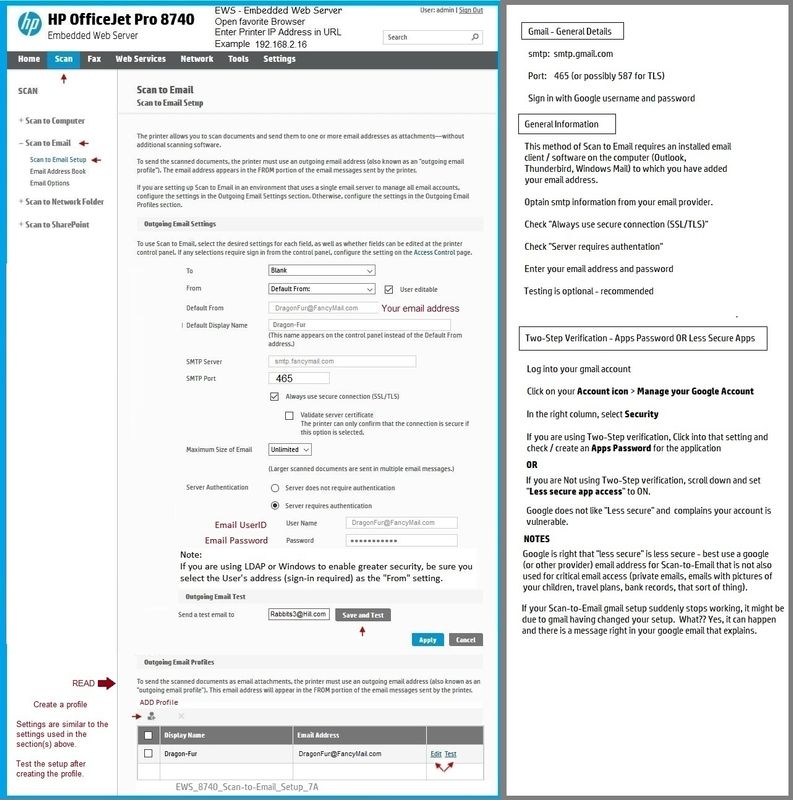
Example provided FYI / for your perusal.

EWS_8740_Scan-to-Email_Setup_7AEWS_8740_Scan-to-Email_Setup_7A


Thank you for participating in our HP Community.

We are a volunteer community workforce dedicated to supporting HP technology

Click Thumbs Up to say Thank You for the help.

If the answer helped resolve your issue, Click "Accept as Solution" .


Dragon-Fur

† The opinions expressed above are the personal opinions of the authors, not of HP. By using this site, you accept the <a href="https://www8.hp.com/us/en/terms-of-use.html" class="udrlinesmall">Terms of Use</a> and <a href="/t5/custom/page/page-id/hp.rulespage" class="udrlinesmall"> Rules of Participation</a>.