• ×
    Information
    Need Windows 11 help?
    Check documents on compatibility, FAQs, upgrade information and available fixes.
    Windows 11 Support Center.
  • post a message
  • ×
    Information
    Need Windows 11 help?
    Check documents on compatibility, FAQs, upgrade information and available fixes.
    Windows 11 Support Center.
  • post a message
Guidelines
Seize the moment! nominate yourself or a tech enthusiast you admire & join the HP Community Experts!
Common problems HP Solution Center not working : Adobe Flash Player Error and Unable to scan
We would like to share some of the most frequently asked questions about HP Solution Center not working : Adobe Flash Player Error and Unable to Scan.
HP Recommended
hp photosmart 7520
Microsoft Windows 10 (64-bit)

trying to setup eprint put it keeps telling me it is disabled.  when I go to the security section it opens a web page an nothing.  on the printer it tells me to check the internet connection.  put I know this is not the problem

3 REPLIES 3
HP Recommended

@DonnaLynn2

Welcome to the HP Community


Are the printer and computer connected to the same network?


Turn on the web services.

  1. On your control panel, press the HP ePrint icon or button.

    If your control panel does not have an HP ePrint icon or button, navigate to Web Services Setup, Network Setup, or Wireless Settings to open the Web Services menu.

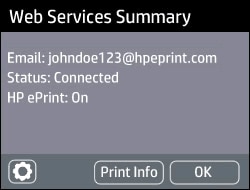
    • If a Web Services Summary screen or connected status displays, Web Services is already on.

      Example of Web Services Summary screen

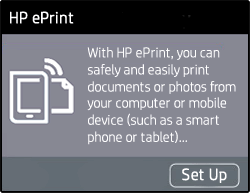
    • If a prompt to turn on Web Services or setup HP ePrint displays, press Turn On, Enable, or Setup.

      Example of clicking Setup to turn on Web Services.

  2. Follow the on-screen instructions to turn on Web Services. If you are prompted to update the firmware, press OK.

Refer to this link: https://support.hp.com/in-en/document/c03721293 for Printing with HP ePrint.


Keep me posted, how it goes!

If the information I've provided was helpful, give us some reinforcement by clicking the Accepted Solution and Kudos buttons, that'll help us and others see that we've got the answers!

Have a great day!

Cheers:)

Raj1788
I am an HP Employee 

HP Recommended

Thank you for getting back to me.  Tried what you said with no luck.  If on the printer I get an error stating that I am not connected to the internet which is not correct.  If I try to enable it using the computer again with no luck.    Please see photos attached.  I would greatly appreciate any help you can give me.

Donna35C80D22-1050-4767-87AD-C95683ECA4EB.jpegD7B8D2E5-01BD-4F72-A820-65D615262BEC.jpeg39E76322-2D79-4A33-803B-DC19FDE96152.jpeg819CB6E3-5D9A-4090-82EA-0F214D07B246.jpeg057C4911-163A-4C6C-8D02-8B2C4955112B.jpeg

HP Recommended

Hi,

Please install the latest printer updates and check if that may resolve either the Web Services or Webscan issues:

https://ftp.hp.com/pub/softlib/software13/printers/ps7520/PS_7520_R1830A.exe


Shlomi


Click the Yes button to reply that the response was helpful or to say thanks.
If my post resolve your problem please mark it as an Accepted Solution 🙂
† The opinions expressed above are the personal opinions of the authors, not of HP. By using this site, you accept the <a href="https://www8.hp.com/us/en/terms-of-use.html" class="udrlinesmall">Terms of Use</a> and <a href="/t5/custom/page/page-id/hp.rulespage" class="udrlinesmall"> Rules of Participation</a>.