• ×
    Information
    Need Windows 11 help?
    Check documents on compatibility, FAQs, upgrade information and available fixes.
    Windows 11 Support Center.
  • post a message
  • ×
    Information
    Need Windows 11 help?
    Check documents on compatibility, FAQs, upgrade information and available fixes.
    Windows 11 Support Center.
  • post a message
Guidelines
Seize the moment! nominate yourself or a tech enthusiast you admire & join the HP Community Experts!
HP Recommended
Voyager FOCUS2 UC USB-A

I just starting using the Poly Focus2. The feature that mutes the mic when it is raised is great, but when I use it, it steals focus from whatever I'm working on and puts it on MS Teams. It doesn't even go back to the correct window. For example, if I'm actively in a call and mute, it puts focus on to the main MS Teams window, stealing it from my call. I've went through the settings and tried everything I can think of. Any suggestions of how to keep the mic mute from stealing focus?

1 ACCEPTED SOLUTION

Accepted Solutions
HP Recommended

Some amount of disconnecting and reconnecting the dongle has solved this issue. I adjusted a bunch of setting that didn't seem to help, then suddenly it stopped happening. IDK....

View solution in original post

3 REPLIES 3
HP Recommended

Hi @rocketman729626, Welcome to the Poly HP Support Community.
 
Sorry to hear about the issue you are facing with the Voyager Focus 2 headset. I understand how important it is to have the headset working perfectly. I request you to follow a few troubleshooting steps and test the headset.

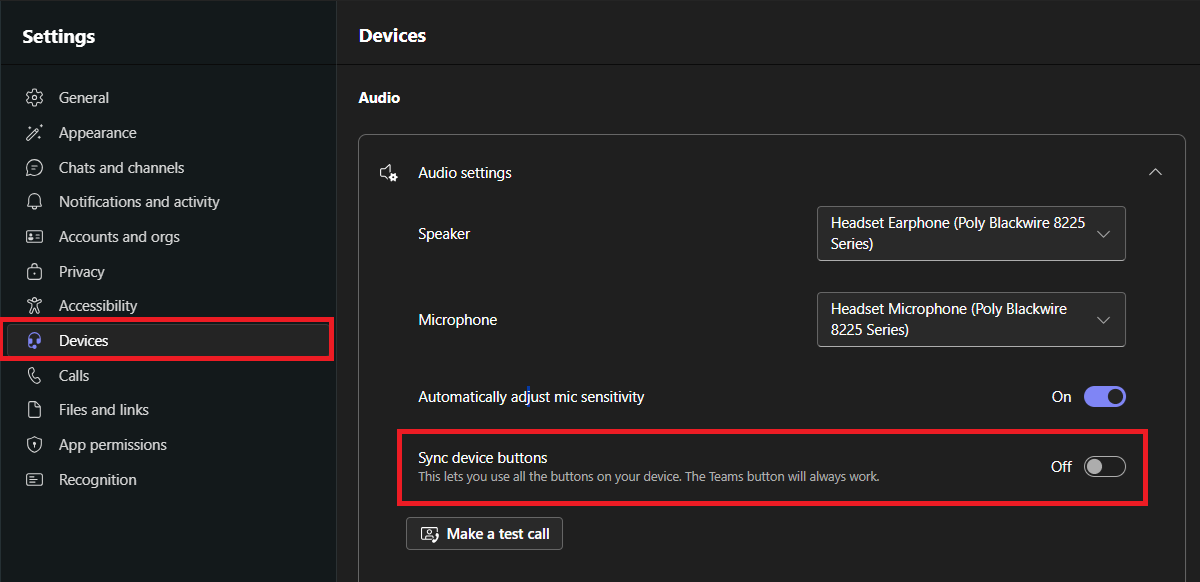
Kindly disable the Sync device button option under Microsoft teams application and restart both PC and headset and test the headset. below is the example image.


If the issue still persists, kindly disable wearing sensors. Open Poly Lens > Select the Device > Settings > Sensors & Presence > Turn off "Wearing sensor."


Should the issue continue after this step, I would request you contact our HP Support and our Support Engineers should be able to sort this out. HP Support can be reached by clicking on the following link.

https://support.hp.com/us-en/poly


I hope this helps! Keep me posted for further assistance. If you find the information provided useful or solves your problems, help other users find the solution more easily by giving Kudos/Thumbs Up and marking my post as an Accepted Solution.


Regards,

Salman

I am an HP Employee.
Click Helpful = Yes to say Thank You.
Question / Concern Answered, Click "Accept as Solution"
HP Recommended

Some amount of disconnecting and reconnecting the dongle has solved this issue. I adjusted a bunch of setting that didn't seem to help, then suddenly it stopped happening. IDK....

HP Recommended

Thank you for your confirmation, @rocketman729626,


I'm glad to hear that your issue has been resolved. If you happen to experience the same issue again, I recommend reaching out to HP Support for further assistance. If your headset is still under warranty, they should be able to arrange a replacement or help resolve the problem promptly.


You can contact HP Support using the following link:: https://support.hp.com/us-en/poly


Regards,

Salman

I am an HP Employee.
Click Helpful = Yes to say Thank You.
Question / Concern Answered, Click "Accept as Solution"
† The opinions expressed above are the personal opinions of the authors, not of HP. By using this site, you accept the <a href="https://www8.hp.com/us/en/terms-of-use.html" class="udrlinesmall">Terms of Use</a> and <a href="/t5/custom/page/page-id/hp.rulespage" class="udrlinesmall"> Rules of Participation</a>.