• ×
    Information
    Need Windows 11 help?
    Check documents on compatibility, FAQs, upgrade information and available fixes.
    Windows 11 Support Center.
  • post a message
  • ×
    Information
    Need Windows 11 help?
    Check documents on compatibility, FAQs, upgrade information and available fixes.
    Windows 11 Support Center.
  • post a message
Guidelines
Seize the moment! nominate yourself or a tech enthusiast you admire & join the HP Community Experts!
Archived This topic has been archived. Information and links in this thread may no longer be available or relevant. If you have a question create a new topic by clicking here and select the appropriate board.

HP Recommended
HP Easy Start
macOS 10.14 Mojave

Hi,

I have an HP OfficeJet Pro 8620.


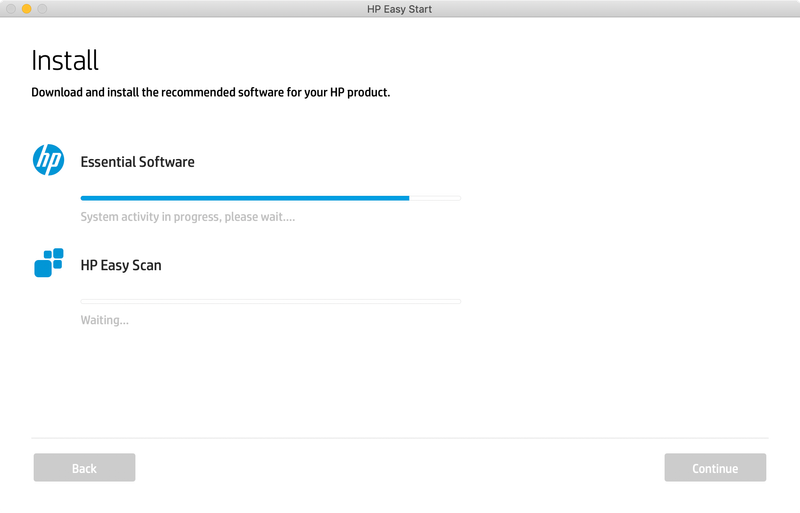
I have uninstalled all previous HP apps, rebooted & the HP Easy Start app still gets stuck in the same place. It's been stuck for over an hour. I have to force quit & when I reboot & try again, the exact same thing happens.


I also can not install the HP printer driver via System Preferences under Printer & Scanners. It can't locate the driver it says. I have even tried to do "Reset Printing System" and it still did not let me install the printer driver. 


I do not have a firewall active. And when I look on the HP website for the printer driver, my only option is download this HP Easy Start app, which does not work. Why can't I simply download the printer driver?


I have this really printer just sitting here & I can't use it because I can't install the printer driver. Very frustating. Does anyone have any solutions for this?


Thank you,

-Doren

Screen Shot 2018-10-23 at 7.01.39 PM.png

Archived This topic has been archived. Information and links in this thread may no longer be available or relevant. If you have a question create a new topic by clicking here and select the appropriate board.
† The opinions expressed above are the personal opinions of the authors, not of HP. By using this site, you accept the <a href="https://www8.hp.com/us/en/terms-of-use.html" class="udrlinesmall">Terms of Use</a> and <a href="/t5/custom/page/page-id/hp.rulespage" class="udrlinesmall"> Rules of Participation</a>.