Sorry, there was an error with your nomination, please try again.
Required fields can't be empty, please try again.
Create an account on the HP Community to personalize your profile and ask a question
Your account also allows you to connect with HP support faster, access a personal dashboard to manage all of your devices in one place, view warranty information, case status and more.
I’ve been having a lot of trouble with latency issues. The laptop I’m using is more than capable of running Traktor Pro 3 but from the second I start playing tracks I’m getting popping and crackling noises.
I’ve worked with the guys at Native Instruments and followed all the tips and advice they have given me but nothing has worked. They suggested going to HP the manufacture of the laptop and see what they say. Again they have also been unable to find a fix for this issue.
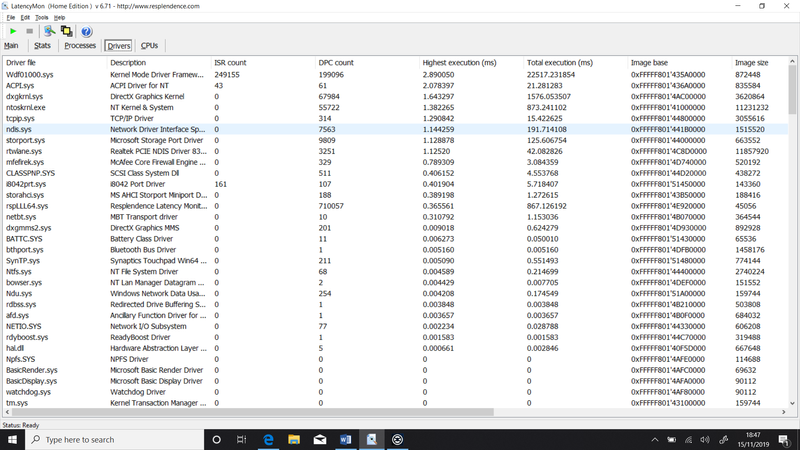
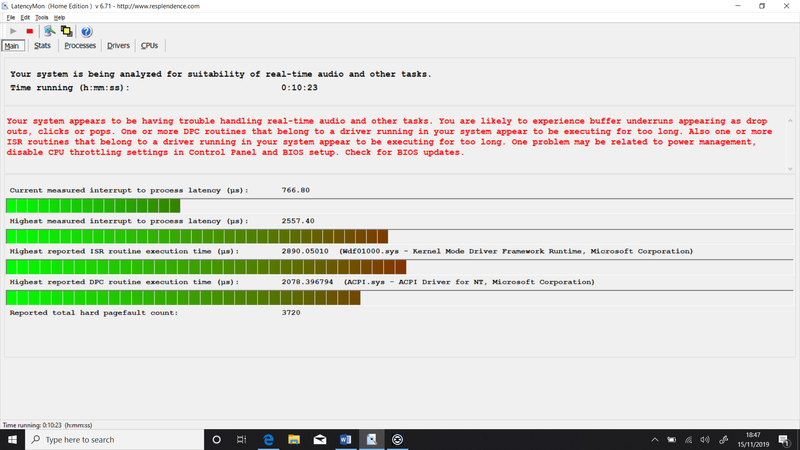
Latency Mon is telling me that Driver files: Wdf01000.sys , ACPI.sys , dxgkrnl.sys , ntoskrl.sys are causing me the most problems. (See Photos)
Some of the stuff I have tried includes, All the optimisation tips from NI, Reinstalling windows 4 times now. Updating all the drivers in the machine, Updating the BIOS, Only having Traktor program on the machine nothing else. Disabling the network adapters, Disabling dynamic tick, Power optimisation,
All of this has been going on now for about 2 months and I’ve had enough pissing about.
Can anyone offer any more advise before I pack up all this gear and sell it on for something else.