Sorry, there was an error with your nomination, please try again.
Required fields can't be empty, please try again.
Create an account on the HP Community to personalize your profile and ask a question
Your account also allows you to connect with HP support faster, access a personal dashboard to manage all of your devices in one place, view warranty information, case status and more.
We would like to share some of the most frequently asked questions about: Battery Reports, Hold a charge, Test and Calibrating Battery . Check out this link: Is your notebook plugged in and not charging?
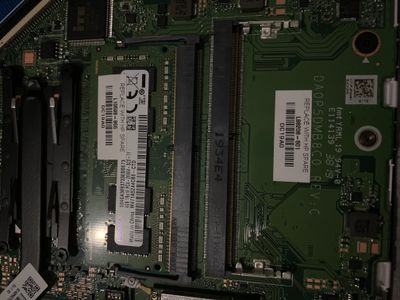
Hello, I’m looking to install a new 8gb RAM next to the current 4gb ram however the 2nd RAM slot has different clips for which do not allow installation of the new RAM, it’s states DDR4 H=4.0R And it had two metal clips point up stopping the ram from being installed? Please see picture attached
If this is not for RAM are you about to advise what this slot would be used for?