-
×InformationNeed Windows 11 help?Check documents on compatibility, FAQs, upgrade information and available fixes.
Windows 11 Support Center.
-
×InformationNeed Windows 11 help?Check documents on compatibility, FAQs, upgrade information and available fixes.
Windows 11 Support Center.
- HP Community
- Printers
- Printer Setup, Software & Drivers
- Who Me Too'd this topic

Create an account on the HP Community to personalize your profile and ask a question
05-27-2020 03:57 PM
Hello,
I bought this printer about a month ago.
Managed to install, print and scan. No problem... until a number of events happened:
1. it would start printing to file
2. it would only print from the HP Smart App (only pdfs)
3. then it stopped working
I tried the following 3 times now:
1. I uninstalled everything and reinstalled everything
2. Installed the drivers individually (the software for this printer has like 5 different drivers)
3. Again, I tried installing the HP smart up
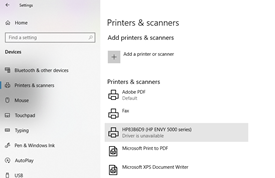
Now it shows the printer as 'added' but with message of 'driver unavailable' ... see picture below
All of the above are not working. My partner managed to install the printer without the App and never had any problems.
We both have Windows 10.
I have now run out of ideas and I am considering returning this product.
Please help, advise, thoroughly disatisfied and frustrated.
Thank you
Juan