-
×InformationNeed Windows 11 help?Check documents on compatibility, FAQs, upgrade information and available fixes.
Windows 11 Support Center. -

-
×InformationNeed Windows 11 help?Check documents on compatibility, FAQs, upgrade information and available fixes.
Windows 11 Support Center. -
- HP Community
- Desktops
- Desktop Video, Display and Touch
- Re: Blocking Truvision HD camera

Create an account on the HP Community to personalize your profile and ask a question
08-12-2019 12:16 PM
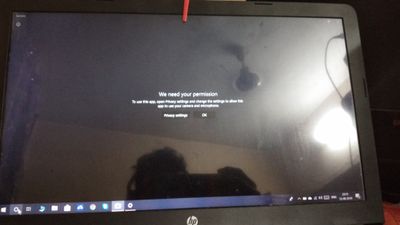
Without knowingly I clicked on block option in hurry in desktop CAMERA.Am accessing my camera in remaining applications like skype etc.it say to access permissions in privacy settings,also i have done that too.but am not accessing in my CAMERA application.am using win 10 64 bit HP LAPTOP.also i attached a photo with this,check that once.Please resolve this problem with a solution to me guys
Solved! Go to Solution.
Accepted Solutions
08-14-2019 05:57 PM
@HarshaRonnie I'm glad that the issue has been resolved, coincidentally its similar to what I had suggested, so please do mark my post as the solution to help others find the same solution you have and make it easier for the rest.
It's been a pleasure interacting with you,
Have a good day, ahead.
Riddle_Decipher
I am an HP Employee
Learning is a journey, not a destination.
Let's keep asking questions and growing together.
08-14-2019 04:56 PM
@HarshaRonnie Welcome to HP Community!
If you've got more than one antivirus program, please uninstall the most recent as they are known to have issues with privacy settings causing the camera to be blocked, if you continue to have issues or you have only one working antivirus program, please check if the camera works in safe mode: click here to know how to access the same.
If the issue persists, please reinstall the drivers by removing the same from the device manager and then restarting the computer for it to automatically reinstall the right drivers that should resolve the issue.
NOTE:
The name of your webcam might display as USB Video Device, HP Webcam, USB 2.0 Camera, HP Pavilion Webcam, or similar. If you do not know the name, select a name to see if video displays. If not, try selecting other video device names until you see the video from your webcam display in the window.
More details: Click here
Keep us posted,
If you would like to thank us for our efforts to help you,
Give us a virtual high-five by clicking the 'Thumbs Up' icon below, followed by clicking on the "Accept as solution" on this post,
Have a great day!
Riddle_Decipher
I am an HP Employee
Learning is a journey, not a destination.
Let's keep asking questions and growing together.
08-14-2019 05:15 PM
Tqsm sir.but i have resolved it in next 3 hours.I was about to think what the thinks i have done in recent times...I just uninstalled my expired licenced antivirus and installed KASPERSKY.after some time i got it and uninstalled that.then restarted my lappy.problem resolved..anyways tqs the solution.
08-14-2019 05:57 PM
@HarshaRonnie I'm glad that the issue has been resolved, coincidentally its similar to what I had suggested, so please do mark my post as the solution to help others find the same solution you have and make it easier for the rest.
It's been a pleasure interacting with you,
Have a good day, ahead.
Riddle_Decipher
I am an HP Employee
Learning is a journey, not a destination.
Let's keep asking questions and growing together.