• ×
    Information
    Need Windows 11 help?
    Check documents on compatibility, FAQs, upgrade information and available fixes.
    Windows 11 Support Center.
  • post a message
  • ×
    Information
    Need Windows 11 help?
    Check documents on compatibility, FAQs, upgrade information and available fixes.
    Windows 11 Support Center.
  • post a message
Guidelines
Seize the moment! nominate yourself or a tech enthusiast you admire & join the HP Community Experts!
HP Recommended
Pavilion 590
Microsoft Windows 10 (64-bit)

Hey everyone,


I have two HP EliteDisplay E273Q monitors that I want to connect in their native 1440p resolution to my computer. Since my pc has only one HDMI output and VGA does not support this resolution, I bought a USB Type C to HDMI adapter from uni (supports displayport alt mode). When I connect the monitor to the adapter, the screen remains black and no input is detected. I also have a USB 3 type A to C adapters and the other USB 3 ports (marked with "SS") also do not work. 

The motherboard is a lincs 843B, the bios version is F.42.

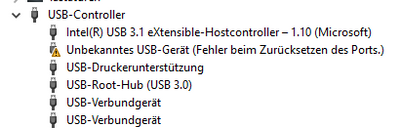
This is what the device manager tells me (unfortunately in German; the error is "Unknow USB-devive (error during resetting of the port"). 

JoeyBKay_0-1594815679057.png

Does anyone have an idea, how I can connect my monitor properly? Using VGA is not realy a great option.

Thank you!

1 ACCEPTED SOLUTION

Accepted Solutions
HP Recommended

The device manager shows that there is no driver present. 


Try Windows update or the manufacturer.


The problem with upgrading the video card is that most that have the power to produce the resolution you  want require that the PC have a 300 Watt PSI.


Your PC has only a 180 Watt PSU. It is a proprietary PSU and that makes things difficult. 


I suggest that it may be time to upgrade to a more powerful PC or to build your own.


Sorry that I do not have better news for you.


Do a search online  for upgrading the Pavilion 590 PC and you will find that owners of your PC have all faced the very same issues.


I am a volunteer forum member. If my suggestion helped you solve your issue, help others by marking that post as the accepted solution. Say thanks by clicking on the Yes button next to the "was this reply helpful?"


View solution in original post

2 REPLIES 2
HP Recommended

The device manager shows that there is no driver present. 


Try Windows update or the manufacturer.


The problem with upgrading the video card is that most that have the power to produce the resolution you  want require that the PC have a 300 Watt PSI.


Your PC has only a 180 Watt PSU. It is a proprietary PSU and that makes things difficult. 


I suggest that it may be time to upgrade to a more powerful PC or to build your own.


Sorry that I do not have better news for you.


Do a search online  for upgrading the Pavilion 590 PC and you will find that owners of your PC have all faced the very same issues.


I am a volunteer forum member. If my suggestion helped you solve your issue, help others by marking that post as the accepted solution. Say thanks by clicking on the Yes button next to the "was this reply helpful?"


HP Recommended

Mhh... this it not what I wanted to hear. This is my work computer and I cannot update the hardware itself. Would this "external graphics card" be an option (https://www.amazon.de/StarTech-com-USB-HDMI-Adapter-Grafikkarte-Schwarz/dp/B00OD37KHG/ref=sr_1_16?__...)? 

† The opinions expressed above are the personal opinions of the authors, not of HP. By using this site, you accept the <a href="https://www8.hp.com/us/en/terms-of-use.html" class="udrlinesmall">Terms of Use</a> and <a href="/t5/custom/page/page-id/hp.rulespage" class="udrlinesmall"> Rules of Participation</a>.