
-
×InformationNeed Windows 11 help?Check documents on compatibility, FAQs, upgrade information and available fixes.
Windows 11 Support Center. -
-
×InformationNeed Windows 11 help?Check documents on compatibility, FAQs, upgrade information and available fixes.
Windows 11 Support Center. -
- HP Community
- Printers
- HP Instant Ink
- Canceling HP Instant Ink

Create an account on the HP Community to personalize your profile and ask a question
Your account also allows you to connect with HP support faster, access a personal dashboard to manage all of your devices in one place, view warranty information, case status and more.
Common problems for INSTANT INK, HP+ PLANS: INK AND TONER
We would like to share some of the most frequently asked questions about Instant Ink. Check out this link: HP INSTANT INK, HP+ PLANS: INK AND TONER. .

It has been a while since anyone has replied. Simply ask a new question if you would like to start the discussion again.

02-08-2022 01:11 PM - last edited on 02-08-2022 02:22 PM by MarcusC
 HP Recommended
Product: HP OfficeJet Pro 6978 All-in-One Printer
Operating System: Microsoft Windows 11
i've been trying to cancel my subscription to HP Instant Ink for days. HP has set up an endless loop in its support structure, from the Virtual Assistant, to the support page, to this community. They have a 45 min wait if you want to phone in your cancellation. I even opened a
They say on the website, under Sign Up Now:
Change or cancel you plan at any time.
But they provide no link to do anything other than sign up. I had to resort to contacting my credit card company and had them Block Merchant in order to unsubscribe. There are many who have written about the problems they've had either cancelling or problems with their pinter after cancelling.
8 REPLIES 8


02-09-2022 02:41 AM
HP Recommended
Hi @DCLeaves,
I'd like to help!
I understand you would like to cancel your instant ink service.
Use your HP Instant Ink account to cancel your HP Instant Ink service.
-
Sign in to hpinstantink.com/signin.
Your HP Instant Ink account page opens.
-
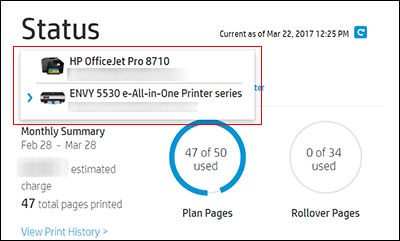
In the Status area of your HP Instant Ink account page, a printer drop-down menu is available when there are multiple printers enrolled. Click the drop-down menu, and then select the printer you want to cancel.
-
Check the Print History or the HP ePrint address of the printer to confirm you have selected the correct printer.
-
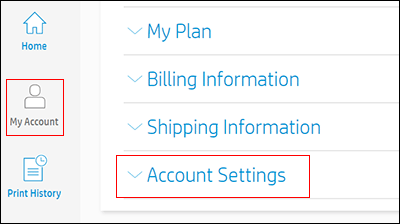
Click My Account, and then click Account Settings.
-
Click Cancel my HP Instant Ink Subscription.
You receive an email confirmation of the cancellation. The cancellation finalizes at the end of the current billing cycle when the final charge is processes successfully.
Hope this helps! Keep me posted.
And, Welcome to the HP Support Community.
Please click “Accept as Solution” if you feel my post solved your issue, it will help others find the solution.
Click the “Yes" on the bottom right to say “Thanks” for helping
02-09-2022 08:56 AM
HP Recommended
Please send us a private message with your Instant Ink account details or you may also respond to the private message I've sent out and I'll help you out, accordingly. Check next to your profile name, you should see a little blue envelope, please click on it.
Let me know.
02-09-2022 10:49 AM
HP Recommended
Send a private message to where, exactly? There is no option to do that on the website when I sign in.
If I receive your private message, I will respond.
There is no Profile Name or Blue Envelope when I sign in.
Lisa

Be alert for scammers posting fake support phone numbers and/or email addresses on the community.
If you think you have received a fake HP Support message, please report it to us by clicking on "Flag Post".
† The opinions expressed above are the personal opinions of the authors, not of HP. By using this site, you accept the Terms of Use and Rules of Participation.


† The opinions expressed above are the personal opinions of the authors, not of HP. By using this site, you accept the <a href="https://www8.hp.com/us/en/terms-of-use.html" class="udrlinesmall">Terms of Use</a> and <a href="/t5/custom/page/page-id/hp.rulespage" class="udrlinesmall"> Rules of Participation</a>.