• ×
    Information
    Need Windows 11 help?
    Check documents on compatibility, FAQs, upgrade information and available fixes.
    Windows 11 Support Center.
  • post a message
  • ×
    Information
    Need Windows 11 help?
    Check documents on compatibility, FAQs, upgrade information and available fixes.
    Windows 11 Support Center.
  • post a message
Guidelines
Join the HP Community Solve‑a‑thon | Help Others & Share Your Solutions | Live on Zoom | 2:30 PM to 2:30 AM IST | Every Wednesday Click here to know more
Check some of the most frequent questions about Instant Ink: HP INSTANT INK, HP+ PLANS: INK AND TONER.


Check out our Black or Color Ink Not Printing, Other Print Quality Issues info about: Print quality and Cartridge Issues.

HP Recommended

Incompatible Cartridge 680 with HP Deskjet 3635

1 REPLY 1
HP Recommended

Hello @Michie_67, Welcome to the HP Support Community.

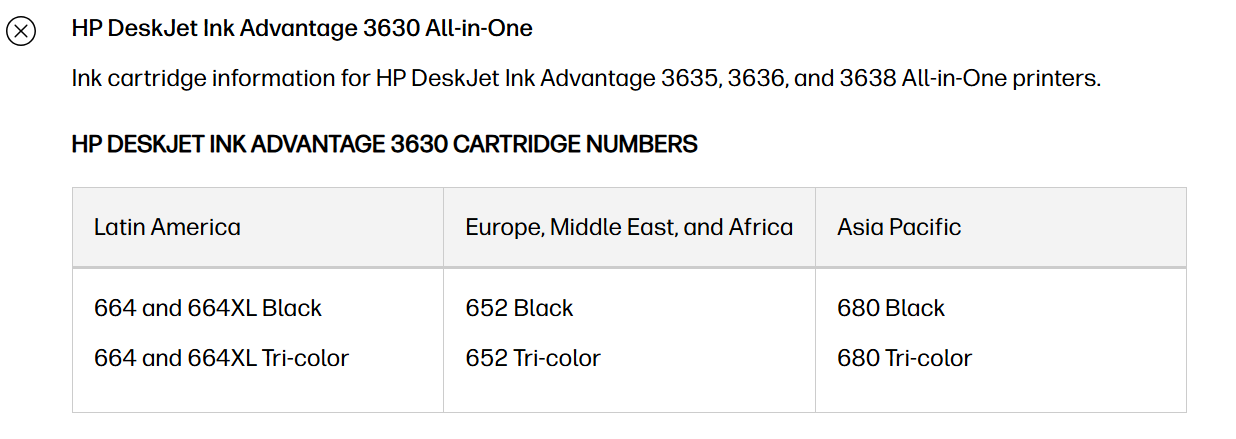
If the printer is being used in the country mentioned, then HP 680 is the correct cartridge for the HP Deskjet Ink Advantage 3635. HP's official cartridge table lists the 3635 under the Asia Pacific region, where the required cartridges are HP 680 Black and HP 680 Tricolor


Please try the following:
 

  • Remove the affected HP 680 cartridge.
  • Check that all protective tape has been removed.
  • Inspect the copper-colored contacts for dirt, damage, or ink residue.
  • Reinstall the cartridge firmly until it clicks into place.
  • Restart the printer and check the message again.
  • If the old cartridge is recognized but the new HP 680 cartridge is not, the new cartridge may be defective, or its cartridge information may not be recognized correctly.

Please let us know:
 

  • Is the black, tri-color, or both cartridges showing as incompatible?
  • Are the cartridges genuine HP 680 cartridges?
  • Was this printer originally purchased in the same country, or was it imported from another country?
  • If the printer was originally purchased in another region, please mention that as well, because HP printers can use different cartridge numbers depending on their regional configuration.
  • Also, please send us the images of the cartridge on private message. Private Messages - HP Support Community

Have a great day!

I'm an HP Employee.


If this reply helped resolve your issue, please select the Accept as Solution as it helps others in the community quickly find the answer they’re looking for.


And if you found this reply helpful, clicking Yes below is a great way to let us know we’re providing the support you need, as it encourages us to keep improving and sharing helpful guidance.

† The opinions expressed above are the personal opinions of the authors, not of HP. By using this site, you accept the <a href="https://www8.hp.com/us/en/terms-of-use.html" class="udrlinesmall">Terms of Use</a> and <a href="/t5/custom/page/page-id/hp.rulespage" class="udrlinesmall"> Rules of Participation</a>.
-->