• ×
    Information
    Need Windows 11 help?
    Check documents on compatibility, FAQs, upgrade information and available fixes.
    Windows 11 Support Center.
  • post a message
  • ×
    Information
    Need Windows 11 help?
    Check documents on compatibility, FAQs, upgrade information and available fixes.
    Windows 11 Support Center.
  • post a message
Guidelines
Seize the moment! nominate yourself or a tech enthusiast you admire & join the HP Community Experts!
Common problems for INSTANT INK, HP+ PLANS: INK AND TONER
We would like to share some of the most frequently asked questions about Instant Ink. Check out this link: HP INSTANT INK, HP+ PLANS: INK AND TONER. .
HP Recommended
HP Officejet Pro 8600 Plus e-All-in-One Printer - N911g

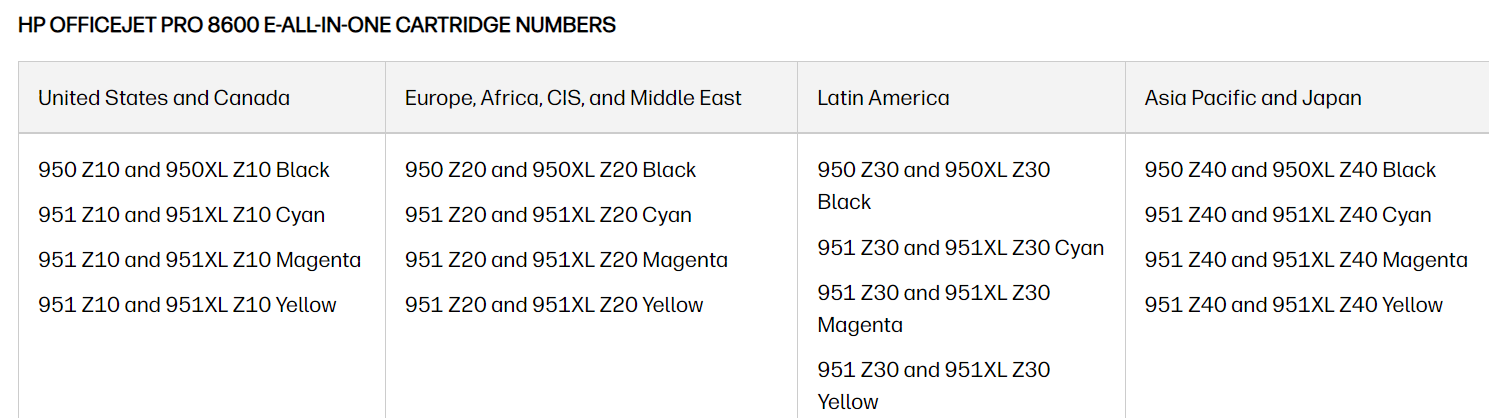
I need help changing the regionalization on my Officejet Pro 8600. Any assistance will be greatly appreciated. Thank you. 

3 REPLIES 3
HP Recommended

Hi @lcamp1210,


Welcome to the HP Support Community.

Thank you for posting your query. I will be glad to assist you.


I see that you are looking for help with performing a regional reset on your printer.

To understand the issue and help you, please share the details listed below:


- Are you enrolled in the instant ink service and want to move the account to the new region?

- Are you planning to perform the regional reset so that you can use store bought ink cartridges on your that are compatible in the new region?

- May I know which application are you using to print?

- May I know which devices are you using to print eg: Windows PC, Mac, or Smartphone (Android or iPhone)?


Note: Do not share any of your personal information such as serial, phone number, email ID, etc.


Take care and have a great day ahead!


Irwin6

HP Support

Irfan_06-Moderator
I am an HP Employee

HP Recommended

Hi Irwin6, thank you for getting back to me. I used to live in Germany, and now I'm back in the US. I bought the same printer cartridge that I used in Germany. However, now I get an error message that it's not compatible. This doesn't make sense to me, so I assume the issue is regionalization. I only print from my computer (Windows PC) to my printer. Thanks again.


Take care,

Leonie

HP Recommended

Hi @lcamp1210,


Thank you for sharing the above information.

Please purchase the ink cartridges that are compatible in your current region to perform a regional reset.


Then, please install the previous country ink cartridges and perform the steps given below.


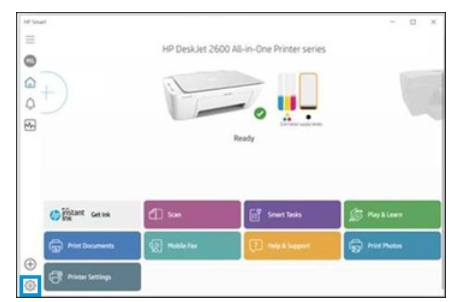
If your computer is connected to the printer with a USB or wireless connection, you can open the Set New Regions window with HP Smart by following these steps.


1) Open the HP Smart app.


2) On the Home screen, click gear icon.


3) Click About, press and hold Ctrl + Shift, and then right-click on the HP Smart logo.

The region reset screen opens.


4) Take a screenshot of the screen and send it to me in a private message.


To access your private messages, click the Private message icon on the upper right corner of your HP Community profile Next, to your profile Name, you should see a little blue envelope, please click on it or simply click on this link


Take care and have a great day ahead!


Irwin6

HP Support

Irfan_06-Moderator
I am an HP Employee

† The opinions expressed above are the personal opinions of the authors, not of HP. By using this site, you accept the <a href="https://www8.hp.com/us/en/terms-of-use.html" class="udrlinesmall">Terms of Use</a> and <a href="/t5/custom/page/page-id/hp.rulespage" class="udrlinesmall"> Rules of Participation</a>.