
-
×InformationNeed Windows 11 help?Check documents on compatibility, FAQs, upgrade information and available fixes.
Windows 11 Support Center. -
-
×InformationNeed Windows 11 help?Check documents on compatibility, FAQs, upgrade information and available fixes.
Windows 11 Support Center. -
- HP Community
- Printers
- HP Instant Ink
- Re: Unable to login to HP Smart App

Create an account on the HP Community to personalize your profile and ask a question
Your account also allows you to connect with HP support faster, access a personal dashboard to manage all of your devices in one place, view warranty information, case status and more.
Common problems for INSTANT INK, HP+ PLANS: INK AND TONER
We would like to share some of the most frequently asked questions about Instant Ink. Check out this link: HP INSTANT INK, HP+ PLANS: INK AND TONER. .

It has been a while since anyone has replied. Simply ask a new question if you would like to start the discussion again.



12-07-2020 04:03 AM
 HP Recommended
If the printer is out of warranty, then yes, you will have to pay for the support.
Keep me posted for any other assistance.
KUMAR0307
I am an HP Employee

12-07-2020 04:54 AM
HP Recommended
@Kumar0307 wrote:
If the printer is out of warranty, then yes, you will have to pay for the support.
My printer works fine, it's the login to HP account from Smart APP application which is having problem
So what printer warranty have to do with this?
12-07-2020 05:38 AM
HP Recommended
You will be paying for the technical support. If the printer is under warranty, technical support is free with a hardware warranty.
Keep me posted.
KUMAR0307
I am an HP Employee
12-07-2020 05:43 AM - edited 12-07-2020 05:43 AM
HP Recommended
You will be paying for the technical support. If the printer is under warranty, technical support is free with a hardware warranty.
The problem is with my hp account, not with my printer, I have to pay to get support for that also?
And how much does this costs?
12-07-2020
11:17 AM
- last edited on
09-02-2025
08:15 AM
by
 Raj_05
HP Recommended
BTW the problem is not restricted to my printer, it's with Hp App account.
If I log in on a browser at https://www.hpapp.com/
After signing in (user+pass) I'm getting the following error
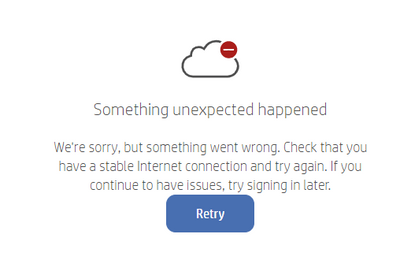
Tried with 3 different Browsers
12-07-2020 10:00 PM
HP Recommended
I understand your concern and I have brought your issue to the attention of an appropriate team within HP.
They will likely request information from you in order to look up your case details or product serial number. Please look for a private message from an identified HP contact.
Additionally, keep in mind not to publicly post personal information (serial numbers and case details).
If you are unfamiliar with how the Community's private message capability works, you can learn about that here:
Thank you for visiting the HP Support Community.
KUMAR0307
I am an HP Employee
12-12-2020 12:22 PM - edited 12-13-2020 12:39 AM
HP Recommended
@Kumar0307 wrote:
I understand your concern and I have brought your issue to the attention of an appropriate team within HP.
They will likely request information from you in order to look up your case details or product serial number. Please look for a private message from an identified HP contact.
I've replied to the private message (sorry for the delay but I didn't get email notification of it)
Meanwhile, I've found a (not perfect) workaround by using the following steps:
- disabled HP web services on my printer maintenance menu
- created another HP account
- activated HP web services
- associated my printer with my new account using the claim code printed
No error now.
I think that this is an evidence that the problem is not with the printer but in the HP account.

Be alert for scammers posting fake support phone numbers and/or email addresses on the community.
If you think you have received a fake HP Support message, please report it to us by clicking on "Flag Post".
† The opinions expressed above are the personal opinions of the authors, not of HP. By using this site, you accept the Terms of Use and Rules of Participation.


† The opinions expressed above are the personal opinions of the authors, not of HP. By using this site, you accept the <a href="https://www8.hp.com/us/en/terms-of-use.html" class="udrlinesmall">Terms of Use</a> and <a href="/t5/custom/page/page-id/hp.rulespage" class="udrlinesmall"> Rules of Participation</a>.