
-
×InformationNeed Windows 11 help?Check documents on compatibility, FAQs, upgrade information and available fixes.
Windows 11 Support Center. -
-
×InformationNeed Windows 11 help?Check documents on compatibility, FAQs, upgrade information and available fixes.
Windows 11 Support Center. -
- HP Community
- Printers
- HP Instant Ink
- Re: Unable to login to HP Smart App

Create an account on the HP Community to personalize your profile and ask a question
Your account also allows you to connect with HP support faster, access a personal dashboard to manage all of your devices in one place, view warranty information, case status and more.
Common problems for INSTANT INK, HP+ PLANS: INK AND TONER
We would like to share some of the most frequently asked questions about Instant Ink. Check out this link: HP INSTANT INK, HP+ PLANS: INK AND TONER. .

It has been a while since anyone has replied. Simply ask a new question if you would like to start the discussion again.


12-14-2020 02:25 AM
 HP Recommended
In my previous post, I mentioned that I would escalate this issue to the respective team and I'd like some additional details to do that.
I have sent you a private message with the required details. Kindly check the same and respond.
Keep me posted.
KUMAR0307
I am an HP Employee

12-14-2020 03:11 AM
HP Recommended
@Kumar0307 wrote:
In my previous post, I mentioned that I would escalate this issue to the respective team and I'd like some additional details to do that.
I have sent you a private message with the required details. Kindly check the same and respond.
Haven't noticed you I had already replied to it?
Quoting myself
"I've replied to the private message (sorry for the delay but I didn't get email notification of it)"
12-14-2020 03:21 AM
HP Recommended
No, I have not received any message from you. Kindly resend it for further assistance.
Keep me posted.
KUMAR0307
I am an HP Employee
12-14-2020 03:30 AM - edited 12-14-2020 03:31 AM
HP Recommended
@Kumar0307 wrote:
, I have not received any message from you. Kindly resend it for further assistance.
Is there another method to reply to a private message?
Here's a (anonymised) screen shot of my inbox:
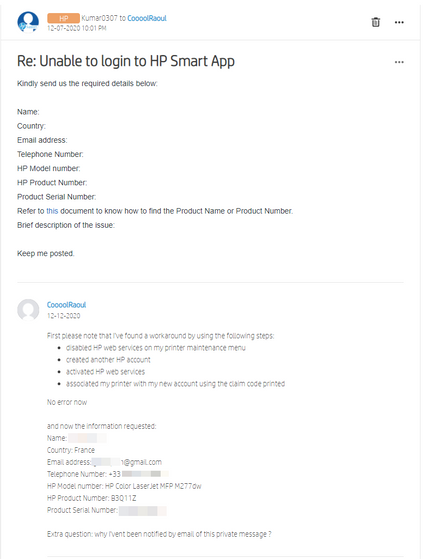
BTW it looks that PM received email nofications are no working.
Maybe the problem is on your side?
01-09-2021
04:21 PM
- last edited on
09-02-2025
08:18 AM
by
 Raj_05
HP Recommended
Unable to sign in to HP App on my Win 10 computer. I have HP Pro 6400. It appears this has been going on for a couple of months? I can print because the printer is on my network but I can not scan.

01-09-2021 09:39 PM
HP Recommended
It's likely the same server issues HP lied about last time that rendered the app useless. It took a couple weeks until I could finally login via the app, but the app is relatively useless except for when required to setup a new printer.
For instance, our two printers were enrolled in Instant Ink at the end of November, and just discovered an hour ago that one printer is very close to its printing allowance for the month. Which I only discovered due to an email informing me we're within 8 pages of our limit. Then I visited the Instant Ink website, where the numbers were completely different.
Seems we were within 9 pages last month, but no email was received then. Makes me wonder **bleep** is being tracked with their so-called Smart app because I know it sure as hell isn't "monitoring" my Instant Ink. Unless HP simply thinks ink supply status notifications just makes too much sense. Then again, it is HP who gets paid when more pages have been printed than subscribed to.
It's bad enough their printers are practically disposable, But combined with their incompetent excuse for support, useless apps and sketchy AF services (Instant Ink) I am done. First thing next week I'll be calling to see if I can [hopefully] still return the new HP printer that brought me here in the first place. The only thing worse than all of this is the painfully obvious fact that this company has absolutely no pride whatsoever in the products bearing the HP name.
Best of luck to all who decide to stick around for this **bleep** show, but I for one am taking my loyalty and money elsewhere!
01-10-2021 08:25 AM
HP Recommended
I reinstalled and restarted 3 time. I removed the printer from Windows and put it back. I have 3 computers but only 1 is having this problem which is just stupid. Wondering what brand of printer to buy next because they are disposable.

01-18-2021
05:10 AM
- last edited on
09-02-2025
08:17 AM
by
Raj_05
HP Recommended
Hi i found this solution in Credential manager removed all the HP App credentials and then opened HP App again entered the credentials and all working fine if that helps anyone.
01-18-2021 07:48 PM
HP Recommended
you have to sign in with your user name(not email address). it worked for me, I had been trying to log in using my email as user name, didn't work. after I read in one of the soulation comments here, someone mentioned. so I used my user name and password BENGO. I did it and faxed my docs. good luck all hope it work for all of ya...

Be alert for scammers posting fake support phone numbers and/or email addresses on the community.
If you think you have received a fake HP Support message, please report it to us by clicking on "Flag Post".
† The opinions expressed above are the personal opinions of the authors, not of HP. By using this site, you accept the Terms of Use and Rules of Participation.


† The opinions expressed above are the personal opinions of the authors, not of HP. By using this site, you accept the <a href="https://www8.hp.com/us/en/terms-of-use.html" class="udrlinesmall">Terms of Use</a> and <a href="/t5/custom/page/page-id/hp.rulespage" class="udrlinesmall"> Rules of Participation</a>.