-
×InformationNeed Windows 11 help?Check documents on compatibility, FAQs, upgrade information and available fixes.
Windows 11 Support Center. -

-
×InformationNeed Windows 11 help?Check documents on compatibility, FAQs, upgrade information and available fixes.
Windows 11 Support Center. -
- HP Community
- Printers
- LaserJet Printing
- Re: Please Help: Streaked and missing black printing

Create an account on the HP Community to personalize your profile and ask a question
01-27-2019 04:16 AM
Hi,
My printer is unable to print in black properly. The words come out streaked or missing in some places. The color printing seems fine but it's only showing issue with black. I have printed several diagnostic pages after cleaning the printhead with the software. Please see attached and let me know if something wrong with my black printhead and if needs replacement.
Solved! Go to Solution.
Accepted Solutions
01-31-2019 06:40 AM
Yes, this could be the issue with the printhead.
I request you to talk to HP support.
They might have multiple options to help you with this.
1) Click on this link - www.hp.com/contacthp/
2) Click on "Continue as guest".
3) Enter the serial of your device.
4) Select the country from the drop-down.
5) Click on "Show Options".
Fill the web-form. A case number and phone number will now populate for you.
Cheers.
Sandytechy20
I am an HP Employee
01-29-2019 03:03 PM
Welcome to HP forums, I see that the black ink is not printing.
Did you check the black ink levels?
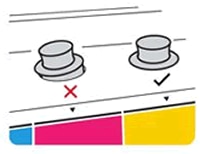
If the ink levels are fine, make sure the ink tank plugs are pressed firmly into place.

Check the ink delivery system
-
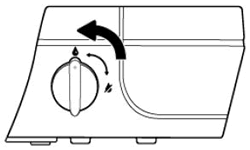
Make sure the transportation ink valve is in the unlocked position.
CAUTION:
Printing with a locked transportation ink valve can damage the printheads.

-
Make sure the printer is turned on.
-
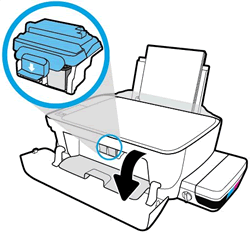
Inspect the position of the blue printhead latch.
-
Open the exterior door.
-
Open the printhead access door.

-
Wait until the carriage is idle and silent before you continue.
-
Visually inspect the printhead latch position.
-
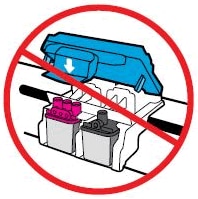
Do not touch the blue printhead latch! Touching the latch might open the carriage and cause damage to the ink system.
-

-
-
-
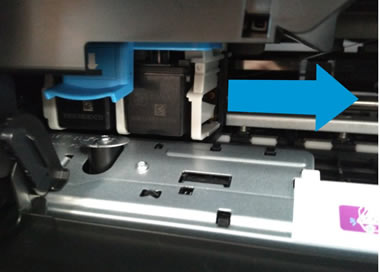
Reach inside the printer through the printhead access door, and then manually move the carriage to the right.

-
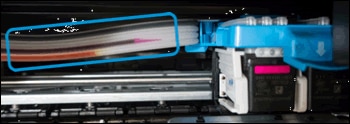
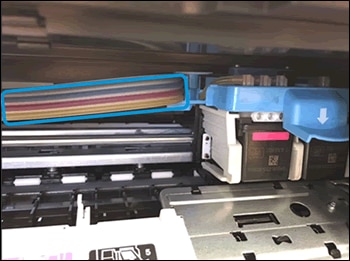
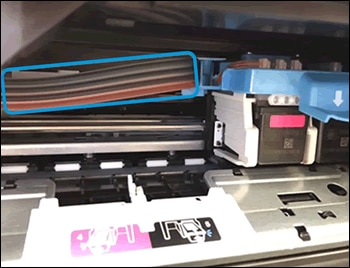
Visually inspect the ink delivery tubes.
-


- If the tubes are completely filled with dark ink, the printer is properly primed and filled with ink,

You can refer this HP documents for more assistance:- Click here
Let me know how it goes.
To thank me for my efforts to help you, please mark my post as an accepted solution so that it benefits several others.
Cheers.
Sandytechy20
I am an HP Employee
01-31-2019 05:13 AM
Thanks Sandy.
The ink levels are fine and the ink plugs are also intact. I have also checked the ink delivery tubes which also seem fine. It prints perfectly when I print in color but does not print well in black. I have also attached a printer status page. You can see the print quality but that's on a good day. Is my black printhead defective? If so, can I only replace the black printhead.
01-31-2019 06:40 AM
Yes, this could be the issue with the printhead.
I request you to talk to HP support.
They might have multiple options to help you with this.
1) Click on this link - www.hp.com/contacthp/
2) Click on "Continue as guest".
3) Enter the serial of your device.
4) Select the country from the drop-down.
5) Click on "Show Options".
Fill the web-form. A case number and phone number will now populate for you.
Cheers.
Sandytechy20
I am an HP Employee