-
×InformationNeed Windows 11 help?Check documents on compatibility, FAQs, upgrade information and available fixes.
Windows 11 Support Center. -

-
×InformationNeed Windows 11 help?Check documents on compatibility, FAQs, upgrade information and available fixes.
Windows 11 Support Center. -
- HP Community
- Printers
- Mobile Printing & Cloud Printing
- Can't login into hp smart account

Create an account on the HP Community to personalize your profile and ask a question
06-01-2020 09:10 AM
Please help. I'm really frustrated.
I've got my envy 4500 printer secondhand. I tried to login into the hp smart account to change some settings but I JUST CAN'T LOGIN. I've tried a semi full reset. All the standart passwords etc. Nothing works and I really need to scan some documents.
What can I do?
06-04-2020 03:01 PM
@angie_99 Did you create this account? or was it given to you by the person you bought it from, if you didn't create it, here's what you need to know:
Set up an HP Smart (formerly HP Connected) account to access additional web printing services and settings for your printer, such as HP ePrint and HP Instant Ink. An HP account is not required to use the basic functions of your printer, such as setting up, scanning, or printing.
NOTE:The HP Smart website availability depends on your country/region. To see if the website is available for your country/region, go to HP Smart, and then select the country/region and language menu.
If you registered with the HP Smart website during printer setup, your printer might already be added. Go to HP Smart, and then sign in to your account.
-
If your printer is listed, skip to Setting up web-connected printing services.
-
If your printer is not listed, continue with these steps.
FOR DETAILS & FURTHER INSTRUCTIONS, USE THIS LINK: CLICK HERE
(By the end of this article all the issues should be resolved)
P.S: Welcome to HP Community 😉
Keep us posted,
If you would like to thank us for our efforts to help you,
Give us a virtual high-five by clicking the 'Thumbs Up' icon below, followed by clicking on the "Accept as solution" on this post,
Have a great day!
Riddle_Decipher
I am an HP Employee
Learning is a journey, not a destination.
Let's keep asking questions and growing together.
06-09-2020 09:14 AM
Hi
This account was setup by me. I've already tried the steps you suggested but I still have the problem. Whenever I try to scan, I have to change the settings for scanning and for that I need the login data. I've tried standart password etc but nothing works...
06-10-2020 12:50 PM
@angie_99 Here's a few other things you can try:
-
Sign in to HP Smart.
-
Click the Account icon
at the top of the webpage. -
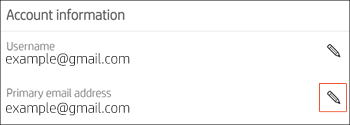
Select Settings to open the account information.
-
Locate the setting you want to update, and then select the Edit icon
next to the setting.
-
Update the information, and then click Save.
Frequently asked questions (FAQs)
Review these frequently asked questions.
Keep us posted,
If you would like to thank us for our efforts to help you,
Give us a virtual high-five by clicking the 'Thumbs Up' icon below, followed by clicking on the "Accept as solution" on this post,
Have a great day!
Riddle_Decipher
I am an HP Employee
Learning is a journey, not a destination.
Let's keep asking questions and growing together.