• ×
    Information
    Need Windows 11 help?
    Check documents on compatibility, FAQs, upgrade information and available fixes.
    Windows 11 Support Center.
  • post a message
  • ×
    Information
    Need Windows 11 help?
    Check documents on compatibility, FAQs, upgrade information and available fixes.
    Windows 11 Support Center.
  • post a message
Guidelines
Join the HP Community Solve‑a‑thon | Help Others & Share Your Solutions | Live on Zoom | 2:30 PM to 2:30 AM IST | Every Wednesday Click here to know more
Check some of the most frequent questions about Instant Ink: HP INSTANT INK, HP+ PLANS: INK AND TONER.


Check out our WINDOWS 11 Support Center info about: OPTIMIZATION, KNOWN ISSUES, FAQs AND MORE.
HP Recommended
Office jet 4650
Microsoft Windows 10 (64-bit)

I am in my Instant Ink account and cannot get it to connect to my printer. Ihave been in instant ink program for over 3 years .

1 REPLY 1
HP Recommended

Hey there! @erkegs99, Thanks for stopping by the HP Support Forums!


Don't worry I'll try to help you out. Please answer a few questions below in order to assist you better.


Did you make any changes to your printer?


Is your printer connected to the internet?


Have you tried opening the link from a different browser?


Are you able to open the instant ink website from a different device?


Let's try some troubleshooting now and check if it helps.


Try disabling and enabling web services on the printer and try logging again.


To address this message and make sure you receive replacement ink cartridges on time, connect your printer to the Internet, and then verify the connection status on your HP Instant Ink account page.

  1. Depending on where the error message displays, touch or press OK on the printer control panel, or click OK on the computer.

    The printer attempts to connect.

  2. If a No Wireless or Connection Error message displays on the computer or the printer, go to the Wireless printing center (in English) to learn how to troubleshoot problems with your wireless network or Internet connection.

  3. Once your printer is connected to the Internet with an active connection, go to hpinstantink.com/signin (the HP Connected website) to sign in to your HP Instant Ink account, if you are not signed in already.

  4. At the top of the Status area on your HP Instant Ink account page, click the refresh icon  . Look for a green checkmark and Online to make sure your printer is connected to the HP Instant Ink service.
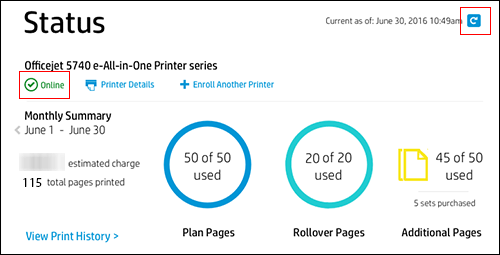
    Clicking the refresh icon and making sure the printer is online

  5. If the printer is connected to the Internet, but the printer status on your Instant Ink account page continues to display Offline after clicking the refresh icon , wait and try again later.


If the printer is online and if it's enrolled, then I would suggest here is to update the printer.


In order to update the printer, On the printer control panel - Setup - Printer Maintenance - Update the printer.

Once done, restart the printer and then check.


Go to hpinstantink.com/signin (the HP Connected website) to sign in to your HP Instant Ink account, if you are not signed in already.

On your HP Instant Ink account page, review the following HP Instant Ink account information.

Print History: View the date and number of pages printed, and download invoices from completed billing cycles.

Account History: View detailed information about HP Instant Ink shipments, including the shipment date, shipment tracking numbers, and any additional charges. Also find enrollment and cancellation dates, promotional and referral discounts, and all historical transactions for your account.


Refer this article to know more information about checking instant ink account information. Click Here


Refer this article to know more information about instant ink.


If you have any issues with checking the account details, Please share few the details in a private message So I can help you in getting the instant ink account information.


Printer Model Name

Serial Number of the printer

Instant ink Email Address

Instant Ink Account Number


Hope this answers your query!


I hope you have a great day! 🙂


Please click “Accept as Solution” if you feel my post solved your issue, it will help others find the solution.

Click the “Kudos, Thumbs Up" on the bottom right to say “Thanks” for helping!

A4Apollo
I am an HP Employee

† The opinions expressed above are the personal opinions of the authors, not of HP. By using this site, you accept the <a href="https://www8.hp.com/us/en/terms-of-use.html" class="udrlinesmall">Terms of Use</a> and <a href="/t5/custom/page/page-id/hp.rulespage" class="udrlinesmall"> Rules of Participation</a>.


