-
×InformationNeed Windows 11 help?Check documents on compatibility, FAQs, upgrade information and available fixes.
Windows 11 Support Center. -

-
×InformationNeed Windows 11 help?Check documents on compatibility, FAQs, upgrade information and available fixes.
Windows 11 Support Center. -
- HP Community
- Printers
- Mobile Printing & Cloud Printing
- Connection issues hp7155 printer

Create an account on the HP Community to personalize your profile and ask a question
10-03-2021 02:36 PM
Welcome to the HP Community.
Product Specifications for the HP ENVY Photo 7155 All-in-One Printer (Z3M52A)
Connectivity
Ports | 1 USB 2.0 client; 1 Wi-Fi 802.11 b/g/n, dual band wifi 2.4/5 Ghz, BLE, SD card slot |
Wireless capability | Yes, dual band Wi-Fi 802.11 b/g/n |
Storage device and direct print support | Memory card slots |
If you have not done so,
Make sure that Wi-Fi Direct is toggled OFF on the printer.
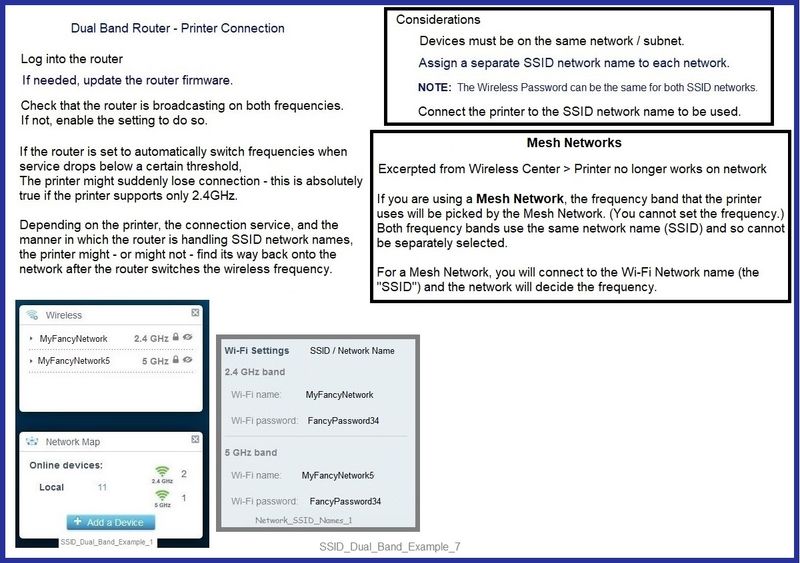
Consider creating a separate SSID named network for each of the bands / frequencies supported on your router.
Connect the printer to the SSID network you intend that it use in the network.
The router will take care of connecting both 2.4GHz and other 5GHz devices to / from the printer.
SSID_Dual_Band_Example_7
What else?
Excellent help is available at the Wireless Center for a variety of subjects...
For example ...
Wireless Center > Section: Common Questions > Topic Connection Issues
Section: Improve Wireless communication by setting a manual (static) IP address
Wireless Center > Section: Common Questions > Topic Printer no longer works on network
Section: Mesh Networks
References / Resources
If / as supported for printer model...
Open your favorite browser > type / enter Printer IP address into URL / Address bar
Tab Network > Wireless (802.11) > IPv4 Configuration
And
Tab Network > Wireless (802.11) > Advanced
In Advanced
Having named SSID / networks separately for each bandwidth at the router level,
Select and connect to the correct SSID / network name for the bandwidth you are using.
======================================================================
HP Printer Home Page - References and Resources – Learn about your Printer - Solve Problems
“Things that are your printer”
NOTE: Content depends on device type and Operating System
Categories: Alerts, Access to the Print and Scan Doctor (Windows), Warranty Check, HP Drivers / Software / Firmware Updates, How-to Videos, Bulletins/Notices, Lots of How-to Documents, Troubleshooting, Manuals > User Guides, Product Information (Specifications), more
HP ENVY Photo 7155 All-in-One Printer
Thank you for participating in the HP Community.
The Community is a separate wing of the HP website - We are not an HP business group.
Our Community is comprised of volunteers - people who own and use HP devices.
Click Thumbs Up to say Thank You.
Question / Concern Answered, Click "Accept as Solution"