-
×InformationNeed Windows 11 help?Check documents on compatibility, FAQs, upgrade information and available fixes.
Windows 11 Support Center. -

-
×InformationNeed Windows 11 help?Check documents on compatibility, FAQs, upgrade information and available fixes.
Windows 11 Support Center. -
- HP Community
- Printers
- Mobile Printing & Cloud Printing
- Re: No response

Create an account on the HP Community to personalize your profile and ask a question
01-12-2019 12:30 PM
Ofeten getting no response when trying to print, but not always. Will sometimes print when I log out or shut down and restart. Connected with USB. Downloaded and installed latest drivers. Said can't commuicate with printer. Huh?
Solved! Go to Solution.
Accepted Solutions
01-13-2019 01:35 PM
Welcome to HP forums, I see that you are getting communication issue between printer and Mac.
Check USB connection: Connect the cable to the USB port on the rear of the printer
and to an available port on the computer.
Add the AirPrint printer to the Mac printer queue
Confirm you are using AirPrint by adding the printer in System Preferences.
-
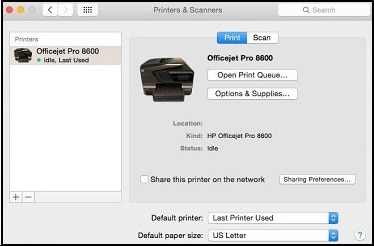
Click the Apple menu, click System Preferences, and then click Print & Scan or Printers & Scanners.
Figure : Example of the Printers & Scanners window

-
Check if your printer name displays in the Printers list, and then do one of the following steps.
-
If your printer is listed, remove and re-add the printer to confirm it is set up for AirPrint. Click the printer name, click the minus sign
to delete the printer, click the plus sign
, click Add Printer or Scanner, click the printer name and then continue to the next step. -
If your printer is not listed, click the plus sign, click Add Printer or Scanner, click the name of your printer, and then continue to the next step.
-
-
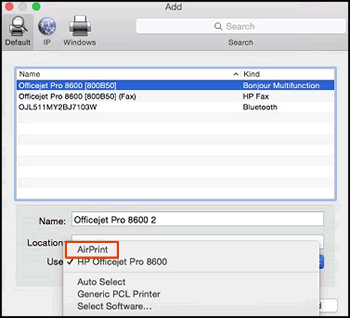
Confirm AirPrint or Secure AirPrint displays in the Use or Print Using menu, and then click Add.
Figure : AirPrint displays in the Use menu

-
Open a document or photo, click File, and then click Print.
You can refer to this HP document for more assistance:- Click here
Let me know how it goes.
To thank me for my efforts to help you, please mark my post as an accepted solution so that it benefits several others.
Cheers.
Sandytechy20
I am an HP Employee
01-13-2019 01:35 PM
Welcome to HP forums, I see that you are getting communication issue between printer and Mac.
Check USB connection: Connect the cable to the USB port on the rear of the printer
and to an available port on the computer.
Add the AirPrint printer to the Mac printer queue
Confirm you are using AirPrint by adding the printer in System Preferences.
-
Click the Apple menu, click System Preferences, and then click Print & Scan or Printers & Scanners.
Figure : Example of the Printers & Scanners window

-
Check if your printer name displays in the Printers list, and then do one of the following steps.
-
If your printer is listed, remove and re-add the printer to confirm it is set up for AirPrint. Click the printer name, click the minus sign
to delete the printer, click the plus sign
, click Add Printer or Scanner, click the printer name and then continue to the next step. -
If your printer is not listed, click the plus sign, click Add Printer or Scanner, click the name of your printer, and then continue to the next step.
-
-
Confirm AirPrint or Secure AirPrint displays in the Use or Print Using menu, and then click Add.
Figure : AirPrint displays in the Use menu

-
Open a document or photo, click File, and then click Print.
You can refer to this HP document for more assistance:- Click here
Let me know how it goes.
To thank me for my efforts to help you, please mark my post as an accepted solution so that it benefits several others.
Cheers.
Sandytechy20
I am an HP Employee

