
-
×InformationNeed Windows 11 help?Check documents on compatibility, FAQs, upgrade information and available fixes.
Windows 11 Support Center. -
-
×InformationNeed Windows 11 help?Check documents on compatibility, FAQs, upgrade information and available fixes.
Windows 11 Support Center. -
- HP Community
- Notebooks
- Notebook Hardware and Upgrade Questions
- Re: 2020 hp omen keyboard backlight timeout

Create an account on the HP Community to personalize your profile and ask a question
Your account also allows you to connect with HP support faster, access a personal dashboard to manage all of your devices in one place, view warranty information, case status and more.
Common problems for Battery
We would like to share some of the most frequently asked questions about: Battery Reports, Hold a charge, Test and Calibrating Battery . Check out this link: Is your notebook plugged in and not charging?

It has been a while since anyone has replied. Simply ask a new question if you would like to start the discussion again.

7 REPLIES 7


08-22-2020 12:58 PM
 HP Recommended
Thank you for posting on HP Support Community.
Don't worry as I'll be glad to help, I have a few troubleshooting steps we could try to fix the issue:
To adjust the brightness of the backlight, press the key with the backlight icon  two or three times in a row. The keyboard backlight dims and brightens. It might be necessary to press the fn (function) key at the same time to activate the backlight key.
Navigate to Built-in Device Options, and then press Enter. In the Built-in Device Options, select Backlit keyboard timeout. Press the spacebar to open the keyboard backlight settings, and then select the timeout setting you want.
Hope this helps! Keep me posted for further assistance.
Please click “Accept as Solution” if you feel my post solved your issue, it will help others find the solution.
ECHO_LAKE
I am an HP Employee

08-23-2020 12:06 PM
HP Recommended
I understand your concerns.
HP has locked a few settings on your computer which are being managed by the system configuration as the device is configured to its optimal performance.
There's no way of resetting or changing these locked settings via HP articles or assistance,
You could unlock and make changes at your own discretion using 3rd party tools, however, HP doesn't recommend the same nor has information about the tools used.
I hope you understand.
08-24-2020 01:44 PM - edited 08-24-2020 01:45 PM
HP Recommended
I have the same questions. I just bought Omen 15 2020. Keyboard ligts are always on until you turn off. This is one of the trash laptop everseen. I should not change my macbook.

08-24-2020 04:09 PM
HP Recommended
NOTE: If there is not a setting for the backlight timing in the BIOS, this behavior might not be supported on the notebook. Check your notebook model's product support documentation to confirm support.
Your BIOS version and screens might vary.
-
Restart the notebook, and then immediately press the F10 repeatedly until the BIOS opens.
-
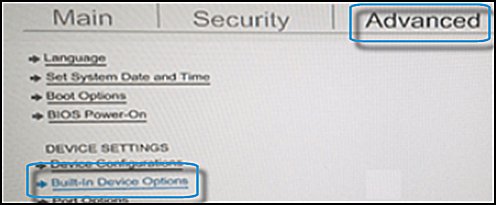
When the BIOS opens, use the arrow keys to navigate to the Advanced tab.
-
Navigate to Built-in Device Options, and then press Enter.
-
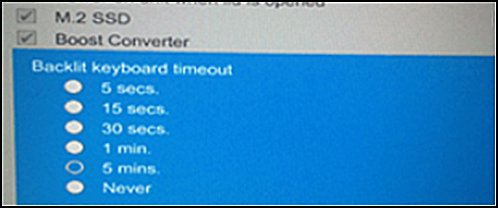
In the Built-in Device Options, select Backlit keyboard timeout.
-
Press the spacebar to open the keyboard backlight settings, and then select the timeout setting you want.
NOTE:
If you select Never, the backlight remains on which could quickly drain the notebook battery power.
If you wish to show appreciation for my efforts, mark my post as Accept as Solution. Your feedback counts!
Cheers!
Stay Home – Stay Safe
The_Fossette
I am an HP Employee

Be alert for scammers posting fake support phone numbers and/or email addresses on the community.
If you think you have received a fake HP Support message, please report it to us by clicking on "Flag Post".
† The opinions expressed above are the personal opinions of the authors, not of HP. By using this site, you accept the Terms of Use and Rules of Participation.


Didn't find what you were looking for?
Ask the community
† The opinions expressed above are the personal opinions of the authors, not of HP. By using this site, you accept the <a href="https://www8.hp.com/us/en/terms-of-use.html" class="udrlinesmall">Terms of Use</a> and <a href="/t5/custom/page/page-id/hp.rulespage" class="udrlinesmall"> Rules of Participation</a>.