
-
×InformationNeed Windows 11 help?Check documents on compatibility, FAQs, upgrade information and available fixes.
Windows 11 Support Center. -
-
×InformationNeed Windows 11 help?Check documents on compatibility, FAQs, upgrade information and available fixes.
Windows 11 Support Center. -
- HP Community
- Notebooks
- Notebook Hardware and Upgrade Questions
- Add new additional RAM to hp notebook

Create an account on the HP Community to personalize your profile and ask a question
Your account also allows you to connect with HP support faster, access a personal dashboard to manage all of your devices in one place, view warranty information, case status and more.
Common problems for Battery
We would like to share some of the most frequently asked questions about: Battery Reports, Hold a charge, Test and Calibrating Battery . Check out this link: Is your notebook plugged in and not charging?

It has been a while since anyone has replied. Simply ask a new question if you would like to start the discussion again.

02-19-2020 04:18 PM
 HP Recommended
Product: HP 15s-fq1510na
Operating System: Microsoft Windows 10 (64-bit)
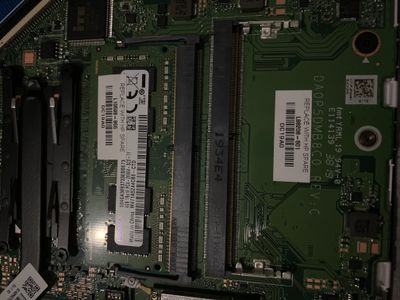
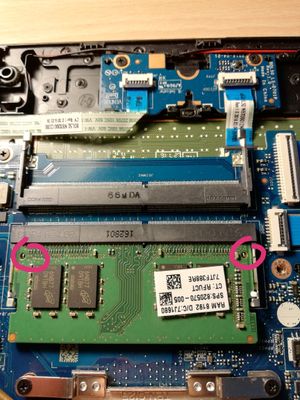
Hello, I’m looking to install a new 8gb RAM next to the current 4gb ram however the 2nd RAM slot has different clips for which do not allow installation of the new RAM, it’s states DDR4 H=4.0R And it had two metal clips point up stopping the ram from being installed? Please see picture attached
If this is not for RAM are you about to advise what this slot would be used for?
6 REPLIES 6


02-19-2020 05:27 PM
HP Recommended
Hi:
It sure looks the same to me.
Did you read the service manual for how to spread open the clips?
See chapter 5, pp 31-32...
02-20-2020 06:57 AM
HP Recommended
Hi:
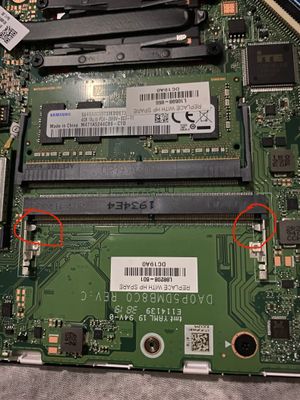
So the memory doesn't go over those clips on an angle into the slot, and you can't push down on it to lock it in?
If not, I have no idea what the problem could be.
I checked the specs and it indicates that there are two memory slots. That is definitely a memory slot.
02-20-2020 08:17 AM
HP Recommended
Hello,
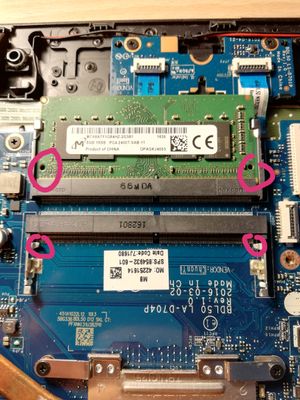
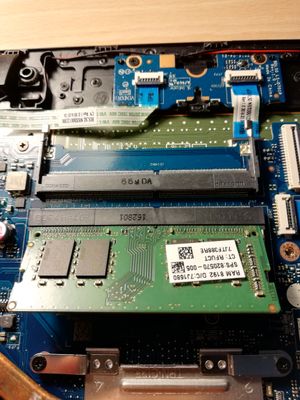
you are able to put the card in at a angle however unfortunately it doesn’t clip down due to the two metal parts which are blocking it from clicking into place, I have a feeling it might brake the RAM so do not want to force
is this something you are able to look into or do I need to contact hp directly? Would there be an adaptor I need to buy?
02-20-2020 08:47 AM
HP Recommended
Hi:
You will have to contact HP directly. I would have no idea who to contact. It might be a design flaw or defect.
You can call HP at the number for computing products for home at the link below.
https://www8.hp.com/uk/en/contact-hp/phone-assist.html
If you can figure out what the issue is, please post back and let us know.

Be alert for scammers posting fake support phone numbers and/or email addresses on the community.
If you think you have received a fake HP Support message, please report it to us by clicking on "Flag Post".
† The opinions expressed above are the personal opinions of the authors, not of HP. By using this site, you accept the Terms of Use and Rules of Participation.


Didn't find what you were looking for?
Ask the community
† The opinions expressed above are the personal opinions of the authors, not of HP. By using this site, you accept the <a href="https://www8.hp.com/us/en/terms-of-use.html" class="udrlinesmall">Terms of Use</a> and <a href="/t5/custom/page/page-id/hp.rulespage" class="udrlinesmall"> Rules of Participation</a>.