• ×
    Information
    Need Windows 11 help?
    Check documents on compatibility, FAQs, upgrade information and available fixes.
    Windows 11 Support Center.
  • post a message
  • ×
    Information
    Need Windows 11 help?
    Check documents on compatibility, FAQs, upgrade information and available fixes.
    Windows 11 Support Center.
  • post a message
Guidelines
Join the HP Community Solve‑a‑thon | Help Others & Share Your Solutions | Live on Zoom | 2:30 PM to 2:30 AM IST | Every Wednesday Click here to know more
Common problems for Battery
We would like to share some of the most frequently asked questions about: Battery Reports, Hold a charge, Test and Calibrating Battery . Check out this link: Is your notebook plugged in and not charging?
HP Recommended
HP 15BS 100NJ
Microsoft Windows 10 (64-bit)

I oppened my laptop to add the SSD but I didn't know where is the place and there wasn't any connector (no cables) and I didn't find a SSD socket on the board or power but there was some sockets that I don't why the function of I can add SSD to the laptop? And if I can what cables I need to get to add it? 

1 ACCEPTED SOLUTION

Accepted Solutions
HP Recommended

Hi,

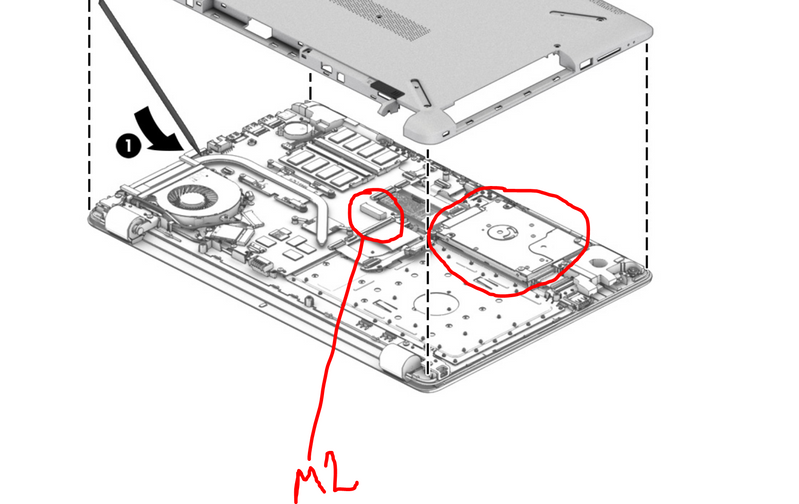
At the moment you have a 256GB M2 SATA3 SSD in the notebook. It might be cheaper and easier just to upgrade the M2 drive to a higher capacity (no limit) M2 SATA3 drive such as the M2 Samsung 860 Evo or similar.


To install an extra drive it depends if the M2 SSD is in a slot directly present on the motherboard or in an M2 bracket where the 2.5" hard drive space is.

M2 slotM2 slot

So, if the SSD you have is in the M2 slot in the picture above, then you can add a 2,5" SATA3 SSD of your desired capacity and brand. You will need:

Hard drive connector board (with cable)       part number 924995-001

Hard drive bracket                                         part number 924980-001

You can search for the parts online with the part number.


On page 53 of service manual, you can see how to install the 2.5" SSD

http://h10032.www1.hp.com/ctg/Manual/c05493257


Hope it helps,

David

Please click on thumbs up for thanks

Please click on accept as solution if answered your question

View solution in original post

3 REPLIES 3
HP Recommended

Hi,

At the moment you have a 256GB M2 SATA3 SSD in the notebook. It might be cheaper and easier just to upgrade the M2 drive to a higher capacity (no limit) M2 SATA3 drive such as the M2 Samsung 860 Evo or similar.


To install an extra drive it depends if the M2 SSD is in a slot directly present on the motherboard or in an M2 bracket where the 2.5" hard drive space is.

M2 slotM2 slot

So, if the SSD you have is in the M2 slot in the picture above, then you can add a 2,5" SATA3 SSD of your desired capacity and brand. You will need:

Hard drive connector board (with cable)       part number 924995-001

Hard drive bracket                                         part number 924980-001

You can search for the parts online with the part number.


On page 53 of service manual, you can see how to install the 2.5" SSD

http://h10032.www1.hp.com/ctg/Manual/c05493257


Hope it helps,

David

Please click on thumbs up for thanks

Please click on accept as solution if answered your question

HP Recommended

Thank you very much

HP Recommended

You're welcome.

Let me know if you need any further help.


All the best,

David

† The opinions expressed above are the personal opinions of the authors, not of HP. By using this site, you accept the <a href="https://www8.hp.com/us/en/terms-of-use.html" class="udrlinesmall">Terms of Use</a> and <a href="/t5/custom/page/page-id/hp.rulespage" class="udrlinesmall"> Rules of Participation</a>.