-
×InformationNeed Windows 11 help?Check documents on compatibility, FAQs, upgrade information and available fixes.
Windows 11 Support Center. -

-
×InformationNeed Windows 11 help?Check documents on compatibility, FAQs, upgrade information and available fixes.
Windows 11 Support Center. -
- HP Community
- Notebooks
- Notebook Hardware and Upgrade Questions
- Re: Adding SSD to HP 15BS 100NJ

Create an account on the HP Community to personalize your profile and ask a question
03-30-2019 04:48 AM
I oppened my laptop to add the SSD but I didn't know where is the place and there wasn't any connector (no cables) and I didn't find a SSD socket on the board or power but there was some sockets that I don't why the function of I can add SSD to the laptop? And if I can what cables I need to get to add it?
Solved! Go to Solution.
Accepted Solutions
03-30-2019 08:19 AM
Hi,
At the moment you have a 256GB M2 SATA3 SSD in the notebook. It might be cheaper and easier just to upgrade the M2 drive to a higher capacity (no limit) M2 SATA3 drive such as the M2 Samsung 860 Evo or similar.
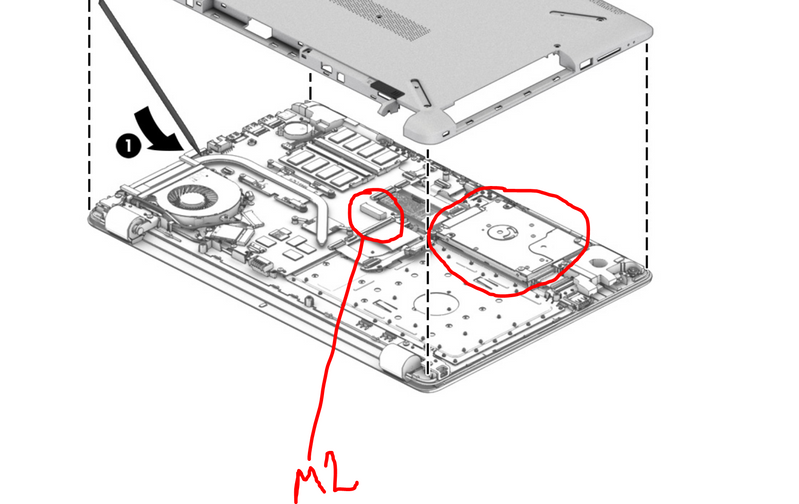
To install an extra drive it depends if the M2 SSD is in a slot directly present on the motherboard or in an M2 bracket where the 2.5" hard drive space is.
M2 slot
So, if the SSD you have is in the M2 slot in the picture above, then you can add a 2,5" SATA3 SSD of your desired capacity and brand. You will need:
Hard drive connector board (with cable) part number 924995-001
Hard drive bracket part number 924980-001
You can search for the parts online with the part number.
On page 53 of service manual, you can see how to install the 2.5" SSD
http://h10032.www1.hp.com/ctg/Manual/c05493257
Hope it helps,
David
Please click on thumbs up for thanks
Please click on accept as solution if answered your question
03-30-2019 08:19 AM
Hi,
At the moment you have a 256GB M2 SATA3 SSD in the notebook. It might be cheaper and easier just to upgrade the M2 drive to a higher capacity (no limit) M2 SATA3 drive such as the M2 Samsung 860 Evo or similar.
To install an extra drive it depends if the M2 SSD is in a slot directly present on the motherboard or in an M2 bracket where the 2.5" hard drive space is.
M2 slot
So, if the SSD you have is in the M2 slot in the picture above, then you can add a 2,5" SATA3 SSD of your desired capacity and brand. You will need:
Hard drive connector board (with cable) part number 924995-001
Hard drive bracket part number 924980-001
You can search for the parts online with the part number.
On page 53 of service manual, you can see how to install the 2.5" SSD
http://h10032.www1.hp.com/ctg/Manual/c05493257
Hope it helps,
David
Please click on thumbs up for thanks
Please click on accept as solution if answered your question