• ×
    Information
    Need Windows 11 help?
    Check documents on compatibility, FAQs, upgrade information and available fixes.
    Windows 11 Support Center.
  • post a message
  • ×
    Information
    Need Windows 11 help?
    Check documents on compatibility, FAQs, upgrade information and available fixes.
    Windows 11 Support Center.
  • post a message
Guidelines
Seize the moment! nominate yourself or a tech enthusiast you admire & join the HP Community Experts!
Common problems for Battery
We would like to share some of the most frequently asked questions about: Battery Reports, Hold a charge, Test and Calibrating Battery . Check out this link: Is your notebook plugged in and not charging?
HP Recommended
HP 8470P
Microsoft Windows 10 (64-bit)

I have an HP 8470P and it this morning ran very fast. Now it runs very slow. What this morning would take 7 minutes to do by the CPU now takes well over an hour to do. In fact I finally canceled after an hour and half and no result of the task that did take 7 minutes.


It's like the CPUs are excessively throttled. I have Windows 10 Fall Update with the Nov 15 cumulative security patches applied.


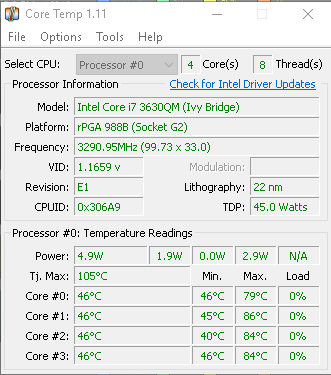
Attached are the screen shots from Core Temp and for the Intel Processor Identification Utility. The Intel CPU ID Utility claims the system bus is 100 MHz and that was expected. I guess I confuse that bus with the 1600 FSB?


Anyone have any clue what might be wrong? Thanks very much for your help.


Intel CPU ID Utility.png


Core Temp.png

1 ACCEPTED SOLUTION

Accepted Solutions
HP Recommended

Hi,


Try performing HP diagnostics on the system. Here is link to HP support page showing how to perform the test. Try the quick test:


https://support.hp.com/my-en/document/c03467259


Also go into task manager and see if the CPU, hard drive and network are being excessively used by any application. 


You can also use a free program such as HWmonitor to see the temps of the various components and see if this is why the CPU is working slower:


https://www.cpuid.com/softwares/hwmonitor.html


A program such as AIDA64 extreme will allow you to perform a system stability test (stress test) which will also show if there are any problems. You can download and use the 30 day trial version:


https://www.aida64.com/downloads


I would also perform a Malware scan with program such as Malwarebytes anti-malware to see if there are any unwanted applications using system resources:


https://www.malwarebytes.com/premium/


Hope it helps,

David

View solution in original post

3 REPLIES 3
HP Recommended

I removed the Cumulative Security Patch from Microsoft for Windows 10 Fall Creator's Update called 2017-11 Cumulative Update for Windows 10 Version 1709 for amd64-based Systems (KB4048955) and rebooted. It turned out the problem was caused by something in that update.


...oh second thought...something is still wrong. Is there a utility to test the soundness of the system board, the CPU, the GPU, and so on?

HP Recommended

Hi,


Try performing HP diagnostics on the system. Here is link to HP support page showing how to perform the test. Try the quick test:


https://support.hp.com/my-en/document/c03467259


Also go into task manager and see if the CPU, hard drive and network are being excessively used by any application. 


You can also use a free program such as HWmonitor to see the temps of the various components and see if this is why the CPU is working slower:


https://www.cpuid.com/softwares/hwmonitor.html


A program such as AIDA64 extreme will allow you to perform a system stability test (stress test) which will also show if there are any problems. You can download and use the 30 day trial version:


https://www.aida64.com/downloads


I would also perform a Malware scan with program such as Malwarebytes anti-malware to see if there are any unwanted applications using system resources:


https://www.malwarebytes.com/premium/


Hope it helps,

David

HP Recommended

I narrowed it down further & to my surprise a 3D scene I had put together in DAZ Studio absolutely throttled my CPU & withit DAZ Studio. I think they have a few serious bugs in that application. I tried another scene I had put together & it still works fine but this one scene nope. I'm disappoited because it took 4 hours for my to put the scene together corrrectly.


I will still have your tools on hand that you suggested and Very Sleey too although my computer becomes so throttled I'm not sure if they can be used effectively.


Thanks alot.

† The opinions expressed above are the personal opinions of the authors, not of HP. By using this site, you accept the <a href="https://www8.hp.com/us/en/terms-of-use.html" class="udrlinesmall">Terms of Use</a> and <a href="/t5/custom/page/page-id/hp.rulespage" class="udrlinesmall"> Rules of Participation</a>.