
-
×InformationNeed Windows 11 help?Check documents on compatibility, FAQs, upgrade information and available fixes.
Windows 11 Support Center. -
-
×InformationNeed Windows 11 help?Check documents on compatibility, FAQs, upgrade information and available fixes.
Windows 11 Support Center. -
- HP Community
- Notebooks
- Notebook Hardware and Upgrade Questions
- Re: Can't find switchable graphics mode in bios

Create an account on the HP Community to personalize your profile and ask a question
Your account also allows you to connect with HP support faster, access a personal dashboard to manage all of your devices in one place, view warranty information, case status and more.
Common problems for Battery
We would like to share some of the most frequently asked questions about: Battery Reports, Hold a charge, Test and Calibrating Battery . Check out this link: Is your notebook plugged in and not charging?

It has been a while since anyone has replied. Simply ask a new question if you would like to start the discussion again.

01-14-2019 04:05 PM
 HP Recommended
Product: HP 250 G4
Operating System: Microsoft Windows 10 (64-bit)
Hello. I have notebook HP 250 G4. I want to switch to fixed mode in bios to use only discret videocard (İntel HD 5500). I have updated the latest bios version for my device, but I still can't find option "Switchable graphics mode" in bios. Please help!
Thanks.
9 REPLIES 9


01-14-2019 04:46 PM - edited 01-14-2019 04:47 PM
HP Recommended
Not all switchable graphics systems have the ability to be set on fixed mode in fact the more recent the machine the less likely you can do that. I ran through the BIOS simulator and there is no way to set the graphics to fixed mode so you just have to deal with the switchable graphics. And the Intel HD 5500 is actually the integrated part of the switchable..the discrete is the AMD Radeon.


01-19-2019 09:46 PM
HP Recommended

Desktop Graphics Card for Laptop ?? Yes !! you can now use an external graphics card for laptop to play heavy games on it. I received an item from banggood.com called "EXP GDC v8.0 Laptop External Video Card Dock" which allows you to install a desktop graphics card on a laptop externally. The ...
01-20-2019 06:05 AM
HP Recommended
You can't believe everything you see on youtube. This video has the eGPU output showing on the laptop screen which generally can't happen. And not every mini-pcie slot with a wireless card in it will work for an eGPU. So again, please tell us what you have and exactly how it is hooked up.
01-20-2019 06:50 AM
HP Recommended
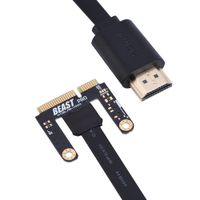
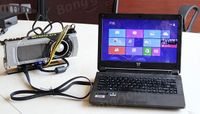
i have intel hd 5500 and amd r5 m330 graphics card.i cant remove my amd card from the system so i cant load my nvdia card.My problem is not switchable graphics mode on my bios so my computer does not see my external graphics card (gtx 750 ti).
01-20-2019 07:41 AM
HP Recommended
You think that is the problem but it is not. eGPU can work with switchable graphics. If you absolutely must disable the discrete AMD card then that cannot happen.I suspect the problem is you have a mini-pcie slot that is set to only work with a wireless card and is not able to drive an eGPU. If you could get it to work you would need an external monitor. There is no way to loop the eGPU output back to the laptop screen. What brand eGPU dock did you get?

Be alert for scammers posting fake support phone numbers and/or email addresses on the community.
If you think you have received a fake HP Support message, please report it to us by clicking on "Flag Post".
† The opinions expressed above are the personal opinions of the authors, not of HP. By using this site, you accept the Terms of Use and Rules of Participation.


Didn't find what you were looking for?
Ask the community
† The opinions expressed above are the personal opinions of the authors, not of HP. By using this site, you accept the <a href="https://www8.hp.com/us/en/terms-of-use.html" class="udrlinesmall">Terms of Use</a> and <a href="/t5/custom/page/page-id/hp.rulespage" class="udrlinesmall"> Rules of Participation</a>.