• ×
    Information
    Need Windows 11 help?
    Check documents on compatibility, FAQs, upgrade information and available fixes.
    Windows 11 Support Center.
  • post a message
  • ×
    Information
    Need Windows 11 help?
    Check documents on compatibility, FAQs, upgrade information and available fixes.
    Windows 11 Support Center.
  • post a message
Guidelines
Webcam Not Working? Advanced Fixes for HP Notebooks! Click here to view the instructions!
Common problems for Battery
We would like to share some of the most frequently asked questions about: Battery Reports, Hold a charge, Test and Calibrating Battery . Check out this link: Is your notebook plugged in and not charging?
HP Recommended
Pavilion 15-au030wm
Microsoft Windows 10 (64-bit)

Hello. I have taken the cover off, and gotten this picture of the motherboard. I've looked under both the battery and the HDD and found no connectors. It doesn't seem there's even an M.2 slot for an SSD. Is that correct? Or else, where is it?


IMG_20191023_194335483.jpg

4 REPLIES 4
HP Recommended

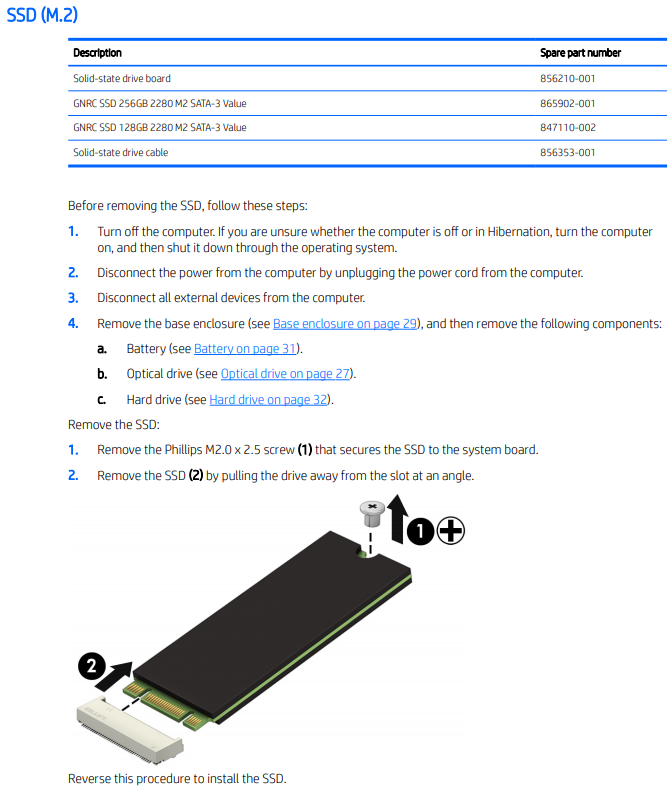
@mm-cfield Here's all you need to know about the M.2 SSD slot and how to make hardware changes to it:

(refer to your product's service and maintenance guide for more details: click here & visit page. 34 of Chapter 6 Removal and replacement procedures for authorized service p...)


P.S: Welcome to HP Community 😉


Keep me posted, as I (Or a trusted colleague) shall follow-up on this case to ensure the concern has been addressed, 

And your device is up and running again, only in case you don't get back to us, first! 

That said, If the information I've provided was helpful, give us some reinforcement by clicking the solution and kudos buttons, 

That'll help us, and others see that we've got the answers!

Good Luck.

Riddle_Decipher
I am an HP Employee


Learning is a journey, not a destination.
Let's keep asking questions and growing together.
HP Recommended
I saw this information in the manual that you're pointing to ... however, that is a manual that covers a number of models, not just this one. Look at the picture I took - this is my actual system board - and if this slot is even there, where is it?
 
HP Recommended

@mm-cfield Its hard to pin point where is it is using a picture, I personally suggest you take the device over to a local store tech and have him help you with the same, if that's not an options, or the slot is missing though you were promised to have one, I suggest you talk to HP support and discuss your options, follow the below steps to get started:


1) Click on this link - http://www.hp.com/contacthp/

2) Click on Sign-in or select the product using the below step:

3) Enter the serial of your device.

4) Select the country from the drop-down.

5) Click on "Show Options".

Fill the web-form, to populate a case number and phone number for yourself!


Also, if you are having trouble navigating through the above options, it's most likely because the device is out of warranty, if yes? please send me a private message with the region you are contacting us from, 

here's how private messages work: Click here for details.


If you wish to thank me for my efforts, you could click on "Accept as solution" on my post as the solution should help others too.

Riddle_Decipher
I am an HP Employee


Learning is a journey, not a destination.
Let's keep asking questions and growing together.
HP Recommended
Thank you again. I have seen, through other forum posts, that the inclusion of such a slot is a hit-or-miss proposition in the Pavilion 15 AU series, and that in my case, the slot does not exist - it would be at bottom left, next to the HDD, if it were there.


† The opinions expressed above are the personal opinions of the authors, not of HP. By using this site, you accept the <a href="https://www8.hp.com/us/en/terms-of-use.html" class="udrlinesmall">Terms of Use</a> and <a href="/t5/custom/page/page-id/hp.rulespage" class="udrlinesmall"> Rules of Participation</a>.