• ×
    Information
    Need Windows 11 help?
    Check documents on compatibility, FAQs, upgrade information and available fixes.
    Windows 11 Support Center.
  • post a message
  • ×
    Information
    Need Windows 11 help?
    Check documents on compatibility, FAQs, upgrade information and available fixes.
    Windows 11 Support Center.
  • post a message
Guidelines
Webcam Not Working? Advanced Fixes for HP Notebooks! Click here to view the instructions!
Common problems for Battery
We would like to share some of the most frequently asked questions about: Battery Reports, Hold a charge, Test and Calibrating Battery . Check out this link: Is your notebook plugged in and not charging?
HP Recommended
HP Notebook - 15-bs234wm
Microsoft Windows 11

Product No.3tt19ua#aba. windows 11 23H2. 2 new batteries. wont fully charge cant calibrate. Unplug power cord system shuts off. Windows security icon with yellow exclamation on , blank screen when I try to go there? 

1 REPLY 1
HP Recommended

This does not look good.  Possibly there is damage to the charging circuitry.


Did it work for a short time when the battery was installed?

If so, I suspect a real hardware charging problem.


Can you post the summary of a the battery report?


Please run the battery report and post the summery if you want
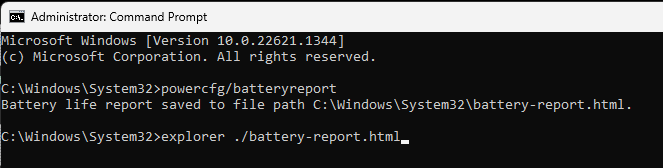
you run the battery report by bringing up the administrator command window and running

 powercfg/batteryreport 


as shown below


After entering that explorer line you should see something like the following. You will have to click on it as it is long
https://stateson.net/docs/SP4_battery-report.html


Click here to check warranty
and
Click here for world-wide contact info
Or contact the closest authorized service center


You could also try downloading and running the latest UEFI diagnostics


HP releases newer UEFI diagnostics periodically.
When you select F2 during boot you are requesting UEFI diagnostics.
There is an updated diagnostics package Click Here
Look for the phrase 'issues outside the OS',
Expand the'+'symbol and click the DOWNLOAD button.
The version of the UEFI diagnostics is shown at the left of that DOWNLOAD button.
When you press F2 to run diagnostics please ensure the version is the new one.

Thank you for using HP products and posting to the community.
I am a community volunteer and do not work for HP. If you find
this post useful click the Yes button. If I helped solve your
problem please mark this as a solution so others can find it
† The opinions expressed above are the personal opinions of the authors, not of HP. By using this site, you accept the <a href="https://www8.hp.com/us/en/terms-of-use.html" class="udrlinesmall">Terms of Use</a> and <a href="/t5/custom/page/page-id/hp.rulespage" class="udrlinesmall"> Rules of Participation</a>.