• ×
    Information
    Need Windows 11 help?
    Check documents on compatibility, FAQs, upgrade information and available fixes.
    Windows 11 Support Center.
  • post a message
  • ×
    Information
    Need Windows 11 help?
    Check documents on compatibility, FAQs, upgrade information and available fixes.
    Windows 11 Support Center.
  • post a message
Guidelines
Webcam Not Working? Advanced Fixes for HP Notebooks! Click here to view the instructions!
Common problems for Battery
We would like to share some of the most frequently asked questions about: Battery Reports, Hold a charge, Test and Calibrating Battery . Check out this link: Is your notebook plugged in and not charging?
HP Recommended
Pavilion BC-406tx
Microsoft Windows 10 (64-bit)

I purchased product on June 25 2019 and it had a base warranty of 1 year as other products have as well. Now recently when I checked my warranty period, it ended on Feb 19 2020 , due before actual warranty expiration date.When I checked for more details it said purchase date as something Dec 25 2018. 

I found a link to dispute the warranty as my product still has atleast 4 months warranty. I tried so many times to dispute, but everytime I enter details and upload purchase proof as well, it says 'Site is temporarily unavailable'.

I've a feeling that they're doing it on purpose. I didn't expected this from HP.

Is there any other way I could challenge it?? Please Help

1 ACCEPTED SOLUTION

Accepted Solutions
HP Recommended

@Anand_Nakat

Thank you for posting on the HP Support Community.


Don't worry as I'll be glad to help, in order to bring your issue to the attention of an appropriate team within HP. I am sending you a private message. Please check the mailbox icon at the top-right corner of this screen.

ECHO_LAKE
I am an HP Employee

View solution in original post

2 REPLIES 2
HP Recommended

@Anand_Nakat 


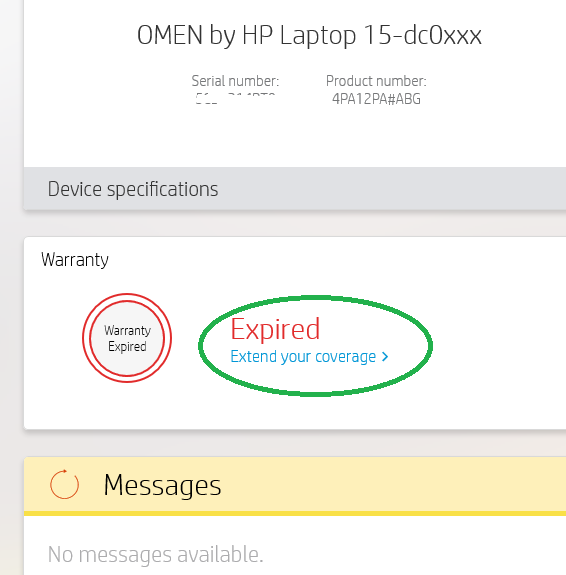
HPSA should tell you the ACTUAL date. For example


  extent.png


Regards.

BH
***
**Click the KUDOS thumb up on the left to say 'Thanks'**
Make it easier for other people to find solutions by marking a Reply 'Accept as Solution' if it solves your problem.


HP Recommended

@Anand_Nakat

Thank you for posting on the HP Support Community.


Don't worry as I'll be glad to help, in order to bring your issue to the attention of an appropriate team within HP. I am sending you a private message. Please check the mailbox icon at the top-right corner of this screen.

ECHO_LAKE
I am an HP Employee

† The opinions expressed above are the personal opinions of the authors, not of HP. By using this site, you accept the <a href="https://www8.hp.com/us/en/terms-of-use.html" class="udrlinesmall">Terms of Use</a> and <a href="/t5/custom/page/page-id/hp.rulespage" class="udrlinesmall"> Rules of Participation</a>.