-
×InformationNeed Windows 11 help?Check documents on compatibility, FAQs, upgrade information and available fixes.
Windows 11 Support Center. -

-
×InformationNeed Windows 11 help?Check documents on compatibility, FAQs, upgrade information and available fixes.
Windows 11 Support Center. -
- HP Community
- Notebooks
- Notebook Hardware and Upgrade Questions
- Re: Envelope print - paper mismatch

Create an account on the HP Community to personalize your profile and ask a question
06-12-2022 11:38 AM
I have an OfficeJet 4652. When trying to print address on envelope I put the envelope in the main (only) paper tray as directed (in the middle of the tray) and adjust the paper guide. I select the media (A10) and when I try to send the job to the printer I get an error indicating paper mismatch. I have never been able to print envelopes with this printer and this forum is my last ditch effort before going and buying a non-HP printer. Any help would be appreciated.
06-12-2022 12:20 PM
Welcome to the HP User Community.
@kjones799 wrote:I have an OfficeJet 4652.
When trying to print address on envelope I put the envelope in the main (only) paper tray as directed (in the middle of the tray) and adjust the paper guide.
I select the media (A10) and when I try to send the job to the printer
I get an error indicating paper mismatch.
I have never been able to print envelopes with this printer and
this forum is my last ditch effort before going and buying a non-HP printer.
Any help would be appreciated.
Here it is - "last ditch help"...
=+=+=+=+=+=+=+=+=+=+=+=+=+=+=+=+=+=+=+=+=+=+=+=+=+=+=+=+=+=+=+=
Printer Software
If the Full Feature Software / full driver printer software is installed,
The printer supports creating Custom Paper Size form(s) within the sizes stated.
=+=+=+=+=+=+=+=+=+=+=+=+=+=+=+=+=+=+=+=+=+=+=+=+=+=+=+=+=+=+=+=
What is supported / What the printer can do
This printer supports Envelope sizes as shown in the Specifications.
There is no A10 envelope size.
A quick check shows A10 as 1.0 X 1.5 inches
Printer Specifications for HP DeskJet 4530, 4670, ENVY 4510, 4520, OfficeJet 4650 Printers
Section Paper Handling > Supported envelopes
Paper type | Paper size |
A2 envelope | 111 x 146 mm (4.4 x 5.8 inches) |
C5 envelope | 162 x 229 mm ( 6.4 x 9.0 inches) |
C6 envelope | 114 x 162 mm (4.5 x 6.4 inches) |
Chou #3 envelope | 120 x 235 mm (4.7 x 9.3 inches) |
Chou #4 envelope | 90 x 205 mm (3.5 x 8.1 inches) |
DL envelope | 110 x 220 mm (4.3 x 8.7 inches) |
Monarch envelope | 98 x 191 mm (3.9 x 7.5 inches) |
U.S. 10 envelope | 105 x 241 mm (4.1 x 9.5 inches) |
Envelope 6 3/4 | 92 × 165 mm (3.63 × 6.5 inches) |
Section
Supported custom sizes
Paper size | Input tray | ADF |
76.2 to 127 mm (3.0 to 5.0 inches) wide and 127 to 482.6 mm (5.0 to 19.0 inches) long | ☑️
| |
127 to 203 mm (5.0 to 8.0 inches) wide and 241 to 305 mm (9.5 to 12.0 inches) long | ☑️
|
=+=+=+=+=+=+=+=+=+=+=+=+=+=+=+=+=+=+=+=+=+=+=+=+=+=+=+=+=+=+=+=
Load Media
Load the envelopes into the tray according to the instructions:
The User Guide
and Print on envelopes with an HP printer
=+=+=+=+=+=+=+=+=+=+=+=+=+=+=+=+=+=+=+=+=+=+=+=+=+=+=+=+=+=+=+=
Next,
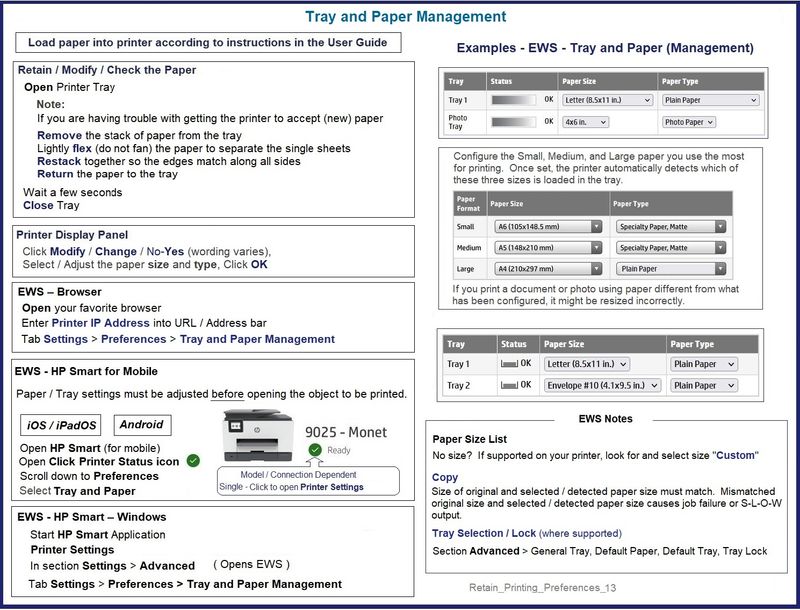
Alert the printer to the paper size loaded in the tray
Check / Adjust / Retain the Paper Size and Type at the Printer Display Panel
NOTE This Section is not applicable to printers lacking a printer display panel.
Look for a message on the printer display panel.
Click Modify / Change / No-Yes (wording varies),
Select / Adjust the paper size and type, Click OK
Paper Sizes
No Size in List?
If the size of the Paper Size is not in the Drop-down list,
If the printer supports the option,
Select Custom
Notes:
- Not all printers support size “Custom”
- "Copy" dislikes mismatched content / paper size and type. For example, select for Tray: Standard sized "Letter" / "A4" plain paper
=-=-=-=-=-=-=-=-=-=-=-=-=-=-=-=-=-=-=-=-=-=-=-=-=-=-=-=-=-=-=-=-=-=-=-=-=-=-=
Embedded Web Server (EWS)
EWS > HP Document / How-to
Use the HP printer Embedded Web Server (EWS)
NOTES
- EWS is available on many network connected printers.
- Laser Printers - Options and Settings - availability and location - are likely (and frequently) different.
If EWS is supported on your printer,
Use the Embedded Web Server (EWS) to view / configure your printer.
Example
----------------------- ----------------------- ----------------------- -----------------------
EWS – Browser
Open your favorite browser > type / enter Printer IP address into URL / Address bar
Tab Settings > Preferences > Tray and Paper Management
Model Dependent:
- No Size > Select “Custom” Note: Not all printers support size “Custom”
- Advanced section > General Tray, Default Paper, Default Tray, Tray Lock
Click Apply to save changes
----------------------- ----------------------- ----------------------- -----------------------
EWS - HP Smart for Mobile - iOS / iPadOS / Android
Reminder: Tray and Paper settings must adjusted before opening the object to be printed.
Open HP Smart (for mobile)
Open Click on “Green Circle Check” on Printer Status icon
Scroll down to Preferences
Click, Tray and Paper
Model Dependent:
- No Size > Select “Custom” Note: Not all printers support size “Custom”
- Advanced section > General Tray, Default Paper, Default Tray, Tray Lock
Click Apply to save changes
----------------------- ----------------------- ----------------------- -----------------------
Retain_Printing_Preferences_13
=+=+=+=+=+=+=+=+=+=+=+=+=+=+=+=+=+=+=+=+=+=+=+=+=+=+=+=+=+=+=+=
Paper Sizes / Types
HP Document: HP Printers - Creating Custom Paper Sizes
Custom Size(s) might be used, for example, to create an envelope in Word in the size / shape of the envelope.
Example - Create Custom Paper Size form
Custom_Paper_Size_Form_Examples_5
=+=+=+=+=+=+=+=+=+=+=+=+=+=+=+=+=+=+=+=+=+=+=+=+=+=+=+=+=+=+=+=
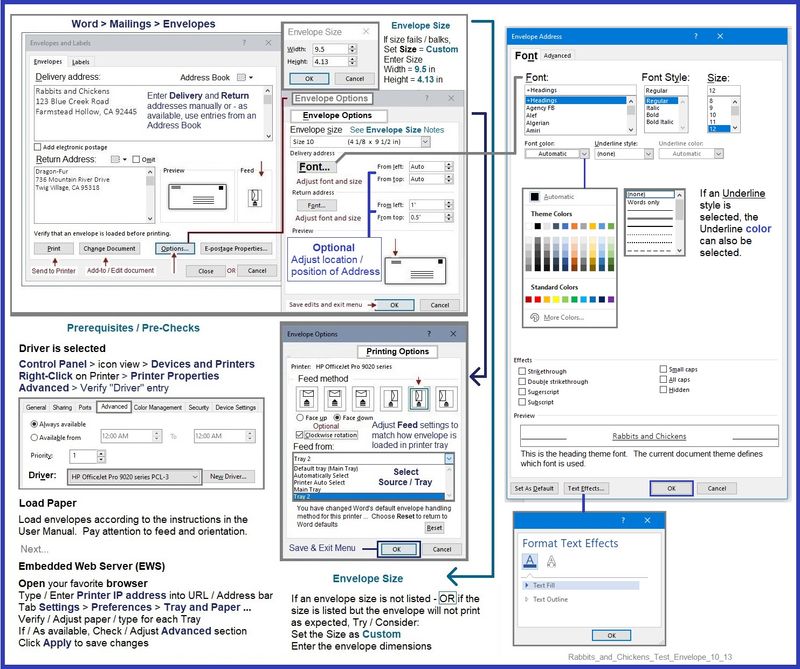
Create Envelope / Envelope Document
Whether Word > Mailings > Envelopes supports the custom size depends on the dimensions of the envelope.
What?
Word supports custom paper sizes in documents that the Mailings > Envelopes software cannot handle.
What?
Envelope software has separate rules about what it can do.
Examples - Envelopes
Example - Word > Mailings > Envelopes - #10 envelope
Heed the notes about envelope size
Rabbits_and_Chickens_Test_Envelope_10_13
Example - Word > Manual Envelope document
Manual_DL_Envelope_Text_Box_Insert_3
HP Printer Home Page - References and Resources – Learn about your Printer - Solve Problems
“Things that are your printer”
When the website support page opens, Select (as available) a Category > Topic > Subtopic
NOTE: Content depends on device type and Operating System
Categories: Alerts, Access to the Print and Scan Doctor (Windows), Warranty Check, HP Drivers / Software / Firmware Updates, How-to Videos, Bulletins/Notices, Lots of How-to Documents, Troubleshooting, Manuals > User Guides, Product Information (Specifications), more
Open
HP OfficeJet 4652 All-in-One Printer
Thank you for participating in the HP Community.
Our Community is comprised of volunteers - people who own and use HP devices.
Click Helpful = Yes to say Thank You
Question / Concern Answered, Click "Accept as Solution"