• ×
    Information
    Need Windows 11 help?
    Check documents on compatibility, FAQs, upgrade information and available fixes.
    Windows 11 Support Center.
  • post a message
  • ×
    Information
    Need Windows 11 help?
    Check documents on compatibility, FAQs, upgrade information and available fixes.
    Windows 11 Support Center.
  • post a message
Guidelines
Join the HP Community Solve‑a‑thon | Help Others & Share Your Solutions | Live on Zoom | 2:30 PM to 2:30 AM IST | Every Wednesday Click here to know more
Common problems for Battery
We would like to share some of the most frequently asked questions about: Battery Reports, Hold a charge, Test and Calibrating Battery . Check out this link: Is your notebook plugged in and not charging?
HP Recommended
HP OfficeJet 4652 All-in-One Printer
Microsoft Windows 10 (64-bit)

I have an OfficeJet 4652. When trying to print address on envelope I put the envelope in the main (only) paper tray as directed (in the middle of the tray) and adjust the paper guide. I select the media (A10) and when I try to send the job to the printer I get an error indicating paper mismatch. I have never been able to print envelopes with this printer and this forum is my last ditch effort before going and buying a non-HP printer.  Any help would be appreciated.

1 REPLY 1
HP Recommended

@kjones799 


Welcome to the HP User Community.


@kjones799 wrote:

I have an OfficeJet 4652.

When trying to print address on envelope I put the envelope in the main (only) paper tray as directed (in the middle of the tray) and adjust the paper guide.

I select the media (A10) and when I try to send the job to the printer

I get an error indicating paper mismatch.

I have never been able to print envelopes with this printer and

this forum is my last ditch effort before going and buying a non-HP printer. 

Any help would be appreciated.


Here it is - "last ditch help"...


=+=+=+=+=+=+=+=+=+=+=+=+=+=+=+=+=+=+=+=+=+=+=+=+=+=+=+=+=+=+=+=

Printer Software


If the Full Feature Software / full driver printer software is installed,

The printer supports creating Custom Paper Size form(s) within the sizes stated.


=+=+=+=+=+=+=+=+=+=+=+=+=+=+=+=+=+=+=+=+=+=+=+=+=+=+=+=+=+=+=+=

What is supported / What the printer can do


This printer supports Envelope sizes as shown in the Specifications.


There is no A10 envelope size.

A quick check shows A10 as 1.0 X 1.5 inches


To avoid paper jams and other issues, make sure you are using the correct type and size of envelope when loading the printer.
Paper type
Paper size
A2 envelope
111 x 146 mm (4.4 x 5.8 inches)
C5 envelope
162 x 229 mm ( 6.4 x 9.0 inches)
C6 envelope
114 x 162 mm (4.5 x 6.4 inches)
Chou #3 envelope
120 x 235 mm (4.7 x 9.3 inches)
Chou #4 envelope
90 x 205 mm (3.5 x 8.1 inches)
DL envelope
110 x 220 mm (4.3 x 8.7 inches)
Monarch envelope
98 x 191 mm (3.9 x 7.5 inches)
U.S. 10 envelope
105 x 241 mm (4.1 x 9.5 inches)
Envelope 6 3/4
92 × 165 mm (3.63 × 6.5 inches)


Section

Supported custom sizes

To avoid paper jams and other issues when printing on nonstandard custom paper sizes, make sure the dimensions fall within the parameters listed in the following table.
Paper size
Input tray
ADF
76.2 to 127 mm (3.0 to 5.0 inches) wide and 127 to 482.6 mm (5.0 to 19.0 inches) long
 

☑️


127 to 203 mm (5.0 to 8.0 inches) wide and 241 to 305 mm (9.5 to 12.0 inches) long


☑️


=+=+=+=+=+=+=+=+=+=+=+=+=+=+=+=+=+=+=+=+=+=+=+=+=+=+=+=+=+=+=+=

Load Media


Load the envelopes into the tray according to the instructions:

The User Guide

and Print on envelopes with an HP printer


=+=+=+=+=+=+=+=+=+=+=+=+=+=+=+=+=+=+=+=+=+=+=+=+=+=+=+=+=+=+=+=

Next,

Alert the printer to the paper size loaded in the tray


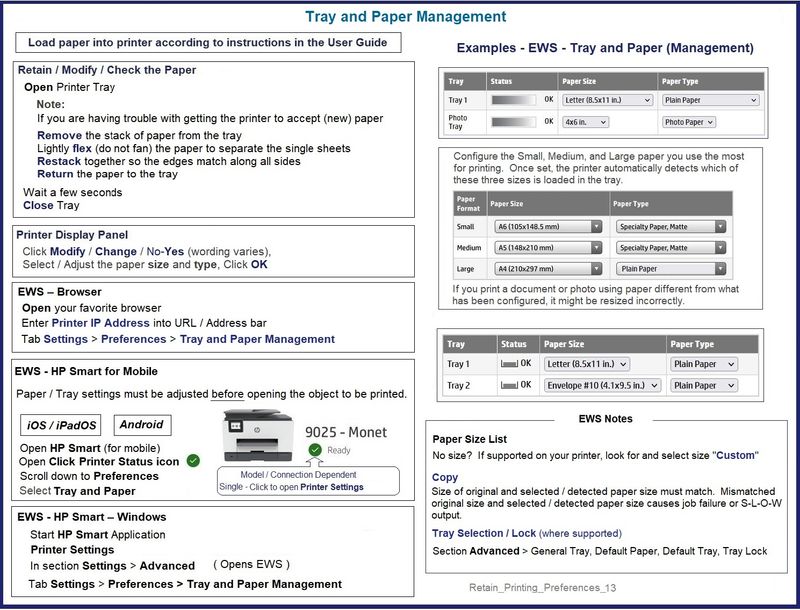
Check / Adjust / Retain the Paper Size and Type at the Printer Display Panel


NOTE  This Section is not applicable to printers lacking a printer display panel.

Look for a message on the printer display panel.

Click Modify / Change / No-Yes (wording varies),

Select / Adjust the paper size and type, Click OK


Paper Sizes


No Size in List?

If the size of the Paper Size is not in the Drop-down list,

If the printer supports the option,

Select Custom


Notes: 

  • Not all printers support size “Custom”
  • "Copy" dislikes mismatched content / paper size and type.  For example, select for Tray:  Standard sized "Letter" / "A4" plain paper


=-=-=-=-=-=-=-=-=-=-=-=-=-=-=-=-=-=-=-=-=-=-=-=-=-=-=-=-=-=-=-=-=-=-=-=-=-=-=

Embedded Web Server (EWS)


EWS > HP Document / How-to

Use the HP printer Embedded Web Server (EWS)


NOTES

  • EWS is available on many network connected printers.
  • Laser Printers - Options and Settings - availability and location - are likely (and frequently) different.


If EWS is supported on your printer,

Use the Embedded Web Server (EWS) to view / configure your printer.


Example


 -----------------------  -----------------------  -----------------------  ----------------------- 


EWS – Browser

Open your favorite browser > type / enter Printer IP address into URL / Address bar

Tab Settings > Preferences > Tray and Paper Management

Model Dependent: 

  • No Size > Select “Custom”  Note:  Not all printers support size “Custom”
  • Advanced section > General Tray, Default Paper, Default Tray, Tray Lock

Click Apply to save changes


 -----------------------  -----------------------  -----------------------  ----------------------- 

EWS - HP Smart for Mobile - iOS / iPadOS / Android

Reminder: Tray and Paper settings must adjusted before opening the object to be printed.

Open HP Smart (for mobile)

Open Click on “Green Circle Check” on Printer Status icon

Scroll down to Preferences

Click, Tray and Paper

Model Dependent: 

  • No Size > Select “Custom”    Note:  Not all printers support size “Custom”
  • Advanced section > General Tray, Default Paper, Default Tray, Tray Lock

Click Apply to save changes


 -----------------------  -----------------------  -----------------------  ----------------------- 


Retain_Printing_Preferences_13Retain_Printing_Preferences_13


=+=+=+=+=+=+=+=+=+=+=+=+=+=+=+=+=+=+=+=+=+=+=+=+=+=+=+=+=+=+=+=

Paper Sizes / Types


HP Document: HP Printers - Creating Custom Paper Sizes


Custom Size(s) might be used, for example, to create an envelope in Word in the size / shape of the envelope.


Example - Create Custom Paper Size form

Custom_Paper_Size_Form_Examples_5Custom_Paper_Size_Form_Examples_5


=+=+=+=+=+=+=+=+=+=+=+=+=+=+=+=+=+=+=+=+=+=+=+=+=+=+=+=+=+=+=+=

Create Envelope / Envelope Document


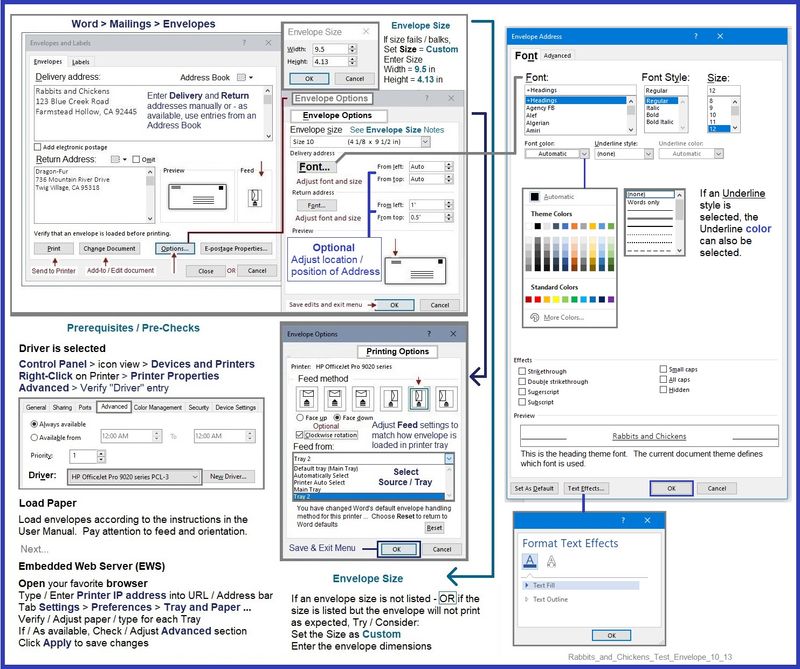
Whether Word > Mailings > Envelopes supports the custom size depends on the dimensions of the envelope.

What?

Word supports custom paper sizes in documents that the Mailings > Envelopes software cannot handle.

What?

Envelope software has separate rules about what it can do.


Examples - Envelopes


Example - Word > Mailings > Envelopes - #10 envelope

Heed the notes about envelope size

Rabbits_and_Chickens_Test_Envelope_10_13Rabbits_and_Chickens_Test_Envelope_10_13


Example - Word > Manual Envelope document

Manual_DL_Envelope_Text_Box_Insert_3Manual_DL_Envelope_Text_Box_Insert_3


HP Printer Home Page - References and Resources – Learn about your Printer  - Solve Problems

 “Things that are your printer”

When the website support page opens, Select (as available) a Category > Topic > Subtopic

NOTE:  Content depends on device type and Operating System

Categories:  Alerts, Access to the Print and Scan Doctor (Windows), Warranty Check, HP Drivers / Software / Firmware Updates, How-to Videos, Bulletins/Notices, Lots of How-to Documents, Troubleshooting, Manuals > User Guides, Product Information (Specifications), more

Open

HP OfficeJet 4652 All-in-One Printer 


Thank you for participating in the HP Community.

Our Community is comprised of volunteers - people who own and use HP devices.

Click Helpful = Yes to say Thank You

Question / Concern Answered, Click "Accept as Solution"


Dragon-Fur

† The opinions expressed above are the personal opinions of the authors, not of HP. By using this site, you accept the <a href="https://www8.hp.com/us/en/terms-of-use.html" class="udrlinesmall">Terms of Use</a> and <a href="/t5/custom/page/page-id/hp.rulespage" class="udrlinesmall"> Rules of Participation</a>.