
-
×InformationNeed Windows 11 help?Check documents on compatibility, FAQs, upgrade information and available fixes.
Windows 11 Support Center. -
-
×InformationNeed Windows 11 help?Check documents on compatibility, FAQs, upgrade information and available fixes.
Windows 11 Support Center. -
- HP Community
- Notebooks
- Notebook Hardware and Upgrade Questions
- Re: HP 255 G7 Notebook 301 error message on start up

Create an account on the HP Community to personalize your profile and ask a question
Your account also allows you to connect with HP support faster, access a personal dashboard to manage all of your devices in one place, view warranty information, case status and more.
Common problems for Battery
We would like to share some of the most frequently asked questions about: Battery Reports, Hold a charge, Test and Calibrating Battery . Check out this link: Is your notebook plugged in and not charging?

07-23-2026 05:20 AM - edited 07-23-2026 10:29 AM
 HP Recommended
Hi
My hp 255 G7 notebook is getting the 301 error message on start up, looking at other posts, i now know its best to replace the hard drive before it fails, can someone show me the correct hard drive i need to replace the old one with, Edit..Just checked it seems i have an SSD installed will replacing that fix the error message ?
Thank you
Solved! Go to Solution.
1 ACCEPTED SOLUTION
Accepted Solutions


07-24-2026 12:17 PM
HP Recommended
Hi @samperuso1
Welcome to the HP Support Community.
Thank you for posting your query.
The HP 255 G7’s “301 error” means the system has detected a failing drive, the SSD. Replacing the SSD with a compatible model (M.2 SATA ) will fix the issue, but you should back up your data immediately before the drive fails completely.
Before Proceeding further I would request you to perform the below step and go through the link shared.
Run HP diagnostics on startup
- Power on or restart your notebook.
- As soon as the HP logo appears, press the Esc key repeatedly (about once per second).
- A Startup Menu will appear.
- Press F2 to open System Diagnostics.
- In the menu, choose Component Tests → Storage.
- Select : Extensive Test
- Run the Test.
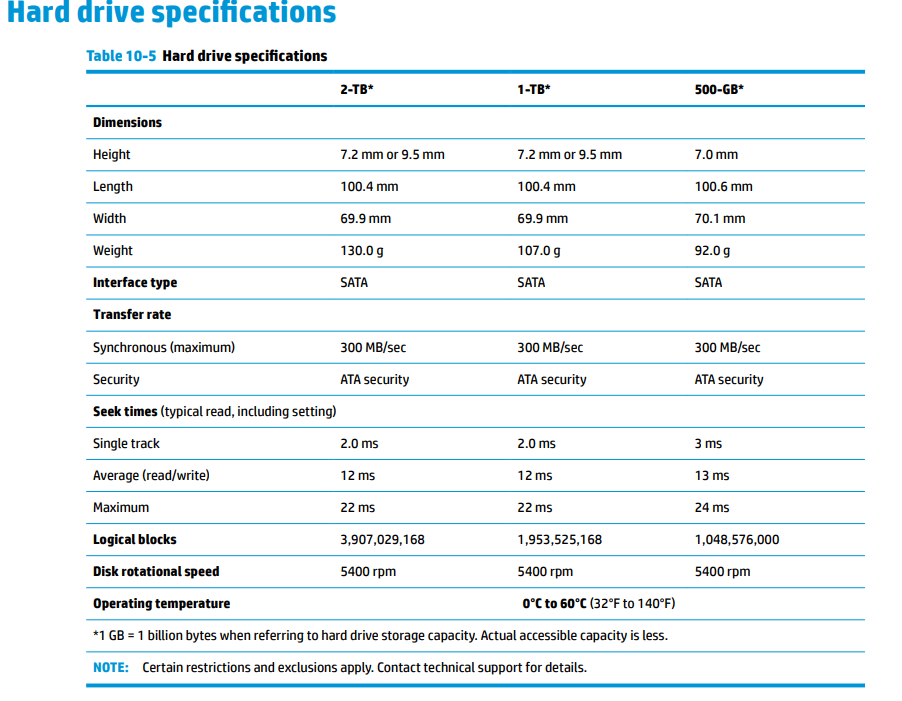
https://support.hp.com/us-en/document/ish_3894112-3198952-16 Follow the link for detailed steps.
https://kaas.hpcloud.hp.com/pdf-public/pdf_13033529_en-US-1.pdf Service Guide.
I hope this helps.
Take care and have an amazing day!
I'm an HP Employee.
If this reply helped resolve your issue, please select the Accept as Solution as it helps others in the community quickly find the answer they’re looking for.
And if you found this reply helpful, clicking Yes below is a great way to let us know we’re providing the support you need, as it encourages us to keep improving and sharing helpful guidance.
9 REPLIES 9
07-24-2026 12:17 PM
HP Recommended
Hi @samperuso1
Welcome to the HP Support Community.
Thank you for posting your query.
The HP 255 G7’s “301 error” means the system has detected a failing drive, the SSD. Replacing the SSD with a compatible model (M.2 SATA ) will fix the issue, but you should back up your data immediately before the drive fails completely.
Before Proceeding further I would request you to perform the below step and go through the link shared.
Run HP diagnostics on startup
- Power on or restart your notebook.
- As soon as the HP logo appears, press the Esc key repeatedly (about once per second).
- A Startup Menu will appear.
- Press F2 to open System Diagnostics.
- In the menu, choose Component Tests → Storage.
- Select : Extensive Test
- Run the Test.
https://support.hp.com/us-en/document/ish_3894112-3198952-16 Follow the link for detailed steps.
https://kaas.hpcloud.hp.com/pdf-public/pdf_13033529_en-US-1.pdf Service Guide.
I hope this helps.
Take care and have an amazing day!
I'm an HP Employee.
If this reply helped resolve your issue, please select the Accept as Solution as it helps others in the community quickly find the answer they’re looking for.
And if you found this reply helpful, clicking Yes below is a great way to let us know we’re providing the support you need, as it encourages us to keep improving and sharing helpful guidance.
07-25-2026 04:46 AM
HP Recommended
Thank you for your reply
I have tried all the possible fixes, nothing solves the problem, still getting the 301 error on start up.
My data is already backed up on to a flash drive just in case it goes suddenly. I will purchase the relevant SSD you
advised.
Many thanks for confirming this, much appreciated
07-27-2026 09:31 AM
HP Recommended
Hi
Can you tell me if this is the correct SSD that i need ?
https://www.amazon.co.uk/gp/product/B0B7QYZF9X?psc=1
Thank you

07-30-2026 02:58 AM
HP Recommended
Hi @samperuso1,
Please note as per the system design the below are the compatible once :
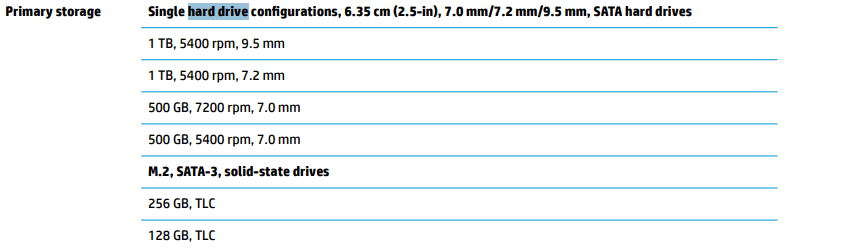
Solid-state drive (M.2)
256 GB, SATA-3, TLC L50020-001
128 GB, SATA-3, TLC L50019-001
For Hard Drive 7 mm :
1 TB, 5400 rpm L30422-005
500 GB, 7200 rpm 703267-005
500 GB, 5400 rpm 778186-005
Regards
Deep_World
I'm an HP Employee.
If this reply helped resolve your issue, please select the Accept as Solution as it helps others in the community quickly find the answer they’re looking for.
And if you found this reply helpful, clicking Yes below is a great way to let us know we’re providing the support you need, as it encourages us to keep improving and sharing helpful guidance.
08-01-2026 09:49 AM
HP Recommended
Many thanks
I shall order the 256 GB, SATA-3, TLC L50020-001 as you suggested.
I think my laptop is about to go any minute, when i type some of the words are shaded out, and certain websites
text is shaded also.
Thanks again
08-03-2026 06:30 AM
HP Recommended
Hi @samperuso1,
I noticed that your laptop seems to be showing additional issues. If letters, words, or website text are appearing shaded, faded, missing, or distorted, it could indicate a display-related issue, graphics driver problem.
To better understand the situation, could you please let me know:
- Are the shaded or missing characters visible in all applications or only on certain websites?
- Have you noticed any screen flickering, discoloration, lines, or other display abnormalities?
- If possible, could you share a photo of the issue?
In the meantime, you may try these basic steps and confirm :
- Update the graphics driver through HP Support Assistant or Windows Update.
- Connect an external monitor (if available) to see if the issue appears there as well.
- Run an HP Hardware Diagnostics display test to check for any hardware-related concerns.(Link for steps to perform the UEFI - Click here )
Kindly share the requested details when convenient, and we'll do our best to help determine the cause of the issue.
I hope this help.
I'm an HP Employee.
If this reply helped resolve your issue, please select the Accept as Solution as it helps others in the community quickly find the answer they’re looking for.
And if you found this reply helpful, clicking Yes below is a great way to let us know we’re providing the support you need, as it encourages us to keep improving and sharing helpful guidance.
08-06-2026 09:55 AM
HP Recommended
Hi @samperuso1,
Thanks for letting us help you out! If you're all set, please mark this post as 'Accepted Solution' so I can do a virtual happy dance!
If you need anything else, I'm all ears (or rather, all text). Just let me know!
You're awesome, and I'm honored to have been your go-to guide today!
Stay fantastic, and have an amazing day ahead!
Regards,
Deep_World
I'm an HP Employee.
If this reply helped resolve your issue, please select the Accept as Solution as it helps others in the community quickly find the answer they’re looking for.
And if you found this reply helpful, clicking Yes below is a great way to let us know we’re providing the support you need, as it encourages us to keep improving and sharing helpful guidance.

Be alert for scammers posting fake support phone numbers and/or email addresses on the community.
If you think you have received a fake HP Support message, please report it to us by clicking on "Flag Post".
† The opinions expressed above are the personal opinions of the authors, not of HP. By using this site, you accept the Terms of Use and Rules of Participation.


Didn't find what you were looking for?
Ask the community
† The opinions expressed above are the personal opinions of the authors, not of HP. By using this site, you accept the <a href="https://www8.hp.com/us/en/terms-of-use.html" class="udrlinesmall">Terms of Use</a> and <a href="/t5/custom/page/page-id/hp.rulespage" class="udrlinesmall"> Rules of Participation</a>.