-
×InformationNeed Windows 11 help?Check documents on compatibility, FAQs, upgrade information and available fixes.
Windows 11 Support Center. -

-
×InformationNeed Windows 11 help?Check documents on compatibility, FAQs, upgrade information and available fixes.
Windows 11 Support Center. -
- HP Community
- Notebooks
- Notebook Hardware and Upgrade Questions
- HP KI04 Notebook Battery

Create an account on the HP Community to personalize your profile and ask a question
06-30-2020 10:30 AM
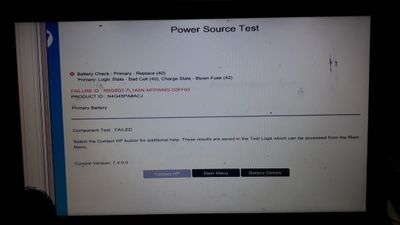
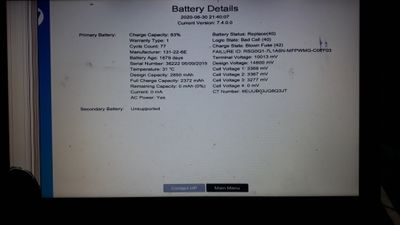
I am facing an error in my notebook battery. The battery status is showing Plugged in and Not Charging. I tried to troubleshoot using HP UEFI HARDWARE DIAGNOSTIC SOFTWARE. But this doesn't solve my problem. Please suggest me some ways to solve the problem.
20200630_213952.jpg
20200630_214102.jpg
Solved! Go to Solution.
Accepted Solutions
06-30-2020 11:02 AM
The battery has failed.
Diagnostics report results.
Battery must be removed from the computer and replaced.
Description Spare part number
4-cell, 41-Whr, 2.8-Ah Li-ion battery 800049-001
Replacement procedure on starting on Page 31
HP Pavilion Notebook (AMD) Maintenance and Service Guide
-----------------------------------------------------------------------------------
Good Reference
HP Collection of “how-to” videos
- Use Categories and / or enter your request in the search bar to narrow the search.
Examples,
Select Category Computing and Mobile Devices > Battery and Power
Select Category Computing and Mobile Devices > Parts Replacement and Upgrades
Search for replace battery or replace battery x360
Select and watch your Video
-----------------------------------------------------------------------------------
Find / Check for parts at PartSurfer / HP Parts Store
Open PartSurfer
- Select your Country
- Enter the device Product Number , Serial Number, or Part Number in the Quick Search box
- HINT: To see a system-specific list, replace the Product Number with your device Serial Number
- Items accompanied by a tiny box in the Add-to-Cart column are available for purchase
Parts marked as "n/a" are not available from HP.
Parts marked as available for purchase might be available from: HP Parts Store
OR
If HP does not provide the part for retail purchase,
Use your search engine to find the part number at your favorite online store.
Device Home Page - References and Resources – Learn about your Device - Solve Problems
NOTE: Content depends on device type and Operating System
Categories: Alerts, Warranty Check, HP Drivers / Software and BIOS, How-to Videos, Bulletins/Notices, How-to Documents, Troubleshooting, User Guides / Manuals, Service and Maintenance Guide (Replacement Parts and Procedures), Product Information (Specifications), more
When the website support page opens, Select (as available) a Category > Topic > Subtopic
HP Pavilion Notebook - 15-ab035ax
Thank you for participating in our HP Community.
We are a world community of volunteers dedicated to supporting HP technology
Click Thumbs Up to say Thank You for the assist.
Answered? Click "Accept as Solution" to help others find it.
06-30-2020 11:02 AM
The battery has failed.
Diagnostics report results.
Battery must be removed from the computer and replaced.
Description Spare part number
4-cell, 41-Whr, 2.8-Ah Li-ion battery 800049-001
Replacement procedure on starting on Page 31
HP Pavilion Notebook (AMD) Maintenance and Service Guide
-----------------------------------------------------------------------------------
Good Reference
HP Collection of “how-to” videos
- Use Categories and / or enter your request in the search bar to narrow the search.
Examples,
Select Category Computing and Mobile Devices > Battery and Power
Select Category Computing and Mobile Devices > Parts Replacement and Upgrades
Search for replace battery or replace battery x360
Select and watch your Video
-----------------------------------------------------------------------------------
Find / Check for parts at PartSurfer / HP Parts Store
Open PartSurfer
- Select your Country
- Enter the device Product Number , Serial Number, or Part Number in the Quick Search box
- HINT: To see a system-specific list, replace the Product Number with your device Serial Number
- Items accompanied by a tiny box in the Add-to-Cart column are available for purchase
Parts marked as "n/a" are not available from HP.
Parts marked as available for purchase might be available from: HP Parts Store
OR
If HP does not provide the part for retail purchase,
Use your search engine to find the part number at your favorite online store.
Device Home Page - References and Resources – Learn about your Device - Solve Problems
NOTE: Content depends on device type and Operating System
Categories: Alerts, Warranty Check, HP Drivers / Software and BIOS, How-to Videos, Bulletins/Notices, How-to Documents, Troubleshooting, User Guides / Manuals, Service and Maintenance Guide (Replacement Parts and Procedures), Product Information (Specifications), more
When the website support page opens, Select (as available) a Category > Topic > Subtopic
HP Pavilion Notebook - 15-ab035ax
Thank you for participating in our HP Community.
We are a world community of volunteers dedicated to supporting HP technology
Click Thumbs Up to say Thank You for the assist.
Answered? Click "Accept as Solution" to help others find it.