• ×
    Information
    Need Windows 11 help?
    Check documents on compatibility, FAQs, upgrade information and available fixes.
    Windows 11 Support Center.
  • post a message
  • ×
    Information
    Need Windows 11 help?
    Check documents on compatibility, FAQs, upgrade information and available fixes.
    Windows 11 Support Center.
  • post a message
Guidelines
Webcam Not Working? Advanced Fixes for HP Notebooks! Click here to view the instructions!
Common problems for Battery
We would like to share some of the most frequently asked questions about: Battery Reports, Hold a charge, Test and Calibrating Battery . Check out this link: Is your notebook plugged in and not charging?
HP Recommended
Omen 15-5113dx
Microsoft Windows 10 (64-bit)
Hello. I just got this Omen 5113dx and tried installing Windows on a Samsung PM981 SSD. It's a 256GB M.2 NGFF PCIe NVME SSD. Nothing I can do will get the computer to find it. So my question is, which type of SSD's will work? Thanks!
3 REPLIES 3
HP Recommended

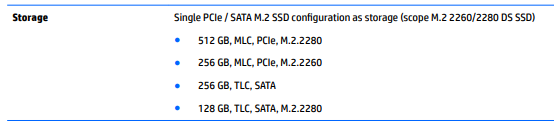
@Apache23 Here's the list of parts tested and approved to work on your device:


Click here to verify & visit page. 30 Chapter 5 Removal and replacement procedures for Authorized Service Provider parts for replacement instructions.


P.S: Welcome to HP Community 😉


Let me know how that pans out,

If you feel I was helpful, simply click on Accept as Solution to help the community grow,

That said, I will have someone follow-up on this to ensure you've been helped,

Just in case you don't get back to us within 24 - 48hrs, and have a good day, ahead.

Riddle_Decipher
I am an HP Employee


Learning is a journey, not a destination.
Let's keep asking questions and growing together.
HP Recommended

Yes, I saw those as I was doing some of my many hours of research into this. I was actually able to get Windows installed by opening a command prompt at the beginning of the installation and using DISKPART to clean the drive and convert it to GPT. But after Windows finished copying files and rebooted, it went back to the installation from the USB flash drive instead of the Windows installation on the SSD. So I went into the BIOS and set windows boot manager to first boot device and the drive is not found. I have tried every setting (there aren't many) in BIOS to get it to at least recognize the drive and nothing. So I went into HP diagnostics and ran the HDD Test and it says not installed. I think there needs to be a BIOS update to allow for NVMe SSDs before it will work. So I just need to get a non-NVMe M.2 SSD in order for it to work. It has the HM87 Express chipset and I'm pretty sure from what I've read, it needs the BIOS update to be compatible.

HP Recommended

@Apache23


Update the BIOS using this link:- Click here


I hope that helps.

To thank me for my efforts to help you, please mark my post as an accepted solution so that it benefits several others.

Cheers.

Sandytechy20
I am an HP Employee

† The opinions expressed above are the personal opinions of the authors, not of HP. By using this site, you accept the <a href="https://www8.hp.com/us/en/terms-of-use.html" class="udrlinesmall">Terms of Use</a> and <a href="/t5/custom/page/page-id/hp.rulespage" class="udrlinesmall"> Rules of Participation</a>.