
-
×InformationNeed Windows 11 help?Check documents on compatibility, FAQs, upgrade information and available fixes.
Windows 11 Support Center. -
-
×InformationNeed Windows 11 help?Check documents on compatibility, FAQs, upgrade information and available fixes.
Windows 11 Support Center. -
- HP Community
- Notebooks
- Notebook Hardware and Upgrade Questions
- KEYBORAD KEYS ARE NOT WORKING

Create an account on the HP Community to personalize your profile and ask a question
Your account also allows you to connect with HP support faster, access a personal dashboard to manage all of your devices in one place, view warranty information, case status and more.
Common problems for Battery
We would like to share some of the most frequently asked questions about: Battery Reports, Hold a charge, Test and Calibrating Battery . Check out this link: Is your notebook plugged in and not charging?

It has been a while since anyone has replied. Simply ask a new question if you would like to start the discussion again.

07-14-2020 02:40 AM
 HP Recommended
Product: HP PAVILLION 15au-620tx
Operating System: Microsoft Windows 10 (64-bit)
I am having the problem with my laptop's keyboard. My laptop's model number is HP pavilion au-620tx. most of its key combination are not working, (for eg. (tab, right shift + all buttons) and (left shift + zxcvbnm and qweruiop,.) are not working) however in boot time troubleshooting option, it is showing that keyboard is fine. I have also tried uninstalling the keyboard from device manager and then restarting, but that's not either showing any improvement. I am also updating driver from device manager but it says already have an updated driver.
11 REPLIES 11


07-16-2020 11:28 AM
HP Recommended
Thank you for posting on HP Support Community.
Don't worry as I'll be glad to help, I have a few troubleshooting steps we could try to fix the issue:
Use HP PC Hardware Diagnostics to complete functional test of the keyboard and identify any problems with the hardware.
note:Bluetooth devices are not currently supported.
-
Download the latest version of HP PC Hardware Diagnostics.
-
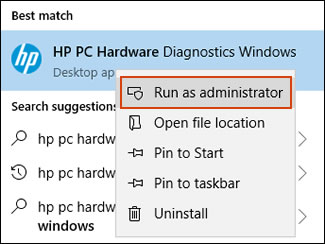
In Windows, search for and right-click HP PC Hardware Diagnostics for Windows, and then select Run as administrator.
-
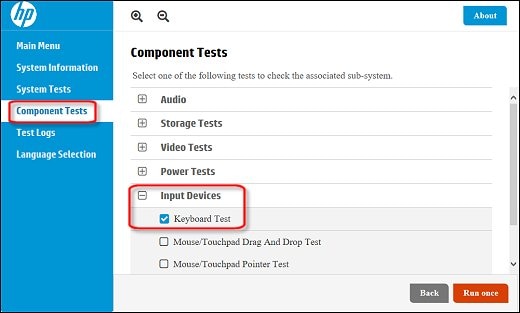
Click Component Tests, click Input Devices, and then select the Keyboard Test.
-
Click Run once to begin the test.
The test ends when you complete the tasks or after 3 minutes.
For more information about using the HP PC Hardware Diagnostics for Windows, go to HP PCs - Testing for Hardware Failures.
Hope this helps! Keep me posted for further assistance.
Please click “Accept as Solution” if you feel my post solved your issue, it will help others find the solution.
ECHO_LAKE
I am an HP Employee
07-17-2020 01:11 AM
HP Recommended
Thank you for your help.
I have tried the method which you said, it passed successfully.
Also while the time of sign-in only specific keys works like Esc, Enter, Spacer and nothing else works.
The keyboard stops working in between uses means becomes unresponsive and also not works while sign in during windows after shutdown/restart/sleep/hibernate.
07-17-2020 01:12 AM
HP Recommended
Thank you for your help.
I have tried the method which you said, it passed successfully.
Also while the time of sign-in only specific keys works like Esc, Enter, Spacer and nothing else works.
The keyboard stops working in between uses means becomes unresponsive and also not works while sign in during windows after shutdown/restart/sleep/hibernate.
07-17-2020 01:15 AM
HP Recommended
Thank you for your help.
I have tried the method which you said, it passed successfully.
Also while the time of sign-in only specific keys works like Esc, Enter, Spacer and nothing else works.
The keyboard stops working in between uses means becomes unresponsive and also not works while sign in during windows after shutdown/restart/sleep/hibernate.
07-17-2020 01:16 AM
HP Recommended
Thank you for your help.
I have tried the method which you said, it passed successfully.
Also while the time of sign-in only specific keys works like Esc, Enter, Spacer and nothing else works.
The keyboard stops working in between uses means becomes unresponsive and also not works while sign in during windows after shutdown/restart/sleep/hibernate.
07-17-2020 01:18 AM
HP Recommended
Thank you for your help.
I have tried the method which you said, it passed successfully.
Also while the time of sign-in only specific keys works like Esc, Enter, Spacer and nothing else works.
The keyboard stops working in between uses means becomes unresponsive and also not works while sign in during windows after shutdown/restart/sleep/hibernate.
07-18-2020 08:44 AM
HP Recommended
Thank you for posting back.
I appreciate your efforts to try and resolve the issue. I would suggest performing system factory reset will put the computer back to the original factory settings in this way all corrupted and outdated software will be removed.
While doing the recovery there is an option to back up your personal files. If you have not previously done one now is a good time.
Restoring Files that were Backed Up Using HP Recovery Manager (Windows)You can also contact HP support for assistance. They can remotely access your system to help alleviate difficulties: www.hp.com/contacthp/
The HP Cloud Recovery Tool allows you to download recovery software to a USB drive. You can use the downloaded recovery image file in order to install the Windows operating system.
- Click here: https://support.hp.com/in-en/document/c04758961#AbT3to perform System Recovery (Windows 10)
- Click here: https://support.hp.com/in-en/document/c06162205 to Use the HP Cloud Recovery Tool (Windows 10)
Hope this helps! Keep me posted for further assistance.
Please click “Accept as Solution” if you feel my post solved your issue, it will help others find the solution.
ECHO_LAKE
I am an HP Employee


07-19-2020 11:21 AM
HP Recommended
@VJyoti If you've done all that and yet the issue persists, I suggest you talk to HP support and discuss your options, follow the below steps to get started:
1) Click on this link - http://www.hp.com/contacthp/
2) Click on Sign-in or select the product using the below step:
3) Enter the serial of your device.
4) Select the country from the drop-down.
5) Click on "Show Options".
Fill the web-form, to populate a case number and phone number for yourself!
Also, if you are having trouble navigating through the above options, it's most likely because the device is out of warranty, if yes? please send me a private message with the region you are contacting us from,
here's how private messages work: Click here for details.
If you wish to thank me for my efforts, you could click on "Accept as solution" on my post as the solution should help others too.
Riddle_Decipher
I am an HP Employee
Learning is a journey, not a destination.
Let's keep asking questions and growing together.

Be alert for scammers posting fake support phone numbers and/or email addresses on the community.
If you think you have received a fake HP Support message, please report it to us by clicking on "Flag Post".
† The opinions expressed above are the personal opinions of the authors, not of HP. By using this site, you accept the Terms of Use and Rules of Participation.


Didn't find what you were looking for?
Ask the community
† The opinions expressed above are the personal opinions of the authors, not of HP. By using this site, you accept the <a href="https://www8.hp.com/us/en/terms-of-use.html" class="udrlinesmall">Terms of Use</a> and <a href="/t5/custom/page/page-id/hp.rulespage" class="udrlinesmall"> Rules of Participation</a>.