• ×
    Information
    Need Windows 11 help?
    Check documents on compatibility, FAQs, upgrade information and available fixes.
    Windows 11 Support Center.
  • post a message
  • ×
    Information
    Need Windows 11 help?
    Check documents on compatibility, FAQs, upgrade information and available fixes.
    Windows 11 Support Center.
  • post a message
Guidelines
Webcam Not Working? Advanced Fixes for HP Notebooks! Click here to view the instructions!
Common problems for Battery
We would like to share some of the most frequently asked questions about: Battery Reports, Hold a charge, Test and Calibrating Battery . Check out this link: Is your notebook plugged in and not charging?
HP Recommended
AB516TX
Microsoft Windows 10 (32-bit)

hi team & Echo,


My original query 16.07.020:

Usin HP Pavillion AB516TX notebook running on Windows 10 (64 bit). Off late I have witnessed a unique problem of backlight turning on automatically without pressing any key


Also I try to turn it off using the backlight key, it turns off for a few secs and turns on again.

I can press numeric keys 5/6/7 also to turn it off and then it turns on again.

Sometimes, it turns on as I switch on the notebook

............

Echo Lake in reply to my post, asked these queries

  • Did this happen after a recent window or software update?
  • Have you made any hardware/software changes?
  • Did you make any changes on the settings of your PC prior to the issue?
  • When was the last time it worked fine?

While you respond to that, let's try these steps: 

Hard Reset: Follow steps from the link: https://hp.care/2GnkMa8. (do not skip any troubleshooting steps even if you feel steps are repeating)

BIOS default: 

  1. Turn off the computer and wait five seconds.
  2. Press the Power button to start the computer and repeatedly press the F10 key to enter the BIOS setup menu.
  3. On the BIOS Setup screen, press F9 to select and load the BIOS Setup Default settings.
  4. Press F10 to Save and Exit.
  5. Use the arrow keys to select Yes, then press Enter when asked Exit Saving Changes?
  6. Follow the prompts to restart your computer. 

..................................

to answer Echos queries.

I think its a software uprade post which this issue has started cropping up. It was working absolutely fine till June 2020. First backlit started trouble, then other keys.


have tried hard reset method but it doesnt work. Keys g and h, symbol + (numpad), number 6 (numpad and below F keys) are not working apart from the others mentioned before.


If you can make me understand, is it problem of keyboard or just specific keys. 


Do you advise anything

3 REPLIES 3
HP Recommended

@ank7471

Thank you for posting back. 


To get the answer to this question, firstly we need to run test on keyboard to corner down the problem.

Use HP PC Hardware Diagnostics to complete functional test of the keyboard and identify any problems with the hardware.

NOTE: Bluetooth devices are not currently supported.
  1. Download the latest version of HP PC Hardware Diagnostics.

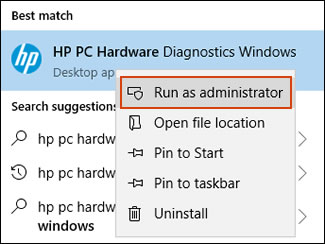
  2. In Windows, search for and right-click HP PC Hardware Diagnostics for Windows, and then select Run as administrator.

    Run HP PC Hardware Diagnostics Windows as an administrator

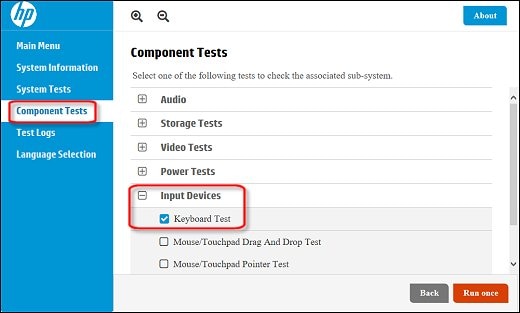
  3. Click Component Tests, click Input Devices, and then select the Keyboard Test.

    Running the Keyboard Test

  4. Click Run once to begin the test.

    The test ends when you complete the tasks or after 3 minutes.

For more information about using the HP PC Hardware Diagnostics for Windows, go to HP PCs - Testing for Hardware Failures.
 

Hope this helps! Keep me posted for further assistance.
Please click “
Accept as Solution” if you feel my post solved your issue, it will help others find the solution.

ECHO_LAKE
I am an HP Employee

HP Recommended

Hi Echo,


I have run the test as you suggested. I have also included the test results as a picture. Pls help

I pressed function key many times, for some it did work as in like Fn+ which opened the projection options. But majorly the Function key did not work.

Another problem which might not be included in the test is, I press Shift on the right hand side and then x which gives me X, however when I use left shift key, it does not work.


Pls help Echo, my troubles are getting multiplied week after week. Its an ordeal even typing out this reply message to youTest results.jpg

HP Recommended

@ank7471

Thank you for posting back. 


I did decode the failure ID: 6BRG7W-82AA8B-MFPX61-G1HE13 Failed and its refers to Keyboard Keypress Failure.


As we have limited support boundaries in the support community as of now. I would request you to reach out to our Support and our Support Engineers should be able to check the available service options in order to diagnose the computer physically. HP Support can be reached by clicking on the following link:  www.hp.com/contacthp/


Please feel free to contact us here anytime you need any further assistance. Please click “Accept as Solution” if you feel my post solved your issue, it will help others find the solution.

ECHO_LAKE
I am an HP Employee

† The opinions expressed above are the personal opinions of the authors, not of HP. By using this site, you accept the <a href="https://www8.hp.com/us/en/terms-of-use.html" class="udrlinesmall">Terms of Use</a> and <a href="/t5/custom/page/page-id/hp.rulespage" class="udrlinesmall"> Rules of Participation</a>.