
-
×InformationNeed Windows 11 help?Check documents on compatibility, FAQs, upgrade information and available fixes.
Windows 11 Support Center. -
-
×InformationNeed Windows 11 help?Check documents on compatibility, FAQs, upgrade information and available fixes.
Windows 11 Support Center. -
- HP Community
- Notebooks
- Notebook Hardware and Upgrade Questions
- Laptop not charging and recognizing battery and crashes

Create an account on the HP Community to personalize your profile and ask a question
Your account also allows you to connect with HP support faster, access a personal dashboard to manage all of your devices in one place, view warranty information, case status and more.
Common problems for Battery
We would like to share some of the most frequently asked questions about: Battery Reports, Hold a charge, Test and Calibrating Battery . Check out this link: Is your notebook plugged in and not charging?

It has been a while since anyone has replied. Simply ask a new question if you would like to start the discussion again.

07-26-2025 03:18 PM
 HP Recommended
Product: Victus by HP 15.6 inch Gaming Laptop 15-fa1000 (771S7AV)
hello, i was using laptop and it crashed automatically and charging is enough and same happens in screen off and in the mean time my laptop battery was not getting charged it the orange charging light starts blinking and i have to unplug and again plug charger that it starts work and day before it but laptop randomly crashed while i was just browsing and so i decided to calibrate it but so i charged to 100 percent and then used it 0 and when i again try to plugged in it to charge it to hundred and turned on laptop the battery icon shows 100 percent and i suddenly went hp assisstant and runed battery test it then doesn't recognized it and in F2 diagnosed test it doesn't recognized it and even tried power reset trick to hold power button and 20 seconds then plugged but didn't work and so on next i removed the opening laptop and also and and again tried 20 seconds trick and plugged and on but it again showed 100 percent battery and not recognized but after some minutes it started charging from 1 percent and recognized it but with many stucks means to 61 percent in 3 hours and stuck on it so after that i removed charger and started using it and and after an hour and half it turned off and because of charging end and when i turned it on after plugging it again was at same condition 100 percent showing and not recognizing battery and not charging it as before and one more thing while in state laptop dose not boat with battery when press power button the amred or white charging light blinks 2 times each time we press power button and only boat with charger and so on same that problem and now a strange thing happens today i was working i leaved laptop for some time when i came back it was shut down again in screen off, and when i turn on it again stared charging and recognizing battery and also charged to 100 and only charging stop once and after plug in and plug out it started charging and even now running normal on battery what is all this and how to fix it permanently and where is the problem
here am also sharing battery health report of hp assissant and F2 diagnosed battery test report which amost same
Warranty Type: 3
Cycle count: 899 / 1000
Manufacturer: 333-AC-4B-A
Serial Number: 00598 08/31/2023
Temperature: 36 °C
Current: -1029 mA
Adaptive Battery Optimizer: Enabled/Activated
Terminal Voltage: 16623 mV
Design Voltage: 15400 mV
AC Power: No
CT Number: 6KXCN0I81II4Q1
Design Capacity: 70 WHr
Full Charge Capacity: 63 WHr (89%)
Remaining Capacity: 59 WHr
and the report of command powercfg /battery report
Installed batteries
Information about each currently installed battery
BATTERY 1
NAME Primary
MANUFACTURER HP
SERIAL NUMBER SerialNumber
CHEMISTRY LION
DESIGN CAPACITY 70,070 mWh
FULL CHARGE CAPACITY 60,629 mWh
CYCLE COUNT 130
both are different and so pls tell where is the problem
5 REPLIES 5


07-29-2025 08:11 AM
HP Recommended
Hi @ark1924
Welcome to the HP Support Community! We're here to help you get back up and running.
You’ve done an incredibly thorough job documenting the issue—seriously, hats off to your persistence and technical instincts.
Let’s break this down and get to the root of what’s happening with your Victus 15-fa1000.
What the Symptoms Suggest
Your laptop is showing signs of intermittent battery recognition, charging inconsistencies, and unexpected shutdowns, which point to one or more of the following:
- Battery firmware miscommunication with the system
- Battery degradation or nearing end-of-life
- Power delivery instability from the charger or charging circuit
- EC (Embedded Controller) or BIOS glitches affecting battery detection
Battery Health Analysis
Let’s compare the two reports:
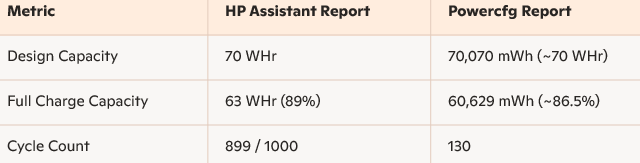
Discrepancy Alert: The cycle count difference is huge. HP Assistant shows 899, while Powercfg shows 130. This could mean:
- HP Assistant is reading from the battery’s internal firmware.
- Powercfg is pulling from Windows’ cached or misreported data.
This mismatch itself suggests firmware confusion or corruption in battery telemetry.
Key Warning Signals:
- Battery not recognized in diagnostics: Indicates a communication failure between battery and system firmware.
- Laptop only boots with charger: Suggests the battery isn’t supplying power reliably.
- Charging stuck or erratic: Points to either battery cell imbalance or charging circuit issues.
- Blinking amber/white lights: HP uses these as diagnostic codes—two blinks often relate to battery failure or absence.
Steps to Fix or Isolate the Issue:
1. Update BIOS and EC Firmware
- Go to HP’s support page for your model and install the latest BIOS and firmware updates.
- This can resolve miscommunication between battery and system.
2. Perform a Clean Battery Calibration
Since you’ve already tried a manual drain and recharge, try this:
- Charge to 100%, then let it sit plugged in for 2 hours.
- Unplug and use until it shuts down.
- Recharge uninterrupted to 100%.
- Then run diagnostics again.
3. Reset Battery Drivers
- Open Device Manager > Batteries
- Right-click Microsoft ACPI-Compliant Control Method Battery > Uninstall
- Restart the laptop to reinstall fresh drivers.
4. Try a Different HP Charger
- If available, test with another genuine HP charger to rule out power delivery issues.
5. Inspect Battery Connector
- Since you’ve opened the laptop, double-check the battery connector for dust, looseness, or corrosion.
If All Else Fails…
Your battery may be failing intermittently despite showing decent capacity. Given the high cycle count (899), it’s nearing its rated lifespan.
You might consider replacing it with a compatible WK04XL battery, which is used across Victus and Omen models.
You’ve already done the hard part—now let’s lock in a permanent fix.
If my response helped, please mark it as an Accepted Solution! ✅ It helps others and spreads support. 💙 Also, tapping "Yes" on "Was this reply helpful?" makes a big difference! Thanks! 😊
Take care, and have an amazing day!
Regards,
Hawks_Eye
I am an HP Employee.
07-29-2025 10:25 AM - edited 07-29-2025 10:26 AM
HP Recommended
Thankyou For you Kind Words and this helpful note, i really appreciate and wanna discuss and tell some more things so:
1. Update BIOS and EC Firmware
already done , but didn't impact
2. Perform a Clean Battery Calibration
firstly i tried this but problem is laptop not recognizing the battery and not even charging it 1 day before for it was for some recognizing it but now from more 24 hours its not charging and recognizing even tho when firstly this problem started my battery was not charging some times and orange light also start blinking at times but after plugged out and in again it starts charging and orange light stop blink and stay still because of this problem i tired to calibrate it but i make its charging 0 after charging 100 percent then again plugged in to charge again to 100 percent again it show problem of not charging and orange light blinking and start charging again after plugged out and plugged in but at that time it was not working much i was doing this in powered off laptop so when on it being plugged in and didn't recognized battery after the thing that happens i already stated in previous post
3. Reset Battery Drivers
Also this done already but didn't work
5. Inspect Battery Connector
it was clean
-------------------------------
One more thing my laptop doing that its orange charging light starts blinks after 10 to 15 minutes of blinking and keep blinking until plugged out charger and one more thing that started happens yesterday when i plugged in charger it taking 5 to 8 secs delay in get power means before when i usually plugged in the laptops orange light immediately on and laptop get ready to power on immediately but from yesterday its taking 5 to 8 seconds delay in power on and orange charging light on after plugged in. so please can you tell are these signs too because of battery .
07-31-2025 10:55 AM
HP Recommended
There's an update i take the laptop to repairing center and they said battery voltage is low because i 0 it it became low they make if fix and turned on laptop and its recognizing it and charging too even delay in pugged in which i tell in previous post also got fixed and i bring my laptop back home and started checking it was charging and i unplugged it when it almost 60 percent charged and after seconds i saw its orange charging light blinking and even when i plugged in again charging was stop i then plugged off and plugged in and charger then it again start get charging but after 80 percent charge i remove charger and its orange light again blinking don't know why.. all this happening
07-31-2025 01:01 PM
HP Recommended
Hey @ark1924,
Thanks for reaching out! Since the issue remains unresolved, I suggest contacting our phone/chat support team for personalized assistance. They can provide one-on-one help and may even be able to work their remote assistance magic to fix the problem.
Note: There might be a nominal charge for the service they provide.
Regards,
Garp_Senchau
I am an HP Employee

Be alert for scammers posting fake support phone numbers and/or email addresses on the community.
If you think you have received a fake HP Support message, please report it to us by clicking on "Flag Post".
† The opinions expressed above are the personal opinions of the authors, not of HP. By using this site, you accept the Terms of Use and Rules of Participation.


Didn't find what you were looking for?
Ask the community
† The opinions expressed above are the personal opinions of the authors, not of HP. By using this site, you accept the <a href="https://www8.hp.com/us/en/terms-of-use.html" class="udrlinesmall">Terms of Use</a> and <a href="/t5/custom/page/page-id/hp.rulespage" class="udrlinesmall"> Rules of Participation</a>.